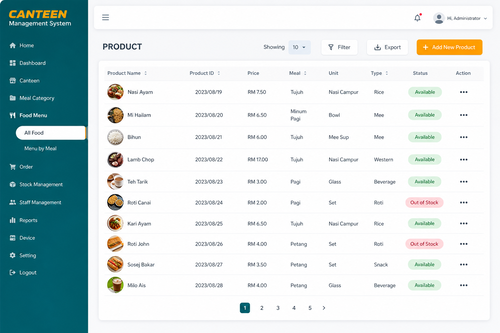
A busy workplace cafeteria can quickly turn into a bottleneck if payments, queues, and meal subsidies are still being managed manually. Long lines during lunch hour, cash handling errors, and confusion over who is entitled to a subsidized meal are common complaints in offices and factories that still rely on paper coupons or manual cashiers. Workplace cafeteria software replaces that friction with digital ordering, cashless payments, and automatic subsidy tracking, making mealtimes faster and more transparent for everyone involved.
Why Traditional Cafeteria Management Falls Short
Manual cafeteria systems typically rely on cash, physical coupons, or basic punch cards, all of which are easy to lose, duplicate, or misuse. Reconciling daily sales against inventory becomes a tedious manual task, and HR often has no easy way to verify how many subsidized meals a specific employee or department has claimed in a given month. These gaps make it hard to control costs or spot abuse of the meal benefit.
What Workplace Cafeteria Software Does
Cafeteria management software digitizes the entire meal ordering and payment process. Employees use a card, mobile app, or biometric scan to identify themselves at the point of sale, while the system automatically applies the correct subsidy, deducts payment, and records the transaction in real time.
Key Benefits of Workplace Cafeteria Software
- Speeds up checkout lines with cashless, card or app-based payment
- Automatically applies employee meal subsidies without manual approval
- Gives finance teams real-time reporting on meal spend by department
- Reduces cash handling and the errors that come with it
- Helps cafeteria operators track inventory against actual sales
Best Practices for Rolling Out Cafeteria Software
- Sync employee records with HR and payroll before launch
- Train cafeteria staff on the new checkout flow before go-live
- Communicate subsidy rules clearly to employees ahead of time
- Review sales and subsidy reports monthly to catch anomalies early
Step-by-Step: How a Meal Purchase Works
- Employee selects their meal at the counter or self-service kiosk
- Employee taps their card, app, or biometric ID at checkout
- The system verifies eligibility and applies any subsidy automatically
- Payment is deducted and the transaction is logged instantly
- Finance and HR teams can view consolidated reports at any time
Key Takeaways
- Cashless payments speed up lines and reduce cash handling errors
- Automatic subsidy tracking removes manual approval bottlenecks
- Real-time reporting gives finance clear visibility into meal spend
- The system scales from a single cafeteria to multi-site operations
Frequently Asked Questions
Can the software handle different subsidy levels for different staff groups?
Yes. Subsidy rules can be configured by department, grade, or employment type, and applied automatically at checkout without cashier intervention.
Does this work with third-party cafeteria operators?
Yes. Many businesses outsource cafeteria operations, and the software can be configured to reconcile payments between the employer and the operator automatically.
What happens if an employee forgets their card?
Most systems offer a backup lookup option, such as searching by employee ID or using a mobile app, so a forgotten card does not mean a missed meal.
Choosing the Right Cafeteria Software for Your Site
Not every workplace has the same cafeteria setup, so it is worth evaluating a few practical factors before choosing a system. Sites with a single in-house kitchen have different needs than campuses with multiple vendors or food courts, and the software should be flexible enough to support whichever model applies. Integration with existing time and attendance or access control systems is also worth checking, since many organizations already use employee cards or biometric IDs for other purposes and would prefer a single credential across the site.
Ease of use for cafeteria staff matters just as much as the back-end reporting features. A system that requires extensive retraining or slows down the checkout process during peak hours will face resistance from the very staff meant to benefit from it, no matter how sophisticated its reporting capabilities are.
The Bigger Picture: Cafeteria Data as a Workplace Insight
Beyond speeding up checkout lines, digitized cafeteria data can offer useful insight into broader workplace patterns. Consistent drops in meal uptake within a specific department, for instance, might prompt HR to check in on morale or workload, while spikes in spend on certain days can help kitchen operators plan staffing and stock more accurately. None of this visibility is possible when transactions are recorded on paper or in disconnected point-of-sale systems.
For finance teams, having subsidy costs broken down by department also simplifies budget planning considerably. Rather than estimating cafeteria expenses as a single lump sum each quarter, teams can see exactly where the benefit is being used most and adjust policies accordingly, whether that means expanding a popular subsidy or reallocating budget to a underused site.
Getting this level of detail used to require significant manual effort, but with automated cafeteria software it comes as a natural byproduct of everyday transactions, giving management a clearer picture of workplace wellbeing and spending without any extra work.
As more workplaces look for practical ways to use existing data to support employee wellbeing, cafeteria transaction patterns are proving to be a surprisingly useful, low-effort starting point.
It costs nothing extra to collect, and the insights it produces can inform decisions well beyond the cafeteria itself.
That kind of everyday, low-cost visibility is exactly why more businesses are treating cafeteria software as core infrastructure rather than a minor convenience.
It is a small change with lasting operational value.
Most sites recover the cost of the switch within the first year.
Conclusion
Workplace cafeteria software takes one of the most common daily friction points in an office or factory and turns it into a smooth, transparent process. By replacing cash and paper coupons with digital payments and automatic subsidy tracking, businesses cut down on errors, speed up mealtimes, and give finance teams the reporting they need to manage costs confidently. For any organization still relying on manual cafeteria processes, moving to a digital system is a straightforward upgrade with an immediate, visible payoff.
You can read more about our compliance features by https://www.smartouch.com.my/canteen-management-system-2/.
Smart Touch technology pte ltd , www.smartouch.com.sg +65-63964767, sales@smartouch.com.sg , www.smartouch.com.my +607-3889903 sales@smartouch.com.my