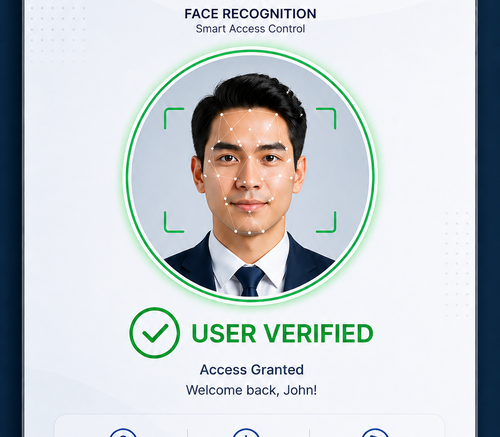
Why Contactless Face Recognition Is Changing Door Access
Traditional door access methods like key cards, PIN pads, and metal keys all share the same weakness: they rely on something a person carries or types, which can be lost, shared, cloned, or forgotten. A contactless face recognition door access system removes that weak link entirely. It verifies identity using a person facial features, granting entry in a fraction of a second without physical contact.
For offices, factories, and residential buildings across Malaysia, this shift is not just about convenience. It is about closing the security gaps that card-based systems leave open, while also supporting the hygiene-conscious expectations that became standard after recent years of heightened health awareness. A face recognition door access system lets employees and residents move through entry points hands-free, reducing surface contact and eliminating the daily friction of hunting for a card or badge.
How a Face Recognition Door Access System Works
At its core, a contactless face recognition door access system uses a camera-equipped terminal mounted at the entry point. When someone approaches, the device captures their facial image, converts it into a mathematical template, and compares that template against a pre-registered database. If the match passes the confidence threshold, the door unlocks automatically, usually within under a second.
Core Components of the System
| Component | Function |
|---|---|
| Facial Recognition Terminal | Captures and analyzes facial data at the entry point |
| Access Control Software | Manages user profiles, permissions, and access logs |
| Electric Door Lock or Strike | Physically secures and releases the door on verification |
| Cloud or Local Server | Stores facial templates and synchronizes access records |
Key Benefits of a Face Recognition Door Access System
Common Security Gaps in Traditional Access Control
Card-based and PIN-based systems are vulnerable in ways that are easy to overlook until a breach occurs. Cards get lent to colleagues “just this once.” PINs get written on sticky notes. Lost cards often go unreported for days. Each of these small lapses creates an opening for unauthorized entry, and traditional systems have no way to verify that the person using the credential is actually the person it was issued to.
- Enhanced Security: Facial data cannot be lent, shared, or easily duplicated the way a card or PIN can.
- Faster Entry: Verification happens in under a second, reducing queues at busy entry points.
- Hygienic Operation: No shared surfaces to touch, which matters in shared office and factory environments.
- Accurate Attendance Data: When integrated with HR systems, entry logs double as reliable attendance records.
- Reduced Administrative Overhead: No more issuing, replacing, or deactivating lost cards.
Common Deployment Challenges and How to Avoid Them
Rolling out a new access control system rarely goes perfectly on the first attempt, and facial recognition brings its own set of considerations. Lighting conditions at entry points can affect recognition accuracy, so terminals installed facing direct sunlight or in poorly lit corridors may need supplemental lighting or shading adjustments. Staff wearing face coverings for religious, cultural, or health reasons may also require an alternate verification method to avoid excluding anyone from smooth building access.
Another common challenge is managing enrollment for a large workforce or resident base. Batch enrollment sessions, rather than one-off registrations, tend to produce more consistent facial templates and reduce the back-and-forth of re-enrolling people who were rushed through the process. Building in a short grace period after go-live, where both the new system and the old access method run in parallel, also helps catch enrollment gaps before they cause access issues.
Best Practices for Implementing Face Recognition Door Access
Step-by-Step Implementation Guide
- Assess Entry Points: Identify which doors need facial recognition versus which can remain on simpler access methods.
- Choose the Right Hardware: Select terminals rated for your environment, indoor lobbies differ from outdoor loading bays.
- Enroll Users Properly: Capture clear facial templates during enrollment to minimize false rejections later.
- Integrate with Existing Systems: Connect the access system with HR, visitor management, or building security platforms.
- Test Under Real Conditions: Run trials during peak entry times and varying lighting conditions before full rollout.
Choosing the Right Face Recognition System in Malaysia
Feature Comparison: What to Look For
| Feature | Why It Matters |
|---|---|
| Recognition Speed | Sub-second verification keeps entry queues moving during peak hours |
| Liveness Detection | Prevents spoofing attempts using photos or video playback |
| Local Compliance | Ensures data handling aligns with Malaysia Personal Data Protection Act requirements |
| Integration Options | Compatibility with existing HR, payroll, and visitor systems |
| Environmental Tolerance | Reliable performance in humid, tropical conditions typical of Malaysia |
Key Takeaways
When evaluating vendors, prioritize systems with proven liveness detection, since basic facial matching alone can be vulnerable to spoofing. Look for local support and warranty coverage, as hardware in tropical climates requires more frequent maintenance checks than in temperate regions.
Industries That Benefit Most from Face Recognition Door Access
Corporate offices use facial recognition to streamline employee entry while maintaining detailed attendance records for payroll purposes. Manufacturing facilities rely on it to restrict access to sensitive production areas, ensuring only authorized personnel enter cleanrooms or hazardous zones. Residential developments and condominiums use the technology to replace traditional access cards for residents while giving property management better visibility into building traffic. Educational institutions and healthcare facilities also increasingly adopt these systems to secure restricted areas while keeping entry fast and contactless for staff and authorized visitors.
Face Recognition Compared to Other Biometric Access Methods
Facial recognition is not the only biometric option available for door access, and it is worth understanding how it compares to alternatives like fingerprint scanners. Fingerprint systems require physical contact with a sensor, which reintroduces the hygiene concerns that contactless systems are designed to eliminate, and performance can degrade if a person hands are wet, dirty, or worn from manual labor. Facial recognition avoids both issues, verifying identity from a short distance without any surface contact.
That said, fingerprint systems still have a place in environments where cameras are impractical or where budget constraints favor simpler hardware. Many businesses in Malaysia are now combining both technologies, using facial recognition at high-traffic main entrances and fingerprint or card access at lower-traffic secondary doors, giving them flexibility without overspending on premium hardware everywhere.
Conclusion
A contactless face recognition door access system offers a meaningful upgrade over card and PIN-based access control, combining stronger security with faster, more hygienic entry. For businesses in Malaysia weighing an upgrade, the combination of reduced administrative overhead, accurate attendance tracking, and resistance to credential sharing makes a strong case for adoption. As with any security investment, the right choice depends on matching the system features to your specific entry points, user volume, and integration needs.
Frequently Asked Questions
1. Is facial recognition door access secure against photo spoofing?
Modern systems include liveness detection that distinguishes a live face from a photo or video, significantly reducing spoofing risk. Always confirm this feature before purchasing.
2. How long does user enrollment take?
Enrollment typically takes under a minute per person, capturing a clear facial template that the system uses for future verification.
3. Can the system work with existing door hardware?
In most cases, yes. Facial recognition terminals typically integrate with standard electric locks and strikes already installed at the entry point.
4. What happens if the system fails to recognize someone?
Most systems include a backup method, such as a PIN or card, to prevent anyone from being locked out during a false rejection.
5. Does the system store facial images or just data templates?
Reputable systems store mathematical templates rather than raw images, which cannot be reverse-engineered into a usable photo, supporting better data privacy compliance.
To see what makes this product unique, click here: https://www.smartouch.com.my/category/time-clock/biometric-facial/
Smart Touch technology pte ltd , www.smartouch.com.sg +65-63964767, sales@smartouch.com.sg , www.smartouch.com.my +607-3889903 sales@smartouch.com.my