Remote and hybrid work arrangements have made traditional attendance tracking increasingly impractical. Teams working from home, client sites, or multiple branches need a way to record attendance that doesn’t depend on being physically present at a central office terminal. E attendance systems, especially those powered by facial clocking, have become a preferred solution for managing distributed teams.
This article explores why remote teams and the businesses managing them are adopting e attendance powered by facial recognition, and what makes this combination particularly effective.
What Is E Attendance Powered by Facial Clocking?
E attendance refers to electronic, often cloud-based, systems that record employee clock-ins and clock-outs digitally rather than through paper logs. When combined with facial clocking, employees verify their identity using facial recognition through a mobile device or terminal, ensuring the person clocking in is genuinely who they claim to be, regardless of location.
How It Differs From Traditional Time Attendance
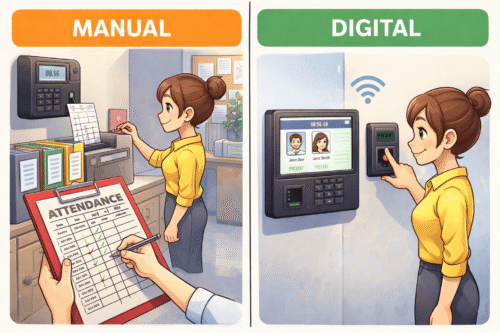
Traditional time attendance systems typically require employees to be physically present at a fixed terminal. E attendance removes this constraint, allowing verified clock-ins from approved remote locations while still maintaining the accuracy that facial recognition provides.
Why Remote Teams Prefer This Approach
Flexibility Without Sacrificing Accountability
Remote employees can clock in from home, client sites, or while travelling, while employers retain confidence that attendance records are accurate and tied to a verified individual.
No Shared or Forgotten Credentials
Unlike PIN codes or login credentials that can be shared or forgotten, facial recognition ties attendance directly to the employee’s identity, removing a common point of friction for remote workers.
Faster Clock-In Process
Employees simply open the app and let the system verify their face, avoiding the delays associated with manual check-ins or supervisor approval for remote attendance.
Real-Time Visibility for Managers
Managers overseeing distributed teams gain real-time visibility into who has clocked in, supporting better coordination across multiple locations or time zones.
Comparing Traditional vs E Attendance Systems
| Feature | Traditional Attendance | E Attendance with Facial Clocking |
|---|---|---|
| Location dependency | Fixed terminal required | Works from approved remote locations |
| Identity verification | Card or PIN, easily shared | Facial recognition, cannot be shared |
| Manager visibility | Delayed, manual reporting | Real-time dashboard access |
| Best suited for | Single-location teams | Remote and hybrid teams |
Key Benefits for Businesses
- Accurate attendance data regardless of employee location
- Reduced administrative burden from manual attendance verification
- Stronger compliance and audit trail for remote work policies
- Seamless integration with payroll for distributed teams
- Improved accountability without micromanaging remote staff
What to Consider Before Adopting E Attendance
Businesses should evaluate whether the system supports geofencing to restrict clock-ins to approved areas, how facial data is stored and secured, and whether the platform integrates smoothly with existing payroll and HR software. It’s also worth confirming the system works reliably across different mobile devices used by the team.
Industries Benefiting Most
E attendance powered by facial clocking is particularly valuable for businesses with field sales teams, remote customer support staff, hybrid corporate teams, and organisations managing employees across multiple branches or countries.
Addressing Privacy Concerns
Employees are often understandably cautious about facial recognition technology. Businesses should be transparent about how facial data is collected, stored, and used, and should obtain clear consent before enrolling employees into the system. Reputable providers store facial data as encrypted templates rather than raw images.
Steps to Implement E Attendance for Remote Teams
- Identify attendance gaps caused by your current remote work setup
- Choose a provider offering mobile-based facial recognition attendance
- Configure geofencing or approved locations if required
- Roll out the system with clear communication and consent from staff
- Integrate attendance data with payroll for automated processing
Conclusion
As remote and hybrid work becomes standard practice, businesses need attendance systems that keep pace without sacrificing accuracy or accountability. E attendance powered by facial clocking gives remote teams the flexibility they value while giving employers the verified, real-time data they need to manage a distributed workforce effectively.
For businesses managing remote or hybrid teams, this combination offers a practical path toward more reliable attendance tracking without forcing employees back to a fixed location.
Frequently Asked Questions
Can e attendance work without an internet connection?
Most systems require an internet connection to verify and sync attendance data, though some offer offline capture with later syncing.
Is facial recognition attendance secure for remote work?
Yes, reputable systems encrypt facial data and use liveness detection to prevent spoofing, making it a secure option for remote verification.
Can this system restrict where employees can clock in from?
Many e attendance platforms offer geofencing features that restrict clock-ins to approved locations or radius zones.
Does e attendance integrate with payroll systems?
Most modern e attendance platforms are designed to integrate directly with payroll software for automatic calculation.
Do employees need special hardware for facial clocking remotely?
No, most systems work through a smartphone camera, removing the need for dedicated hardware for remote employees.
Read the product overview here: http://www.smartouch.com.my/tms-time-management-system-singapore-malaysia/
Smart Touch technology pte ltd , www.smartouch.com.sg +65-63964767, sales@smartouch.com.sg , www.smartouch.com.my +607-3889903 sales@smartouch.com.my