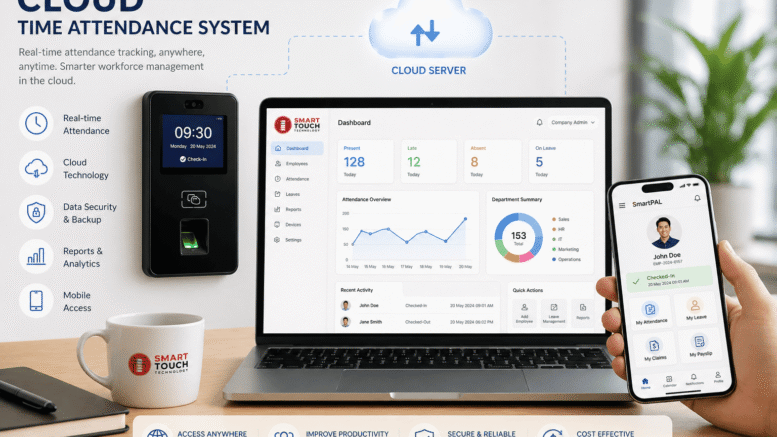
Every workplace tracks attendance differently, and a rigid one-size-fits-all system rarely fits every team’s shift patterns, departments, or reporting needs. Customizable e attendance platforms with built-in facial clocking solve this by combining flexible configuration with fast, hygienic biometric check-ins, giving HR teams a system that adapts to how their organization actually operates rather than forcing operations to adapt to the software.
What Makes an E Attendance Platform Customizable?
A customizable attendance platform lets administrators configure shift patterns, overtime rules, late penalties, and approval workflows to match their organization’s actual policies, rather than forcing every department into the same rigid schedule. Multi-department businesses in particular benefit from this flexibility, since a factory floor team, a sales team, and a remote-friendly office team often need very different attendance rules running on the same underlying platform.
The Role of Built-In Facial Clocking
Facial clocking eliminates the need for physical cards, fobs, or PIN entry, which reduces both hygiene concerns and the administrative burden of managing lost or shared access cards. Because facial recognition ties each clock-in directly to a verified individual, it also prevents buddy punching, a common issue where one employee clocks in on behalf of an absent coworker using a shared card or PIN. It also creates a more reliable audit trail for attendance disputes, since each clock-in is tied to a verified biometric match rather than a card or PIN that could have been shared or misplaced.
Key Customization Options to Look For
When evaluating a platform, look for configurable shift templates, custom overtime and late-arrival thresholds, department-specific reporting, and role-based access so managers only see data relevant to their team. Custom notification rules are also valuable, allowing HR to receive alerts for specific attendance patterns, such as repeated tardiness, without being flooded with irrelevant notifications for every minor variance. Some platforms also let administrators set different rounding rules for clock-in and clock-out times, which is useful for organizations that pay strictly to the minute versus those that round to the nearest quarter hour.
Benefits for Growing Organizations
As organizations grow, attendance needs change quickly, whether through new office locations, expanded shift patterns, or acquisitions that bring different existing policies into the fold. A customizable platform can adapt to these changes without requiring a full system replacement, which is a significant advantage over rigid, one-size-fits-all attendance software that often needs to be swapped out entirely as a company scales. It also reduces the administrative burden on HR staff during periods of rapid hiring, since new shift templates and department rules can be configured in minutes rather than requiring a vendor support ticket or a lengthy reconfiguration project.
Integration With Payroll and HR Systems
The real value of an attendance platform often comes from how well it connects to payroll and broader HR systems. Automated data flow from clock-in records to payroll calculations reduces manual entry errors and speeds up the pay run process significantly. When evaluating a platform, confirm whether it offers native integrations or at minimum reliable data export options compatible with your existing payroll software.
Common Deployment Challenges and How to Avoid Them
Rolling out a new attendance platform is not always as simple as installing the hardware and switching it on. Organizations sometimes underestimate the time needed to map existing shift patterns and approval chains into the new system, which can lead to a bumpy first few weeks if configuration is rushed. Involving HR, payroll, and department supervisors early in the setup process helps ensure that the rules configured in the platform actually reflect how teams work day to day, rather than a generic template that has to be corrected later. Employee adoption can also be a hurdle, particularly if staff are unfamiliar with facial recognition technology or have concerns about how the data is stored and used. Clear communication about privacy safeguards, along with a short onboarding session at each clocking point, typically resolves most hesitation within the first week. Network reliability at each site is another practical consideration, since facial clocking devices generally need a stable connection to sync attendance data in real time; sites with unreliable connectivity may need offline caching capabilities built into the hardware. Planning for these common friction points before deployment, rather than reacting to them afterward, makes the transition to a customizable, facial-clocking-enabled system considerably smoother.
Choosing the Right Platform
Beyond customization and facial clocking, evaluate a platform’s hardware reliability, cloud versus on-premise deployment options, and vendor support responsiveness. A trial period at a single location is a practical way to test configuration flexibility and facial recognition accuracy under real conditions before committing to a company-wide rollout.
Conclusion
Customizable e attendance platforms with built-in facial clocking give organizations the flexibility to match attendance rules to their actual operations while gaining the hygiene, speed, and accuracy benefits of biometric clock-ins. As workforces grow and diversify across shifts, departments, and locations, this combination of adaptability and modern biometric technology positions a company to manage attendance efficiently without outgrowing its system every few years.
Frequently Asked Questions
Can different departments have different attendance rules on the same platform?
Yes, customizable platforms allow administrators to configure separate shift patterns, overtime rules, and approval workflows for different departments or locations within a single system.
Does facial clocking prevent buddy punching?
Yes, since facial recognition verifies the specific individual clocking in, it is much harder for one employee to clock in on behalf of an absent coworker compared to card or PIN-based systems.
Can the platform integrate with our existing payroll software?
Most modern platforms offer native integrations or data export options that connect with common payroll systems, though it is worth confirming compatibility with your specific software before purchase.
Is facial clocking hardware expensive to deploy across multiple locations?
Costs vary by vendor and hardware specification, but many organizations find the reduced administrative overhead and improved accuracy offset the initial investment over time.
How long does it take to configure custom attendance rules for a new department?
Configuration time varies by platform, but most administrators can set up new shift patterns and rules within a few hours once they are familiar with the system’s settings.
Read the product overview here: http://www.smartouch.com.my/tms-time-management-system-singapore-malaysia/
Smart Touch technology pte ltd , www.smartouch.com.sg +65-63964767, sales@smartouch.com.sg , www.smartouch.com.my +607-3889903 sales@smartouch.com.my