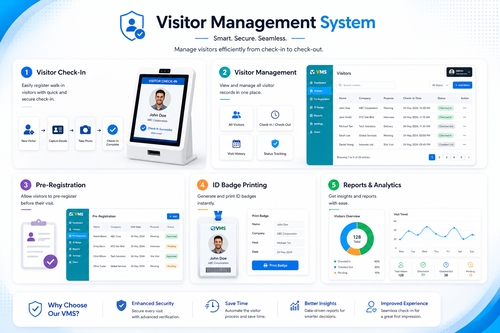
Manual visitor logbooks are slow, insecure, and easy to falsify. For offices, factories, and residential buildings across Malaysia, a mykad scanner visitor management system solves this problem by scanning a visitor’s MyKad in seconds, capturing accurate identity details, and creating a fully digital, auditable visitor record.
In this article, we look at how a mykad scanner visitor management system works, why Malaysian businesses are adopting it, and what to consider when choosing the right solution for your premises, from small offices to large industrial sites.
Why Traditional Visitor Logbooks Fall Short
Paper logbooks and manual sign-in sheets have been standard practice at building receptions for decades. However, they create serious gaps in security, data accuracy, and compliance that modern organisations can no longer afford to ignore.
Illegible and Inaccurate Data
Handwritten entries are often incomplete, illegible, or simply inaccurate. Security teams cannot rely on this information during an emergency or investigation.
No Real Identity Verification
Anyone can write any name and IC number on a physical logbook. Without scanning the actual MyKad, there is no way to confirm a visitor’s true identity.
Difficult to Search and Report
Retrieving historical visitor records from stacks of paper logbooks is time-consuming, making audits, compliance checks, and incident investigations unnecessarily difficult.
What Is a MyKad Scanner Visitor Management System?
A mykad scanner visitor management system is a digital solution that reads and verifies a Malaysian identity card at the point of entry. The system automatically captures the visitor’s name, IC number, and photo, then stores this information securely in a searchable digital database.
Instead of writing details by hand, a visitor simply taps or inserts their MyKad into the scanner, and the visitor management system does the rest, including printing a visitor badge and notifying the host employee of their arrival.
Key Benefits of a MyKad Scanner Visitor Management System
Fast and Accurate Check-In
Scanning a MyKad takes only a few seconds and eliminates transcription errors, allowing visitors to check in quickly even during busy periods.
Stronger Security and Verified Identity
Because the system reads data directly from the MyKad chip, organisations can be confident that visitor identities are genuine, reducing the risk of unauthorised access.
Digital, Searchable Records
Every visit is logged digitally, making it easy to search, filter, and export visitor records for security reviews, audits, or compliance reporting.
Professional Visitor Experience
A modern check-in kiosk with instant badge printing creates a more professional first impression for guests, clients, and business partners.
Host Notification and Approval
Many systems automatically notify the host employee once a visitor checks in, streamlining the greeting process and improving overall visitor flow.
How a MyKad Scanner Visitor Management System Works
Understanding the check-in process helps illustrate why this technology is so effective at both the front desk and at security checkpoints.
- The visitor arrives at the reception kiosk and inserts or taps their MyKad on the scanner.
- The system reads the chip data and instantly captures name, IC number, and photo.
- The visitor selects the person or department they are visiting and states their purpose of visit.
- A visitor badge is printed automatically, often with a QR code or time-limited access rights.
- The host employee receives an instant notification that their visitor has arrived.
This entire process typically takes less than a minute, compared to several minutes for manual sign-in during peak hours.
Manual Logbook vs MyKad Scanner Visitor Management System
| Aspect | Manual Logbook | MyKad Scanner Visitor Management System |
|---|---|---|
| Identity Verification | Not verified | Verified via MyKad chip |
| Check-In Speed | Slow, manual writing | Seconds per visitor |
| Data Accuracy | Often illegible or incomplete | Accurate and consistent |
| Record Retrieval | Difficult to search | Instant digital search |
| Security | Easy to falsify | Hard to forge, fully auditable |
Where MyKad Scanner Visitor Management Systems Are Used
- Corporate offices and business parks
- Factories and industrial premises
- Residential condominiums and gated communities
- Government buildings and institutions
- Hospitals and healthcare facilities
How to Choose the Right Visitor Management System
- Confirm the system can read and verify Malaysian MyKad cards accurately.
- Check whether it integrates with access control, such as door access or car park barriers.
- Evaluate ease of use for both visitors and front-desk staff.
- Look for host notification and visitor pre-registration features.
- Review data protection measures to ensure visitor information is stored securely.
Best Practices for Implementation
- Place the scanner kiosk in a clearly visible, easily accessible location at reception.
- Train front-desk staff on handling exceptions, such as visitors without a MyKad.
- Set a clear data retention policy for visitor records in line with company policy.
- Test host notification alerts to ensure timely visitor greetings.
- Regularly review visitor logs as part of routine security checks.
Key Takeaways
- A mykad scanner visitor management system replaces slow, inaccurate paper logbooks.
- Scanning verifies visitor identity directly from the MyKad chip, improving security.
- Digital records are searchable, auditable, and far easier to manage than paper logs.
- The right system should integrate smoothly with your existing access control setup.
Addressing Common Privacy Concerns
Some organisations hesitate to adopt MyKad scanning because of privacy concerns. In practice, reputable visitor management systems only extract the specific fields needed for check-in, such as name and IC number, and do not store unnecessary personal data. Access to visitor records is typically restricted to authorised security or front-desk personnel, and data can be configured to automatically expire after a set retention period. Being transparent with visitors about what information is collected and why helps build trust while still delivering the security benefits of digital verification.
Conclusion
A mykad scanner visitor management system gives Malaysian organisations a faster, more secure, and more professional way to manage visitors. By replacing manual logbooks with verified digital check-in, businesses can improve security, maintain accurate records, and create a better experience for every guest who walks through the door.
Want to see how this fits your organization? Click here to request a free demo: https://www.smartouch.com.my/vms-visitor-management-system/.
Frequently Asked Questions
1. What is a mykad scanner visitor management system?
It is a digital check-in solution that scans a visitor’s MyKad to verify identity and automatically log their visit details.
2. Is scanning a MyKad safe and compliant?
Reputable visitor management systems only capture necessary identity details and store them securely, in line with data protection best practices.
3. Can the system integrate with access control or car park barriers?
Yes, many mykad scanner visitor management systems integrate with door access and car park barrier systems for a seamless entry experience.
4. What happens if a visitor does not have a MyKad?
Most systems support alternative identification methods, such as passport scanning or manual entry, for visitors without a MyKad.
5. Is this suitable for residential buildings, not just offices?
Yes, mykad scanner visitor management systems are widely used in condominiums and gated communities to improve resident and visitor security.
Smart Touch technology pte ltd , www.smartouch.com.sg +65-63964767, sales@smartouch.com.sg , www.smartouch.com.my +607-3889903 sales@smartouch.com.my