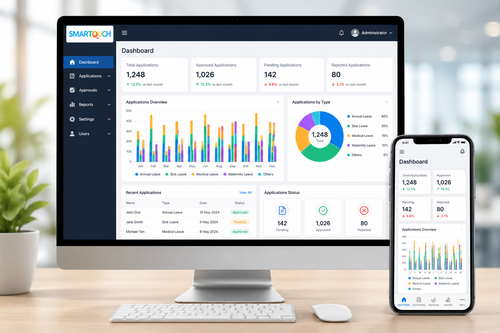
Managing employee leave with spreadsheets and paper forms becomes harder as a company grows. A cloud HRMS with automated leave software gives Malaysian businesses a single, always-accessible system to apply for, approve, and track leave, replacing manual processes that are slow, error-prone, and difficult to audit.
What Is a Cloud HRMS With Automated Leave Software?
A cloud HRMS is a human resource management system hosted online rather than on local servers, accessible from any device with an internet connection. When paired with automated leave software, it allows employees to submit leave applications digitally, managers to approve or reject requests with a click, and HR teams to see real-time leave balances across the entire organisation.
Why Malaysian Businesses Are Moving Leave Management to the Cloud
Anytime, Anywhere Access
Cloud systems are not tied to a single office computer or physical location. Employees working remotely, at client sites, or across multiple branches can apply for leave and check their balance from a phone or laptop at any time.
Fewer Errors and Disputes
Manual leave tracking in spreadsheets is prone to outdated balances, double entries, and miscalculations. Automated leave software calculates entitlements, carry-forward balances, and pro-rated leave automatically, reducing disputes between staff and HR.
Real-Time Visibility for Managers
Managers can see team leave calendars at a glance, helping them avoid approving overlapping leave that could leave a department understaffed during busy periods.
Key Features of a Reliable Cloud HRMS Leave Module
When evaluating a cloud HRMS with automated leave software, look for the following capabilities.
- Self-service leave applications and approvals via web or mobile app
- Automatic calculation of annual, medical, and other statutory leave entitlements
- Team leave calendars visible to managers and HR
- Integration with attendance and payroll for accurate salary computation
- Configurable approval workflows for different departments or seniority levels
- Audit trail of every leave application, approval, and rejection
How Automated Leave Software Works
Step 1: An employee submits a leave application through the cloud HRMS, selecting the leave type and dates.
Step 2: The system automatically checks the employee’s remaining balance and flags any conflicts.
Step 3: The request is routed to the relevant manager for approval based on a configured workflow.
Step 4: Once approved, the leave is recorded and reflected in team calendars and payroll.
Step 5: HR can generate reports on leave trends, balances, and utilisation across the company.
Best Practices for Rolling Out a Cloud HRMS
- Migrate historical leave balances accurately before go-live
- Train managers on the approval workflow before rollout
- Set clear policies for carry-forward and expiry of unused leave
- Communicate the new process to all employees in advance
- Review usage reports regularly to refine leave policies over time
Key Takeaways
- A cloud HRMS with automated leave software replaces manual, error-prone leave tracking
- It gives employees self-service access and managers real-time visibility
- Successful rollout depends on accurate data migration and clear communication
Conclusion
A cloud HRMS with automated leave software removes the friction from one of HR’s most repetitive tasks, giving employees a simple way to apply for leave and giving managers and HR teams accurate, real-time data to work with. Businesses that make the switch typically see fewer disputes, faster approvals, and better workforce planning as a result. As teams grow and become more distributed, cloud-based leave management becomes less of a convenience and more of a necessity.
For companies ready to move away from spreadsheets and paper forms, it is worth seeing how a proven cloud HRMS handles leave management end to end.
Frequently Asked Questions
Can employees apply for leave from their phones?
Most cloud HRMS platforms include a mobile app or mobile-friendly web portal so employees can apply for and check leave from anywhere.
How does the system handle public holidays and different leave types?
A good automated leave system accounts for public holidays, annual leave, medical leave, and other statutory leave types automatically based on configured policies.
What happens to leave balances when we switch systems?
Historical leave balances are typically migrated into the new system during setup, so employees do not lose track of their entitlements.
Can managers see their whole team’s leave at once?
Yes, most systems provide a team calendar view so managers can see who is on leave and avoid scheduling conflicts.
Is a cloud HRMS suitable for small businesses?
Cloud HRMS platforms are generally scalable, making them suitable for small teams as well as larger organisations with multiple departments.
Do we lose control over sensitive HR data by moving to the cloud?
Reputable cloud HRMS providers use encryption, access controls, and regular backups to protect data, and in many cases offer stronger security than an in-house spreadsheet or local server ever could.
How long does it typically take to implement a cloud HRMS?
Implementation timelines vary by company size and data complexity, but many mid-sized businesses can be up and running within a few weeks once historical data is migrated and policies are configured.
Choosing the Right Cloud HRMS for Your Business
No two businesses have identical leave policies, so it is worth choosing a cloud HRMS that can be configured to match your specific rules rather than forcing your company to adapt to rigid, one-size-fits-all software. Look for a vendor that offers local support, understands Malaysian employment regulations, and can demonstrate the system in action before you commit.
For a complete breakdown of features and modules, visit our product page here: https://www.smartouch.com.my/e-leave-system/.
Smart Touch technology pte ltd , www.smartouch.com.sg +65-63964767, sales@smartouch.com.sg , www.smartouch.com.my +607-3889903 sales@smartouch.com.my