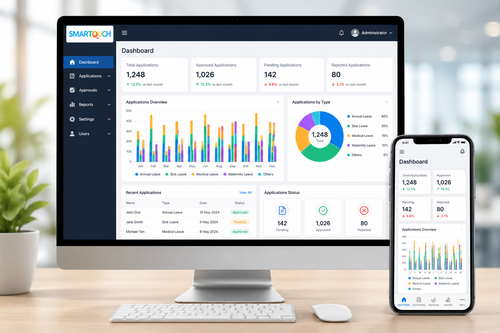
Managing employee leave with spreadsheets or paper forms often leads to double bookings, missed approvals, and confusion about who is actually in the office on a given day. A digital leave calendar solves this by giving HR teams, managers, and employees one shared, real-time view of approved and pending leave. For growing organizations across Malaysia, tools like SmartLeave make office planning simpler by turning leave management into a transparent, automated process rather than a manual chore.
Why Office Planning Breaks Down Without a Digital Leave Calendar
When leave requests are tracked through email threads or shared spreadsheets, it is easy for approvals to fall through the cracks. A manager might approve a request without realizing three other team members are already away that week, leaving a department short-staffed. Without a single source of truth, HR also spends unnecessary time chasing updates and correcting scheduling conflicts after the fact.
What Is SmartLeave?
SmartLeave is a digital leave management system that lets employees apply for leave online, gives managers a clear approval workflow, and displays a shared calendar view of who is in and out of the office. Instead of juggling multiple spreadsheets across departments, everyone works from the same live calendar, updated automatically the moment a request is approved.
Real-Time Visibility for Managers
Managers can see team availability at a glance before approving a new request, which makes it far easier to avoid staffing gaps during busy periods or critical project deadlines.
Self-Service for Employees
Employees can check their remaining leave balance, submit requests, and track approval status from their phone or laptop, without needing to email HR for basic updates.
Key Benefits of a Digital Leave Calendar
- Reduces double bookings and last-minute staffing surprises
- Gives every department a shared, always up-to-date view of leave
- Speeds up approvals with automated notifications to managers
- Cuts down on HR admin time spent tracking balances manually
- Improves accuracy of leave records for payroll and compliance
Best Practices for Rolling Out a Digital Leave Calendar
- Migrate existing leave balances accurately before go-live
- Set clear approval workflows so requests do not stall with a single manager
- Encourage every department to check the shared calendar before approving requests
- Review leave policies periodically to make sure system rules still match company policy
Step-by-Step: How Leave Requests Flow Through SmartLeave
- Employee submits a leave request through the app or web portal
- The system checks the shared calendar for potential conflicts
- The assigned manager receives an instant notification to review the request
- Manager approves or declines, and the employee is notified automatically
- The shared calendar updates instantly for the whole team to see
Key Takeaways
- A shared digital calendar eliminates guesswork around team availability
- Automated approvals save time for both managers and HR
- Accurate leave data improves payroll and compliance reporting
- SmartLeave scales easily as teams and departments grow
Frequently Asked Questions
Can SmartLeave handle different leave types, like medical or annual leave?
Yes. The system supports multiple leave categories, each with its own balance tracking and approval rules, so companies can mirror their existing leave policies.
Will employees still need to email HR about leave balances?
No. Employees can check their balance and request status directly in the app at any time, reducing back-and-forth emails with HR.
Does the shared calendar work across multiple departments?
Yes. Each department can view its own team’s calendar, while managers overseeing multiple teams can see a combined view for better planning.
Choosing the Right Leave Management Tool for Your Business
Not every leave management tool is built the same way. When evaluating options, businesses should look for a system that integrates with existing payroll and attendance software, supports the specific leave types required under Malaysian labour law, and offers mobile access so employees are not tied to a desktop computer. A tool that ticks these boxes will fit naturally into daily operations rather than becoming yet another system employees have to remember to check.
It is also worth considering how easily a system can grow with the business. A leave calendar that works well for twenty employees should still perform smoothly at two hundred, without requiring a complete platform change down the line.
Finally, consider the level of support available during and after implementation. A smooth rollout depends not just on the software itself, but on having a vendor that can help configure approval workflows, migrate historical leave data, and train staff so the transition feels effortless rather than disruptive.
For HR teams juggling multiple priorities, the time saved by automating leave requests often adds up to hours each week that can be redirected toward more strategic work, such as employee engagement or workforce planning. Rather than treating a digital leave calendar as a nice-to-have, forward-thinking businesses increasingly see it as a foundational part of a modern HR technology stack, alongside payroll, attendance, and performance management tools.
Ultimately, the goal of any leave management system is simple: make it effortless for employees to request time off, effortless for managers to approve it responsibly, and effortless for HR to keep accurate records without constant manual intervention.
Businesses that get this balance right typically see fewer scheduling conflicts, faster month-end reporting, and noticeably higher satisfaction among staff who no longer have to chase approvals manually.
That combination of efficiency and transparency is exactly what a well-implemented digital leave calendar is designed to deliver, month after month.
Getting started sooner rather than later means fewer disruptions to fix later on.
Conclusion
A digital leave calendar like SmartLeave turns one of the most common HR headaches into a simple, transparent process. By giving managers and employees a shared, real-time view of leave, businesses can avoid staffing surprises, speed up approvals, and keep more accurate records for payroll and compliance. For organizations still relying on spreadsheets or paper forms, moving to a digital leave calendar is one of the easiest ways to improve day-to-day office planning.
For a complete breakdown of features and modules, visit our product page here: https://www.smartouch.com.my/e-leave-system/.
Smart Touch technology pte ltd , www.smartouch.com.sg +65-63964767, sales@smartouch.com.sg , www.smartouch.com.my +607-3889903 sales@smartouch.com.my