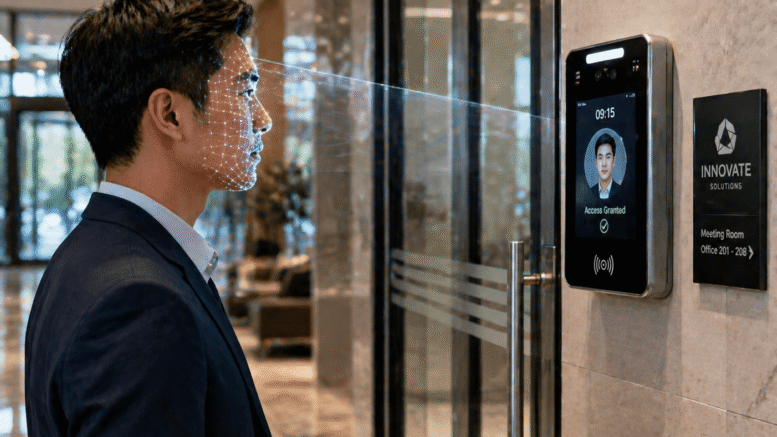
High-rise office towers present unique attendance challenges that smaller buildings simply do not face. Thousands of employees across dozens of floors need to clock in efficiently every morning, often through shared lobbies and multiple elevator banks. Face recognition attendance systems are increasingly the answer, offering fast, hygienic, and highly accurate identification without bottlenecks at peak hours.
This article explains how face recognition attendance works, why it is particularly well suited to high-rise office towers, and what to consider when implementing it at scale.
What Is Face Recognition Attendance?
Face recognition attendance uses biometric facial data to identify employees and automatically log their clock-in and clock-out times. Rather than requiring a card tap or fingerprint scan, employees simply walk past a camera-equipped terminal, and the system matches their face against a pre-registered profile in milliseconds.
For buildings with high employee density, this speed difference matters enormously during the morning rush.
Why High-Rise Towers Need a Different Approach
- Large employee volumes create bottlenecks with card or fingerprint systems
- Multiple tenant companies may share the same lobby and access points
- Peak arrival times are concentrated within a narrow morning window
- Hygiene concerns make touch-based systems less desirable
Key Benefits for High-Rise Buildings
Faster Throughput During Peak Hours
Face recognition terminals can identify employees in under a second, allowing hundreds of staff to clock in within minutes rather than queuing for card readers or fingerprint scanners.
Improved Hygiene and Comfort
Since no physical contact is required, face recognition reduces shared-surface touchpoints, which many employees and building management teams now consider a baseline expectation.
Stronger Security Against Buddy Punching
Unlike cards, which can be shared or lost, facial biometrics are tied to a specific individual, making it far more difficult for employees to clock in on behalf of a colleague.
Multi-Tenant Flexibility
In buildings shared by multiple companies, face recognition systems can be configured to manage access and attendance separately for each tenant while still using shared lobby infrastructure.
Seamless Integration With Access Control
Many systems combine attendance logging with turnstile or elevator access control, so a single face scan both records attendance and grants building entry.
Planning a Deployment at Scale
Rolling out face recognition attendance across a high-rise tower requires more planning than a single-office installation. Building management needs to consider lobby layout, elevator bank placement, and peak traffic flow to determine how many terminals are needed and where they should be positioned to avoid new bottlenecks. Bandwidth and server capacity also matter, since a system processing thousands of scans within a short morning window needs to respond instantly without lag.
It is also worth planning for edge cases, such as employees wearing face coverings, visitors who need temporary access, and backup procedures for when the system is offline or undergoing maintenance.
Choosing the Right System
- Confirm the system can handle your building’s peak-hour transaction volume without slowing down.
- Check whether it supports multi-tenant configuration if the building has multiple companies.
- Ensure integration with existing payroll and access control systems.
- Verify compliance with Malaysia’s data protection requirements for biometric data.
- Ask about local support and maintenance response times.
Key Takeaways
Face recognition attendance is particularly well suited to high-rise office towers, where large employee volumes, multi-tenant buildings, and narrow peak-hour windows make traditional card or fingerprint systems impractical. By combining speed, hygiene, and strong security, it offers a scalable solution for buildings that need to process thousands of clock-ins efficiently every day.
As buildings continue to modernize, face recognition attendance is becoming the standard expectation rather than an optional upgrade for high-density office towers.
Frequently Asked Questions
How accurate is face recognition attendance technology?
Modern systems achieve very high accuracy rates under normal lighting conditions, with most false rejections resolved instantly through a secondary scan.
Can the system handle thousands of employees across multiple floors?
Yes, provided the system is properly sized for the building’s volume, with adequate terminals and server capacity to process peak-hour traffic without delays.
Is biometric facial data stored securely?
Reputable systems encrypt biometric data and restrict access to authorized administrators, in line with data protection requirements.
What happens if an employee’s face is not recognized?
Most systems offer a backup verification method, such as a PIN or card, to ensure employees are never locked out due to a failed scan.
Can face recognition attendance work alongside existing access control systems?
Yes, most modern systems are designed to integrate with existing turnstiles, elevators, and security infrastructure rather than replacing them entirely.
Return on Investment for Building Owners
For building management companies overseeing high-rise towers, face recognition attendance is not just an employee convenience feature, it is also a cost and security investment. Reducing the number of physical access cards issued and replaced each year lowers ongoing administrative costs, while faster lobby throughput reduces the need for additional security personnel during peak hours. Over time, the combination of labor savings, reduced card replacement costs, and improved security incident response can offset the initial investment in hardware and software.
Tenant companies also benefit indirectly, since a well-managed, modern lobby experience is increasingly viewed as a selling point when attracting and retaining office tenants in competitive commercial real estate markets.
Smart Touch technology pte ltd , www.smartouch.com.sg +65-63964767, sales@smartouch.com.sg , www.smartouch.com.my +607-3889903 sales@smartouch.com.my