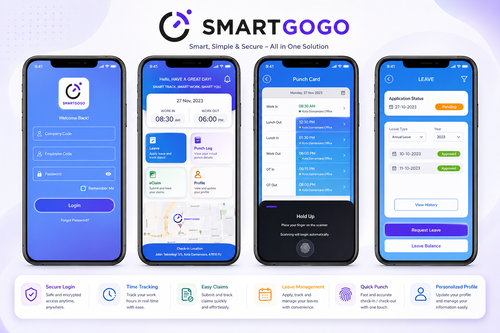
Field staff, delivery riders, technicians, sales representatives, and site-based employees rarely work from a fixed location. This makes attendance auditing far harder than in a typical office, where a single door-mounted terminal can capture every clock-in. Without location data, HR and operations teams are often left relying on manual reports, phone calls, or trust alone to confirm whether a field employee actually attended the job site they claimed to.
A GPS clock-in app solves this by tying every attendance record to a verified location and timestamp, giving employers a defensible, auditable trail of where and when work actually happened.
Why Field Staff Attendance Is Difficult to Audit
Unlike office-based time attendance, field attendance auditing has to deal with:
- Multiple Work Locations
- Staff Who Never Visit the Office
- Client Sites With No Company-Owned Hardware
- Variable Daily Schedules
- Travel Time Between Jobs
- Manual, Unverifiable Reporting
Without a system that records location alongside the clock-in event, it is difficult to confirm attendance without simply taking an employee’s word for it.
What a GPS Clock-In App Actually Records
A properly configured mobile attendance app should capture more than a timestamp. For an audit to hold up, each entry typically needs:
- Clock-In Time and Date
- GPS Coordinates at the Moment of Clock-In
- Clock-Out Time and Location
- Geofence Match Against an Approved Site
- Photo Verification (Optional)
- Device ID
- Job or Site Reference
This combination allows HR to reconstruct exactly where an employee was when they started and ended their shift, rather than relying on a self-reported time sheet.
Step-by-Step: Auditing Field Attendance with GPS Data
1. Set Up Geofenced Work Locations
Before attendance can be audited, every legitimate work site — client premises, project locations, branch offices — should be mapped as a geofence in the system. This defines the radius within which a clock-in is considered valid.
2. Require Clock-In and Clock-Out at Each Site
Employees should clock in immediately on arrival and clock out on departure, rather than logging both actions at the end of the day. Real-time capture reduces backdating and estimation errors.
3. Cross-Check Timestamps Against Geofence Data
Once records are collected, HR or supervisors can compare the clock-in coordinates against the assigned geofence. Any clock-in recorded outside the approved radius should be flagged automatically rather than discovered manually.
4. Review Exceptions, Not Just Totals
An attendance audit should not stop at total hours worked. Reviewing exceptions — late clock-ins, out-of-geofence entries, missed clock-outs, unusually short site visits — surfaces the records that need follow-up.
5. Reconcile Attendance with Job or Project Records
For teams billing clients by site visit, attendance data should also be checked against job assignments to confirm the right technician was at the right site for the right task.
6. Generate Audit-Ready Reports
A complete audit trail should be exportable, time-stamped, and tied to location evidence, so it can support payroll processing, client billing disputes, or labour compliance reviews if required.
Key Features to Look for in a GPS Attendance Solution
| Feature | Why It Matters |
|---|---|
| Mobile App Clock-In/Out | Works without fixed hardware at every site |
| Geofencing | Confirms the employee was physically at the approved location |
| Real-Time Sync | Attendance data is visible to HR immediately, not end-of-day |
| Exception Alerts | Flags anomalies automatically instead of manual review |
| Offline Capture | Continues recording GPS data in areas with poor connectivity |
| Payroll Integration | Removes manual re-entry of hours into payroll |
Field Attendance vs Office Attendance
| Office Attendance | Field Attendance |
|---|---|
| Fixed terminal or biometric device | Mobile app with GPS |
| Single location | Multiple, changing locations |
| Face or card verification | Location and photo verification |
| Predictable shift pattern | Variable job-based schedule |
| Simple to audit manually | Requires geofencing and reporting tools |
Why This Matters for Payroll and Compliance
Inaccurate field attendance does not only affect trust — it directly affects payroll accuracy, overtime calculation, and client billing where site visits are chargeable. A verifiable GPS-based record reduces disputes over hours claimed and gives HR a factual basis when reviewing timesheets before payroll is processed.
How Smart Touch Technology Supports Field Attendance Auditing
Smart Touch Technology’s Smartgogo workplace management platform includes mobile app-based attendance capture as part of its PAL (Payroll, Attendance and Leave) system, alongside face, QR, and card-based options for fixed locations. For field and mobile teams, attendance can be captured through the mobile app and reconciled centrally, giving HR one dashboard to review clock-in records, exceptions, and hours before payroll is processed.
Because Smartgogo is built as a connected system rather than a single device, field attendance data captured on-site can flow directly into attendance summaries and, where needed, payroll processing — reducing the manual reconciliation that normally makes field staff audits time-consuming.
Conclusion
Auditing field staff attendance accurately requires more than a time sheet — it requires location-verified, timestamped records that can be checked against approved work sites. A GPS clock-in app, supported by geofencing, exception alerts, and payroll integration, gives HR teams a reliable, defensible way to confirm attendance for staff who work outside a fixed office. For Malaysian businesses managing field teams, technicians, or multi-site staff, pairing GPS attendance capture with a connected workplace management system like Smartgogo can turn attendance auditing from a manual chore into an automated, exception-based process.
Smart Touch Technology, 36-02 & 36-03, Jalan Permas 10, Bandar Baru Permas Jaya, 81750 Masai, Johor, Malaysia. +607-388 9903 / +6011-5354 9903, sales@smartouch.com.my, www.smartouch.com.my