In today’s increasingly security-conscious business landscape, unauthorized access remains one of the most critical threats to organizations of all sizes. Whether it involves sensitive data, restricted areas, or employee safety, preventing unauthorized entry is essential for maintaining operational integrity and protecting valuable assets.
As companies modernize their security infrastructure, the adoption of Visitor Management System (VMS) kiosks has emerged as a powerful and intelligent solution. These systems not only streamline visitor registration but also play a crucial role in preventing unauthorized access through automation, verification, and real-time monitoring.
In this comprehensive article, we explore how VMS kiosks help prevent unauthorized access, the risks associated with traditional methods, and why organizations must transition to smarter security solutions.
Understanding Unauthorized Access in Modern Organizations
Unauthorized access occurs when individuals enter restricted areas or access systems without proper permission. This can include:
- Unregistered visitors entering office premises
- Former employees attempting entry
- Tailgating (following authorized personnel into secure areas)
- Identity fraud or impersonation
Such incidents can lead to severe consequences, including data breaches, theft, workplace safety risks, and reputational damage.
Limitations of Traditional Visitor Management Methods
Many organizations still rely on outdated systems such as logbooks, manual registration, or basic access cards. While these methods may seem sufficient, they present several vulnerabilities:
1. Lack of Identity Verification
Manual logbooks cannot verify whether the visitor is who they claim to be, making impersonation easy.
2. No Real-Time Monitoring
Traditional systems do not provide instant alerts or tracking, allowing unauthorized individuals to move freely once inside.
3. Human Error and Manipulation
Receptionists may overlook procedures, and handwritten records can be falsified or misread.
4. Inefficient Record Keeping
Searching for visitor history in paper logs is time-consuming and unreliable.
What is a VMS Kiosk?
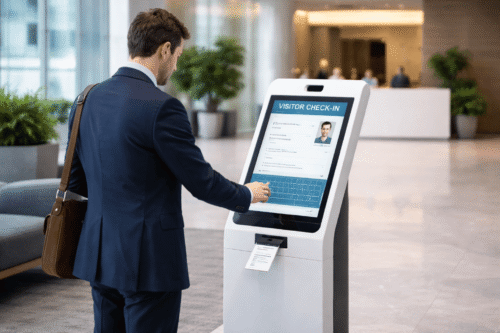
A Visitor Management System (VMS) kiosk is a self-service digital solution that allows visitors to register, verify their identity, and gain controlled access to a facility.
Typically equipped with touchscreens, ID scanners, cameras, and badge printers, VMS kiosks automate the entire visitor check-in process while enhancing security and efficiency.
How VMS Kiosks Prevent Unauthorized Access
1. Digital Identity Verification
VMS kiosks can scan government-issued IDs, QR codes, or pre-registered credentials to verify visitor identity.
This ensures:
- Only authorized individuals are granted access
- Fake identities are detected early
- Accurate visitor records are maintained
2. Pre-Registration and Approval Workflows
Employees can pre-register visitors before their arrival. The system sends invitations with QR codes or access credentials.
Benefits include:
- Faster check-in process
- Pre-approved access control
- Reduced risk of unexpected visitors
3. Real-Time Notifications and Alerts
When a visitor arrives, the host is instantly notified. Security teams can monitor all check-ins in real time.
This allows:
- Immediate response to suspicious activity
- Better coordination between departments
- Enhanced situational awareness
4. Access Control Integration
VMS kiosks can integrate with access control systems such as turnstiles, doors, and elevators.
This ensures:
- Visitors can only access authorized areas
- Entry permissions are time-limited
- Unauthorized movement is restricted
5. Badge Printing with Security Features
Upon successful registration, the kiosk prints a visitor badge with details such as name, photo, and access level.
Security advantages:
- Easy identification of visitors
- Prevention of impersonation
- Visual differentiation between staff and guests
6. Facial Recognition and Biometric Verification
Advanced VMS kiosks utilize facial recognition technology to match visitor identity with stored data.
This provides:
- High-level security authentication
- Contactless verification
- Reduced risk of identity fraud
7. Comprehensive Audit Trails
Every visitor interaction is recorded digitally, creating a complete audit trail.
This helps organizations:
- Track visitor movements
- Investigate incidents
- Ensure compliance with regulations
8. Prevention of Tailgating
By requiring individual authentication at entry points, VMS kiosks reduce the risk of tailgating.
Additional measures include:
- Integration with turnstiles
- One-person-per-entry enforcement
Key Features to Look for in a Secure VMS Kiosk
When selecting a VMS kiosk, organizations should prioritize the following features:
1. Touchless Check-In
Reduces physical contact and enhances hygiene while maintaining security.
2. Cloud-Based Management
Allows remote monitoring and centralized control across multiple locations.
3. Multi-Language Support
Improves usability for international visitors.
4. Customizable Workflows
Adapts to different business needs and security levels.
5. Integration Capabilities
Seamlessly connects with HR systems, access control, and security platforms.
Benefits of Using VMS Kiosk for Access Control
1. Enhanced Security
Automated verification and monitoring significantly reduce unauthorized access risks.
2. Improved Efficiency
Faster check-in processes reduce waiting times and administrative workload.
3. Professional Visitor Experience
Modern kiosks create a positive first impression for visitors.
4. Data Accuracy and Compliance
Digital records ensure accurate reporting and regulatory compliance.
5. Cost Savings
Reduced manpower and operational inefficiencies lead to long-term savings.
Best Practices for Preventing Unauthorized Access
To maximize the effectiveness of VMS kiosks, organizations should implement the following best practices:
1. Define Clear Access Policies
Establish rules for visitor entry, restricted areas, and authorization levels.
2. Train Employees and Security Staff
Ensure all personnel understand how to use the system and enforce policies.
3. Regularly Update Visitor Data
Maintain accurate records and remove outdated entries.
4. Conduct Security Audits
Periodically review system performance and identify vulnerabilities.
5. Combine Technology with Physical Security
Use VMS kiosks alongside CCTV, security personnel, and access control systems.
The Future of Visitor Management and Security
As technology continues to evolve, VMS kiosks will become even more intelligent and integrated. Artificial intelligence, predictive analytics, and IoT connectivity will further enhance security capabilities.
Organizations that invest in advanced visitor management solutions today will be better prepared to להתמודד future security challenges while maintaining operational efficiency.
Conclusion
Preventing unauthorized access is no longer a manual task—it requires smart, automated, and reliable solutions. VMS kiosks provide a comprehensive approach to visitor management by combining identity verification, real-time monitoring, and access control integration.
By implementing a robust VMS kiosk system, organizations can significantly reduce security risks, improve operational efficiency, and create a safer environment for employees and visitors alike.
In an era where security is paramount, adopting advanced visitor management technology is not just a choice—it is a necessity for sustainable business success.
More details about the system can be found in this product solution. Click here: https://www.smartouch.com.my/vms-mobile-kiosk/
Smart Touch technology pte ltd , www.smartouch.com.sg +65-63964767, sales@smartouch.com.sg , www.smartouch.com.my +607-3889903 sales@smartouch.com.my