Remote and hybrid work have made one question more common in HR software conversations than it used to be: should the team rely on the mobile app or the desktop dashboard for day-to-day HRMS tasks? The honest answer is that both have a role, but which one matters more depends heavily on who is using it and what they need to get done.
This article breaks down where mobile apps genuinely outperform desktop platforms for managing remote teams, where desktop still wins, and how most growing companies end up using a combination of both rather than picking one exclusively.
Why This Question Matters More With Remote Teams
When everyone worked from a single office, desktop HR software was rarely a bottleneck, since employees and managers were at their computers most of the day anyway. Remote and distributed teams changed that. Employees now clock in from home offices, managers approve leave from between meetings on different sites, and field staff may not touch a desktop computer at all during a working day.
This shift means the accessibility of the interface, not just its feature depth, has become a real factor in whether an HRMS actually gets used consistently across a remote or hybrid workforce.
Where Mobile Apps Win for Remote Teams
Mobile HRMS apps solve specific problems that desktop platforms struggle with when a workforce is distributed.
Instant Clock-In From Anywhere
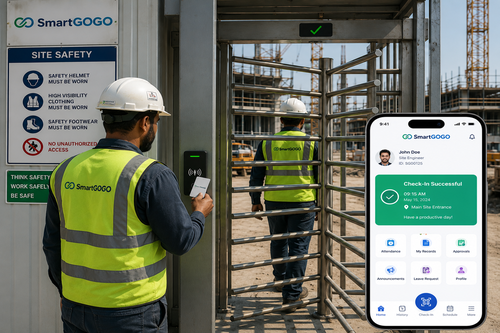
Employees working from home, client sites, or while travelling can clock in and out through a mobile app without needing to be at a specific desk or device, which matters enormously for teams that are not desk-bound.
Faster Approvals for Managers
Leave requests and expense claims often stall because a manager is away from their desk. A mobile app lets approvals happen from a phone between meetings, keeping workflows moving instead of stalling until someone returns to a computer.
Push Notifications Keep People Informed
Mobile apps can send real-time alerts for pending approvals, upcoming leave, or payslip availability, prompting timely action in a way that email notifications, which are easy to miss, often do not.
Location-Aware Attendance
Some mobile HRMS apps support GPS-verified clock-ins, which is particularly useful for field teams, sales staff, or anyone working across multiple sites where a fixed terminal is not practical.
Where Desktop Still Has the Advantage
Despite the mobile app’s convenience, certain HR tasks remain genuinely better suited to a desktop environment.
Complex Reporting and Analytics
Reviewing detailed workforce reports, building custom dashboards, or analysing trends across departments is far easier on a larger screen with a full keyboard and mouse than on a phone.
Bulk Administrative Tasks
HR administrators processing payroll for an entire company, updating multiple employee records, or configuring system settings typically need the precision and screen real estate that only a desktop interface provides.
Document-Heavy Workflows
Reviewing contracts, uploading multiple files, or working through detailed onboarding paperwork is considerably more manageable on desktop than trying to navigate the same tasks on a small screen.
The Case for Using Both Together
Most organisations managing remote teams get the best results by not treating this as an either-or decision. Employees and line managers tend to rely heavily on the mobile app for day-to-day actions like clocking in, checking payslips, and approving simple requests, while HR administrators and finance teams use the desktop platform for payroll processing, reporting, and system configuration. A well-designed HRMS supports both experiences seamlessly, with data syncing in real time between them.
What to Look For When Choosing an HRMS
When evaluating platforms for a remote or hybrid team, check whether the mobile app offers genuine feature parity for common employee actions rather than a stripped-down version of the desktop experience. Confirm that data syncs instantly between mobile and desktop so nothing is out of date, and ask whether the mobile app works reliably offline or in areas with poor connectivity, which matters for field-based staff in particular.
Supporting a Distributed Workforce Long Term
As remote and hybrid arrangements become a permanent fixture rather than a temporary adjustment, the tools supporting them need to hold up over time, not just during an initial rollout. Regular updates to the mobile app, consistent uptime, and responsive vendor support all matter more for distributed teams than for a single-office workforce, since there is no IT desk down the hall to help troubleshoot an issue in the moment.
Key Takeaways
- Mobile HRMS apps excel at clock-ins, quick approvals, and push notifications, making them ideal for day-to-day use by remote employees and managers.
- Desktop platforms remain better suited to complex reporting, bulk administrative tasks, and document-heavy workflows.
- Most companies managing remote teams get the best results by using mobile and desktop together rather than choosing one exclusively.
- Real-time data syncing between mobile and desktop is essential so information stays accurate regardless of which interface is used.
- Offline reliability and genuine feature parity in the mobile app matter especially for field-based or poorly connected staff.
Frequently Asked Questions
Can a company rely entirely on a mobile HRMS app without desktop access?
Small teams with simple needs sometimes can, but most growing organisations eventually need desktop access for tasks like detailed reporting, bulk payroll processing, and system configuration that are impractical on a phone screen.
Do mobile HRMS apps work without an internet connection?
It depends on the platform. Some apps support limited offline functionality that syncs once connectivity resumes, which is worth asking about specifically if your team includes field staff who may have inconsistent internet access.
Is data secure when accessed through a mobile HRMS app?
Reputable platforms use encryption and secure authentication for mobile access, similar to desktop security standards. It is worth confirming a vendor’s specific security measures, including how they handle lost or stolen devices.
How do approvals stay consistent between mobile and desktop?
Well-designed HRMS platforms sync data in real time, so an approval made on a mobile app updates instantly on the desktop dashboard and vice versa, keeping records consistent regardless of which device was used.
What should a company prioritise first when rolling out a new HRMS for a remote team?
Prioritising mobile accessibility for common employee actions like clocking in and submitting leave requests tends to drive faster adoption, since these are the tasks employees interact with most frequently day to day.
Interested in this product? Click here to learn more: https://www.smartouch.com.my/smartgogo/
Smart Touch technology pte ltd , www.smartouch.com.sg +65-63964767, sales@smartouch.com.sg , www.smartouch.com.my +607-3889903 sales@smartouch.com.my