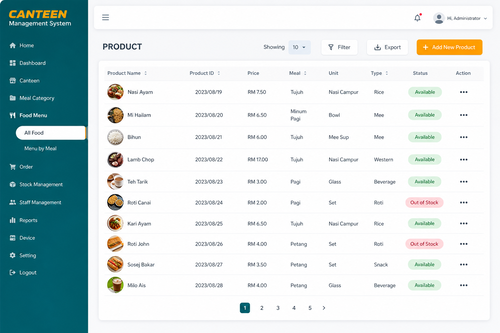
Cash handling in a busy office canteen creates problems that have nothing to do with the food. Coins run short, queues build up while staff count change, and reconciling the till at the end of each day eats into time that could go toward running the canteen itself. A cashless system solves all three by letting employees pay with a card, QR code, or linked account, turning the canteen counter into a fast, contactless transaction point. This article covers how office canteen cashless systems work, the features worth prioritising, and how to roll one out without disrupting lunch service.
Why Cash Is Slowing Down Your Canteen
Long Queues During Peak Hours
Counting change and handling notes takes time, and during the lunch rush that time adds up into queues stretching well past the counter, cutting into the short break employees actually have to eat.
Reconciliation Headaches for Canteen Operators
Cash tills need to be counted and matched against sales records manually, and discrepancies are hard to trace back to a specific transaction once the day is over, leaving operators guessing where the gap came from.
Key Features of an Office Canteen Cashless System
A good cashless canteen system covers more than just accepting card taps. Look for these core capabilities before choosing a vendor.
QR Code and Card Payment Support
Employees should be able to pay however suits them, whether that is scanning a QR code with a phone, tapping a staff card, or using a linked e-wallet. Supporting multiple payment methods keeps queues moving because nobody is stuck without their preferred option.
Prepaid Top-Up and Auto-Deduction
Many offices let staff top up a canteen wallet through payroll deduction or online transfer, then deduct purchases automatically at the point of sale. This removes the need for staff to carry cash altogether and gives HR a clean record of subsidised meals.
Real-Time Sales and Balance Tracking
Canteen operators get a live dashboard showing sales by item, peak transaction times, and outstanding balances, replacing the end-of-day paper count with numbers that are accurate the moment a sale happens.
Benefits of Going Cashless in the Canteen
Faster Service During Lunch Rush
A tap or scan takes seconds compared with counting change, so more employees get through the line within the same lunch window, and the canteen serves more meals without adding staff.
Accurate, Automatic Reporting
Every transaction is logged automatically, so operators no longer need to manually reconcile a cash drawer. Reports on best-selling items and daily revenue are ready instantly, which helps with menu planning and vendor negotiations.
Better Hygiene and Lower Cash-Handling Risk
Handling physical cash means handling something that passes through many hands. A cashless counter reduces that contact point and also removes the security risk of storing cash on site overnight.
Rolling Out a Cashless System Without Disrupting Lunch Service
Start With a Pilot Counter
Rather than switching every till at once, run the new system alongside cash at a single counter first. This lets staff get comfortable with the terminal and gives IT a chance to catch connectivity issues before a full rollout.
Communicate the Top-Up Process Early
Employees need clear instructions on how to load funds, whether through a mobile app, an HR portal, or a top-up kiosk. Sending this information a week before launch avoids confusion on day one.
Keep a Backup Payment Option Ready
Network outages happen. Having a manual fallback process for the first few weeks prevents a single connectivity hiccup from stopping lunch service entirely.
Key Takeaways
An office canteen cashless system speeds up service, gives operators accurate real-time sales data, and removes the daily burden of counting and reconciling cash. Supporting multiple payment methods, offering prepaid top-ups, and piloting the rollout at one counter first are the details that make adoption smooth rather than disruptive.
Conclusion
Moving an office canteen away from cash is a small operational change that pays off every single day, in shorter queues, cleaner reporting, and less administrative overhead for whoever runs the counter. The right system pays for itself quickly once staff get used to tapping instead of digging for coins. If your canteen is still running on cash, a phased rollout starting with one counter is the easiest way to find out how much time it saves.
You can read more about our compliance features by https://www.smartouch.com.my/canteen-management-system-2/.
Smart Touch technology pte ltd , www.smartouch.com.sg +65-63964767, sales@smartouch.com.sg , www.smartouch.com.my +607-3889903 sales@smartouch.com.my
Frequently Asked Questions
Do employees need a smartphone to use a cashless canteen system?
No. Most systems also support physical staff cards or fobs, so employees without a smartphone or who prefer not to use one can still pay by tapping a card at the counter.
What happens if the internet goes down during lunch?
Most terminals can queue transactions offline and sync once connectivity returns, but it is still good practice to keep a manual backup process ready for extended outages.
Can unused canteen balances be refunded?
This depends on company policy rather than the technology itself. Most platforms allow administrators to configure refund or carry-over rules for unused wallet balances, such as when an employee leaves the company.
How long does it take to set up a cashless canteen system?
A single-counter pilot can typically be running within a few days of hardware delivery, while a full rollout across multiple counters and integration with payroll systems usually takes a few weeks.
Choosing the Right Cashless Canteen Vendor
Not every vendor offers the same depth of features, so it helps to compare a shortlist against your canteen’s actual daily operations rather than a generic feature checklist.
Integration With Existing HR and Payroll Systems
If the canteen wallet needs to sync with payroll deductions or an existing staff card used for attendance, confirm the vendor can integrate with those systems before signing a contract. Retrofitting integration later is far more disruptive than planning for it upfront.
Hardware Reliability and Local Support
A canteen terminal takes a beating during peak hours, so ask about hardware warranty terms and how quickly a technician can respond if a terminal fails. A vendor with local support in Malaysia will resolve issues faster than one relying on overseas service teams.
Transparent Transaction Fees
Some providers charge a small fee per transaction or per top-up. Get this in writing before committing, since fees that seem minor per transaction can add up significantly across hundreds of daily canteen sales.