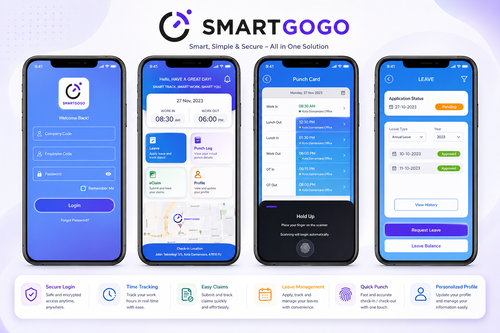
Manual attendance sheets and fixed-location punch clocks were never built for a workforce that moves. Field technicians, sales representatives, and site supervisors in Malaysia now spend their days across multiple locations, and a GPS clock-in app has become the practical way for businesses to know exactly when and where work actually happens. This article looks at why more companies are adopting GPS-based time tracking, what to look for in a smart GPS clock-in app, and how to roll one out without disrupting your team.
Why Malaysian Businesses Are Switching to GPS Clock-In Apps
The Problem with Traditional Time Attendance
Paper timesheets and fixed punch clocks assume everyone works from one address. The moment staff are dispatched to client sites, construction projects, or delivery routes, that assumption breaks down. Supervisors end up trusting self-reported hours, disputes over late arrivals become common, and payroll teams spend hours reconciling attendance before every pay run. For businesses with a mobile workforce, this is more than an inconvenience; it is a direct cost in wasted admin time and unverified wages.
How GPS Clock-In Technology Solves It
A GPS clock-in app captures the employee’s location the moment they clock in or out, using the GPS chip already built into their smartphone. Instead of guessing whether staff were on-site, managers get a verified timestamp and coordinates for every shift. This single change removes the guesswork from mobile workforce management and gives HR teams accurate, audit-ready attendance records without adding extra paperwork.
Key Features of a Smart GPS Clock-In App
Not every attendance app is built for a mobile team. When evaluating a GPS clock-in app, look for the features that actually matter for day-to-day operations.
Real-Time Location Tagging
Every clock-in and clock-out is stamped with GPS coordinates and time, giving managers a live view of where their team is working from at any moment.
Geofenced Check-In Zones
Admins can set virtual boundaries around job sites or branches so employees can only clock in once they are physically within the approved area, preventing buddy punching and off-site check-ins.
Automated Timesheets and Payroll Sync
Hours worked are calculated automatically and can flow straight into payroll, cutting out manual data entry and reducing the chance of underpayment or overpayment disputes.
Benefits of Using a GPS Clock In App for Field and Remote Teams
Accurate attendance is only the starting point. Once a GPS clock-in app is in place, businesses typically see improvements across several areas of operations. Payroll becomes faster to process because hours are verified automatically rather than checked manually line by line. Disputes over late arrivals or early departures drop sharply since every entry is backed by a timestamp and location. Managers gain visibility into which sites are covered and which are short-staffed in real time, allowing them to reassign workers before a job is delayed. Employees also benefit, since transparent records protect them from incorrect deductions and give them confidence that their hours are counted fairly.
Best Practices for Implementing GPS Attendance Tracking
Communicate the Purpose Clearly
Employees are more comfortable with location tracking when they understand it is tied to work hours only, not personal monitoring outside shifts.
Set Realistic Geofences
Job sites vary in size, so boundaries should be wide enough to account for GPS drift while still preventing check-ins from far outside the work area.
Integrate With Payroll Early
Connecting the app to your payroll or HR system from day one avoids double handling of attendance data later.
Review Reports Weekly
Regular check-ins on attendance data help catch irregularities early and keep the rollout on track.
Key Takeaways
A GPS clock-in app gives Malaysian businesses verified, location-based attendance records, reduces payroll disputes, and provides real-time visibility into where mobile teams are working. The right system pairs geofencing and automated timesheets with a simple mobile experience so both managers and employees adopt it quickly.
Conclusion
Workforces that operate outside a single office need attendance tools built for that reality. A GPS clock-in app replaces guesswork with verified data, speeds up payroll, and gives managers the visibility they need to run mobile teams efficiently. For businesses ready to move away from manual timesheets, this is one of the simplest upgrades to make with an immediate return on time saved.
Interested in this product? Click here to learn more: https://www.smartouch.com.my/smartgogo/
Smart Touch technology pte ltd , www.smartouch.com.sg +65-63964767, sales@smartouch.com.sg , www.smartouch.com.my +607-3889903 sales@smartouch.com.my
Frequently Asked Questions
Does a GPS clock-in app work without an internet connection?
Most apps can record the clock-in offline and sync the data automatically once the device reconnects to the internet, so coverage gaps in remote areas are not a problem.
Can employees clock in from outside the approved work area?
No. When geofencing is enabled, the app blocks clock-ins outside the defined radius, which prevents staff from checking in before they arrive on site.
Is GPS tracking only active during clock-in and clock-out?
Yes, in a properly configured system location is only captured at the moment of clocking in or out, not continuously throughout the day, which keeps the tool focused on attendance rather than surveillance.
Does this integrate with existing payroll software?
Yes, attendance data can be exported or synced directly with most payroll systems, removing the need to re-enter hours manually each pay cycle.
How much does a GPS clock-in app cost for a small business?
Pricing typically depends on the number of users and features required, such as geofencing or payroll integration. Most vendors offer per-employee monthly pricing, so costs scale with team size rather than requiring a large upfront investment.
Choosing the Right GPS Clock-In App for Your Business
Not every GPS clock-in app is built the same way, so it helps to match the tool to how your team actually works before committing to one platform.
For Field Service and Delivery Teams
Look for an app with strong geofencing and route history, since these teams move between multiple sites in a single shift and managers need to confirm each stop was completed on time.
For Construction and Project-Based Sites
Prioritise offline clock-in support, since job sites often have weak signal, along with the ability to tag hours to specific projects for accurate cost tracking.
For Sales and Client-Facing Teams
A simple mobile interface and fast clock-in process matter most here, since staff are moving between client meetings and need the app to stay out of their way.
GPS Clock-In App vs Traditional Attendance Methods
Businesses weighing whether to switch often compare a GPS clock-in app against the punch clocks and paper timesheets they already use. Traditional methods require staff to be physically present at one fixed device, offer no way to confirm location, and depend on manual calculation before hours reach payroll, which leaves plenty of room for error. A GPS clock-in app removes the fixed device requirement entirely, verifies location automatically at the moment of clock-in, and pushes calculated hours straight into payroll or HR software. The difference becomes most visible during payroll week, when businesses using manual methods spend hours cross-checking timesheets while GPS-based teams simply export a report that is already accurate. For companies managing five or more mobile staff, that time saved alone often justifies the switch within the first few pay cycles.