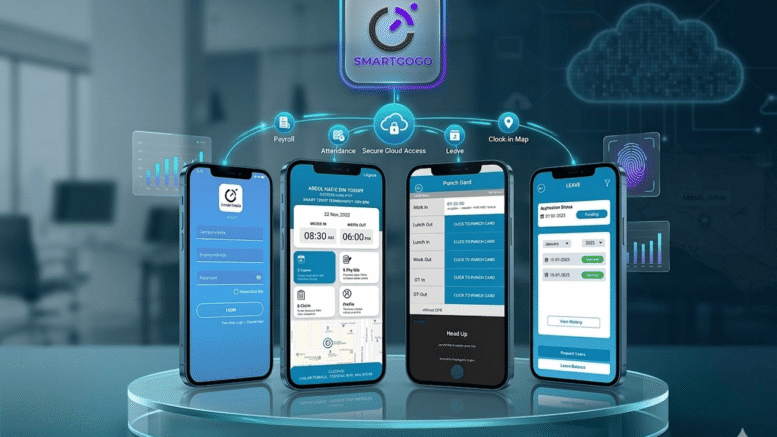
Field-based teams — including sales representatives, technicians, and delivery staff — present a unique management challenge: how do you verify that employees are actually where they say they are during working hours? Solving the accountability puzzle with a GPS clock in app gives managers real-time visibility into field employee locations at the moment of clocking in and out, removing the guesswork from remote workforce management.
Without location-verified attendance, businesses often rely on trust alone, which can lead to inconsistent accountability and difficulty verifying site visits or client meetings. This article explores how GPS clock-in technology solves these accountability challenges for Malaysian and Singaporean businesses with mobile or field-based teams.
The Accountability Challenge with Field Employees
Traditional time attendance systems were built for fixed office locations, leaving a significant gap for businesses whose employees work across multiple sites, client locations, or the field.
No Way to Verify Location
Without GPS verification, managers have no reliable way to confirm that a field employee clocked in from the correct client site, job location, or sales territory.
Difficulty Tracking Multiple Job Sites
Technicians and delivery staff who visit several locations per day are hard to monitor with fixed time clocks, creating blind spots in daily productivity reporting.
How a GPS Clock-In App Solves the Problem
A GPS-enabled clock-in app captures the employee’s precise location at the moment they clock in or out, providing verifiable proof of attendance at the correct job site.
- Real-time GPS location capture at every clock-in and clock-out event
- Geofencing that restricts clocking to within an approved job site radius
- Route and visit history showing each location an employee checked in from during the day
- Photo verification option for additional proof at client sites
- Manager dashboard with live location tracking during work hours
- Offline mode that syncs location data once connectivity is restored
Benefits for Field-Based Businesses
Verified Attendance Accuracy
GPS clock-in data provides objective proof of where and when an employee started and ended their workday, reducing disputes over hours worked.
Improved Client Billing Accuracy
For service businesses that bill clients based on time spent on-site, GPS-verified clock-ins provide accurate, defensible records to support invoicing.
Greater Workforce Accountability
Knowing that attendance is location-verified naturally encourages punctuality and accurate reporting among field staff.
Fixed Time Clock vs GPS Clock-In App
| Factor | Fixed Time Clock | GPS Clock-In App |
|---|---|---|
| Location verification | Not available | Real-time GPS capture |
| Field employee support | Limited | Purpose-built for mobile teams |
| Multiple job sites | Difficult to track | Fully supported |
| Client billing accuracy | Manual estimation | Verified, defensible data |
| Manager visibility | Delayed reporting | Live dashboard tracking |
Best Practices for Rolling Out GPS Clock-In Apps
- Clearly communicate location tracking policies to employees before rollout
- Set up geofences for common job sites to streamline clock-in accuracy
- Ensure the app works reliably in low-connectivity areas with offline sync support
- Review location and attendance reports weekly to spot irregularities early
- Pair GPS attendance data with payroll integration for accurate salary processing
Key Takeaways
A GPS clock-in app closes the accountability gap for field-based teams by providing verified, location-based attendance data. This improves billing accuracy, strengthens workforce accountability, and gives managers real-time visibility into where their teams are working.
Conclusion
For businesses managing field employees, solving the accountability puzzle with a GPS clock-in app is one of the most effective ways to bring transparency and trust into remote workforce management. With verified location data, businesses gain more accurate attendance records, stronger client billing practices, and better overall visibility into daily field operations.
Frequently Asked Questions
What is a GPS clock-in app?
A GPS clock-in app records an employee’s exact location at the moment they clock in or out, providing verifiable proof of attendance at a specific job site.
What is geofencing?
Geofencing restricts clock-in and clock-out actions to within a defined radius around an approved job site, ensuring employees can only log attendance from the correct location.
Does the app work without internet connectivity?
Most GPS clock-in apps support offline mode, storing attendance data locally and syncing automatically once an internet connection is restored.
Is employee location data kept private?
Reputable GPS attendance apps only track location during clock-in and clock-out events, not continuous tracking, and store data securely in compliance with privacy regulations.
Can GPS attendance data integrate with payroll?
Yes, most GPS clock-in apps integrate with payroll systems, allowing verified attendance hours to flow directly into salary calculations.
Interested in this product? Click here to learn more: https://www.smartouch.com.my/smartgogo/
Smart Touch technology pte ltd , www.smartouch.com.sg +65-63964767, sales@smartouch.com.sg , www.smartouch.com.my +607-3889903 sales@smartouch.com.my