Managing employee claims manually can quickly become one of the most frustrating tasks for any business. Receipts get lost. Paper forms pile up. Approvals are delayed. Finance teams spend hours checking details. Employees keep asking for claim status updates. Managers forget to approve submissions. At month-end, the entire process becomes rushed, messy, and stressful.
This is why companies should stop tracking receipts manually and switch to SmartClaim software.
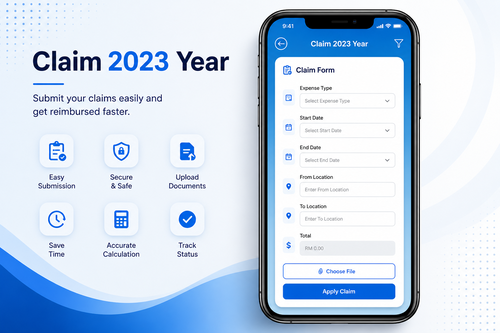
SmartClaim software helps businesses manage employee claims, receipts, approvals, reimbursements, and reporting in one digital platform. Instead of collecting paper receipts and entering claim details manually into spreadsheets, employees can submit claims online, upload receipt images, and track their approval status more easily. Managers can review claims faster, and finance teams can process reimbursement with better accuracy.
For companies in Malaysia and Singapore, where businesses often manage transport claims, petrol claims, parking claims, toll claims, meal claims, medical claims, accommodation claims, business travel claims, and project expenses, a digital claim management system can save time and reduce unnecessary errors.
A good SmartClaim software does more than replace paper forms. It creates a smarter workflow that connects employees, managers, HR, and finance in a clear and organized process.
1. Why Manual Receipt Tracking Is a Problem
Manual receipt tracking may look simple at first, but it becomes difficult when the company grows. A small business may begin with a few monthly claims, but as more employees join, claim volume increases. Soon, HR and finance teams may need to handle dozens or hundreds of receipts every month.
The most common manual claim problems include:
| Manual Claim Problem | Business Impact |
|---|---|
| Lost paper receipts | Claims become hard to verify |
| Messy claim forms | Finance spends more time checking |
| Delayed manager approvals | Employees wait longer for reimbursement |
| Duplicate submissions | Company may overpay |
| Missing supporting documents | Claims may be rejected or delayed |
| No real-time status | Employees keep asking HR or finance |
| Manual spreadsheet updates | Higher risk of calculation errors |
| Hard-to-find records | Audit preparation becomes stressful |
When claims are not managed properly, it affects employee trust and business efficiency. Employees expect claims to be processed fairly and on time. Management expects clear cost control. Finance expects clean documentation. Manual tracking makes all of this harder.
2. What Is SmartClaim Software?
SmartClaim software is a digital claim management solution that helps companies manage employee expense claims from submission to approval and reimbursement. It replaces paper-based claim forms, manual receipt filing, and spreadsheet tracking with a structured online process.
With SmartClaim software, employees can submit claims digitally. They can enter the claim type, claim amount, date, description, project or department, and upload receipt images as supporting proof. Managers can approve or reject claims online. Finance can check approved claims, prepare reimbursement, and generate reports.
This creates a complete claim workflow:
| Step | SmartClaim Process |
|---|---|
| 1 | Employee submits claim online |
| 2 | Receipt image is uploaded |
| 3 | Manager receives approval request |
| 4 | Manager approves or rejects claim |
| 5 | Finance verifies approved claim |
| 6 | Reimbursement is processed |
| 7 | Claim record is stored digitally |
| 8 | Reports are generated for management |
This simple digital flow helps reduce confusion and makes the claim process easier for everyone.
3. Stop Losing Receipts
One of the biggest problems with manual claim tracking is lost receipts. Employees may keep receipts in wallets, bags, cars, drawers, or folders. By the time they submit claims, some receipts may be faded, damaged, or missing.
SmartClaim software helps solve this problem by allowing employees to upload receipt images directly into the system. Once uploaded, the receipt is stored together with the claim record. This makes verification easier and reduces the risk of missing documents.
For field staff, sales teams, technicians, drivers, project workers, and employees who travel often, this feature is especially useful. They do not need to wait until the end of the month to organize receipts. They can submit claims while the details are still fresh.
4. Faster Claim Submission for Employees
Employees do not want to spend time filling long paper forms or waiting for HR to explain the claim process. A digital claim system makes submission faster and more convenient.
Employees can choose the claim category, enter the amount, upload the receipt, add remarks, and submit the claim for approval. This reduces paperwork and makes the process more user-friendly.
Common claim categories may include:
| Claim Type | Example |
|---|---|
| Petrol claim | Sales visit, client meeting, site travel |
| Toll claim | Highway travel for work purpose |
| Parking claim | Office visit, customer appointment |
| Transport claim | Taxi, e-hailing, public transport |
| Meal claim | Approved business meal or overtime meal |
| Medical claim | Clinic visit or company-approved medical expense |
| Accommodation claim | Hotel stay for business trip |
| Travel claim | Flight, bus, train, or other travel expense |
| Project claim | Site-related business expenses |
By organizing claims into categories, SmartClaim software helps employees submit correctly and helps finance track expenses more clearly.
5. Faster Approval for Managers
Manual approvals often slow down the claim process. A paper form may sit on a manager’s desk for days. An email may be missed. A WhatsApp message may be forgotten. When approval is delayed, reimbursement is delayed too.
SmartClaim software gives managers a clear approval workflow. Managers can view pending claims, check receipt images, review claim details, and approve or reject submissions. This helps reduce bottlenecks and keeps the process moving.
A digital approval process also creates better accountability. Every action can be recorded, including who approved the claim and when it was approved. This helps management maintain a transparent workflow.
6. Better Control for Finance Teams
Finance teams need accurate claim records. They must check amounts, verify receipts, confirm approval, prevent duplicate claims, prepare reimbursement, and generate expense reports. When claims are submitted manually, finance may spend too much time correcting incomplete information.
SmartClaim software helps finance teams work more efficiently by keeping all claim records in one place. Approved claims can be reviewed by category, department, employee, project, date, or status. This makes reimbursement preparation easier and improves financial control.
Finance teams can also detect unusual patterns more quickly. For example, if transport claims increase sharply in one department, management can review the reason. If duplicate receipts appear, finance can investigate before reimbursement.
7. Real-Time Claim Status Tracking
One of the most common questions employees ask is: “Has my claim been approved?”
With manual tracking, HR or finance may need to check paper forms, ask managers, or search through emails to answer. This wastes time for everyone.
SmartClaim software allows employees to track their claim status digitally. They can see whether a claim is submitted, pending approval, approved, rejected, or processed. This reduces follow-up messages and improves transparency.
| Claim Status | Meaning |
|---|---|
| Submitted | Employee has submitted the claim |
| Pending Approval | Waiting for manager review |
| Approved | Manager has approved the claim |
| Rejected | Claim was rejected with reason |
| Verified | Finance has checked the claim |
| Processed | Claim is ready for reimbursement or completed |
Clear status tracking helps employees feel more confident because they know where their claim stands.
8. Reduce Duplicate and Incorrect Claims
Manual claim tracking makes it easier for duplicate claims to slip through. An employee may accidentally submit the same receipt twice. A finance officer may miss the duplicate because records are stored in different files or folders.
SmartClaim software helps reduce this risk by centralizing claim records. Finance can review previous submissions, compare receipt details, and check claim history more easily. This protects the company from overpayment and improves expense control.
Incorrect claims can also be reduced. The system can require important fields such as claim date, claim type, amount, description, and receipt upload. This helps ensure every claim is submitted with the necessary details.
9. Better Policy Compliance
Every company has claim policies. Some expenses may have maximum limits. Some claims may require receipts. Some categories may need manager approval. Some expenses may only apply to certain departments or job roles.
Manual claim processing makes it harder to enforce these rules consistently. SmartClaim software helps companies apply claim policies more clearly.
Examples of claim policy controls include:
| Policy Control | Example |
|---|---|
| Claim category limit | Meal claim capped at a company-approved amount |
| Receipt requirement | Receipt must be uploaded for reimbursement |
| Approval workflow | Claims above a certain amount need higher approval |
| Department control | Only selected teams can submit certain claim types |
| Date control | Claims must be submitted within a certain period |
| Project tagging | Site expenses must be linked to a project |
When policies are applied through the system, claims become more consistent and easier to manage.
10. Save Time at Month-End
Month-end is often the busiest time for HR and finance. Salary processing, attendance checking, overtime calculation, statutory contribution, invoices, payments, and claims may all happen around the same period.
Manual claim processing adds more pressure because staff need to collect receipts, check forms, follow up approvals, update spreadsheets, and prepare reimbursement lists.
SmartClaim software reduces month-end stress by allowing claims to be submitted and approved continuously. Finance can monitor claims throughout the month instead of waiting for a large pile of receipts at the end.
This improves productivity and helps payroll or reimbursement preparation run more smoothly.
11. Easier Audit and Recordkeeping
Businesses must keep proper financial records. Claim documents may be needed for audits, internal reviews, tax preparation, project costing, management reporting, and expense verification.
With manual receipts, records may be stored in boxes, folders, envelopes, or filing cabinets. Searching for one receipt from months ago can take a long time.
SmartClaim software stores claim records digitally. This makes it easier to search by employee, date, amount, category, department, project, or approval status. Digital recordkeeping improves organization and helps the company prepare for audits more confidently.
12. Better Expense Visibility for Management
Management needs to know where money is being spent. Manual claim tracking often gives delayed or incomplete information. By the time reports are prepared, the expense pattern may already be outdated.
SmartClaim software gives management better visibility into company claims and employee expenses. Reports can show claim totals by department, employee, branch, category, project, or period.
Useful management reports may include:
| Report Type | Business Use |
|---|---|
| Monthly claim summary | See total employee claim cost |
| Department claim report | Compare expenses by department |
| Employee claim report | Review individual claim history |
| Category report | Track petrol, parking, meals, travel, medical claims |
| Project claim report | Monitor expenses by project or site |
| Pending approval report | Identify approval delays |
| Rejected claim report | Understand common submission issues |
These reports help management make better decisions and control operating costs.
13. Improve Employee Experience
Employees appreciate fast and transparent claim processing. When claims take too long, employees may feel frustrated because they have already spent their own money for company-related expenses.
SmartClaim software improves the employee experience by making submission easier, approval clearer, and status tracking more transparent. Employees do not need to chase multiple people for updates. They can submit claims properly and know what is happening.
A better claim process shows that the company values employees’ time and effort. It also helps build trust between staff, managers, HR, and finance.
14. Suitable for Many Industries
SmartClaim software is useful for many types of businesses in Malaysia and Singapore. Any company that reimburses employee expenses can benefit from a digital claim system.
Industries that commonly need SmartClaim software include:
| Industry | Common Claim Needs |
|---|---|
| Sales and distribution | Petrol, parking, toll, client visit expenses |
| Construction | Site travel, project expenses, accommodation |
| Manufacturing | Transport, medical, shift-related claims |
| Logistics | Driver claims, toll, parking, travel expenses |
| Retail | Branch visit expenses, transport, petty cash claims |
| Security services | Site movement, uniform or approved operational expenses |
| Cleaning services | Project travel, branch expenses |
| Corporate offices | Business meals, travel, parking, medical claims |
| IT companies | Client support travel, project expenses |
| Education and training | Travel, event, accommodation claims |
A digital claim system can be configured according to the company’s actual claim policy and business needs.
15. Why SmartClaim Is Better Than Spreadsheet Tracking
Many companies start with Excel or Google Sheets for claim tracking. This may work for a small number of claims, but it becomes risky as claim volume increases.
| Spreadsheet Tracking | SmartClaim Software |
|---|---|
| Manual data entry | Digital claim submission |
| Easy to make formula mistakes | Structured calculation and records |
| Receipts stored separately | Receipt attached to claim record |
| Approval not always clear | Digital approval workflow |
| Hard to track claim status | Real-time claim status |
| Difficult to prevent duplicates | Easier claim history checking |
| Reports need manual preparation | Reports can be generated faster |
| Files can be overwritten | Better controlled access and records |
Spreadsheets are useful for simple tracking, but they are not designed to manage full claim workflows. SmartClaim software provides a more professional and scalable solution.
16. Connect Claims with HRMS and Payroll
A strong claim system becomes even more powerful when connected with HRMS and payroll. Employee information, department structure, reporting manager, approval workflow, and reimbursement records can work together in one environment.
For example, when an employee submits a claim, the system can route it to the correct manager based on HR records. Once approved, finance can prepare reimbursement or include it in payroll processing, depending on company policy.
This reduces repeated data entry and creates a smoother workflow between HR, finance, and management.
17. SmartClaim Software for Business Cost Control
Employee claims are part of business expenses. Without proper control, costs can increase without management noticing. SmartClaim software helps companies understand claim spending more clearly.
Management can review:
- Which departments spend the most
- Which claim categories are increasing
- Which projects require more expenses
- Which claims are pending too long
- Which employees submit frequent claims
- Which policies need adjustment
- Which expenses can be reduced
This allows the company to manage costs in a fair and data-driven way.
18. How to Switch from Manual Claims to SmartClaim Software
Switching to SmartClaim software does not need to be complicated. Companies can start by reviewing their current claim process and identifying the main pain points.
A simple implementation plan may include:
| Step | Action |
|---|---|
| 1 | List all current claim categories |
| 2 | Confirm claim policies and limits |
| 3 | Set approval workflow |
| 4 | Upload employee information |
| 5 | Train employees and managers |
| 6 | Start digital claim submission |
| 7 | Review first month reports |
| 8 | Improve settings based on real usage |
The goal is not only to install software. The goal is to create a claim process that is faster, clearer, and easier to control.
19. Signs Your Company Needs SmartClaim Software
Your company should consider switching to SmartClaim software if you notice these signs:
- Employees often lose receipts
- Managers delay claim approvals
- Finance spends too much time checking claims
- Claims are tracked in multiple spreadsheets
- Employees frequently ask for claim status
- Duplicate claims are difficult to detect
- Month-end reimbursement is stressful
- Audit records are hard to find
- Claim reports take too long to prepare
- Business expenses are not clearly visible
When these issues appear regularly, it means the manual process is no longer efficient.
20. Final Summary: Stop Tracking Receipts Manually
Manual receipt tracking creates unnecessary work for employees, managers, HR, and finance. It slows down approvals, increases errors, causes missing documents, and makes reporting difficult. As businesses grow, manual tracking becomes harder to control.
SmartClaim software offers a smarter way to manage employee claims. It allows staff to submit claims digitally, upload receipts, follow approval status, and keep proper records. Managers can approve faster. Finance can verify more easily. Management can view expense reports with better clarity.
By switching to SmartClaim software, companies can reduce paperwork, improve reimbursement speed, strengthen expense control, and create a more professional claim management process.
For businesses in Malaysia and Singapore, digital claim management is a practical step toward better business efficiency. Instead of chasing paper receipts and updating spreadsheets manually, we can manage claims in a cleaner, faster, and more reliable way.
Stop tracking receipts manually. Switch to SmartClaim software and build a smarter expense claim workflow for your company.
For more information about the product, please click here: https://www.smartouch.com.my/smartclaim-e-claim-system/
Smart Touch technology pte ltd , www.smartouch.com.sg +65-63964767, sales@smartouch.com.sg , www.smartouch.com.my +607-3889903 sales@smartouch.com.my