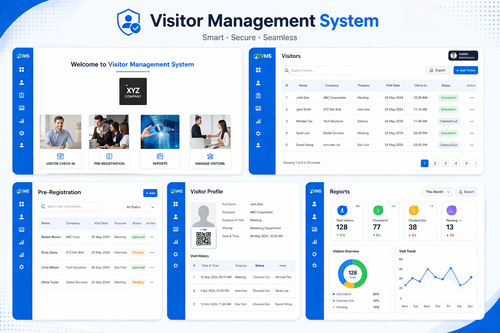
Manual visitor logbooks are still common at office receptions across Malaysia, but they create bottlenecks, security gaps, and hygiene concerns that modern workplaces can no longer ignore. A touchless visitor check-in system replaces sign-in sheets with fast, contactless registration, giving offices a faster, safer, and more professional way to manage guests.
This article explains how a touchless visitor check-in system works, why more Malaysian offices are adopting one, and what to look for when choosing a solution for your building.
What Is a Touchless Visitor Check-In System?
A touchless visitor check-in system allows guests to register their arrival without physically touching a shared screen, pen, or logbook. Visitors typically pre-register online before arrival, scan a QR code, or check in via a self-service kiosk using facial recognition or a mobile app, and the system automatically notifies the host of their arrival.
This is a significant upgrade from paper logbooks, which are slow, easy to falsify, and provide no real security value once information is written down.
Why Touchless Matters for Malaysian Offices
- Reduces shared surface contact at busy reception areas
- Speeds up check-in during high-traffic periods such as morning meetings
- Eliminates illegible handwriting and incomplete visitor logs
- Projects a more professional, modern image to clients and partners
- Supports better compliance with data protection requirements
Key Features to Look For
Pre-Registration and QR Code Check-In
Hosts can pre-register expected visitors ahead of time, generating a unique QR code that lets guests check in within seconds upon arrival, skipping manual data entry entirely.
Facial Recognition Kiosks
For frequent visitors or contractors, facial recognition kiosks allow instant, contactless identification without needing a phone, card, or physical document.
Instant Host Notifications
As soon as a visitor checks in, the system automatically notifies the host via SMS, email, or app notification, removing the need for reception staff to manually call or message employees.
Digital Visitor Records
Every check-in is logged digitally, creating a searchable, tamper-resistant record that is far more useful for audits, compliance checks, and emergency evacuation headcounts than paper logs.
Integration With Access Control
Many touchless systems can integrate directly with door access control and turnstiles, automatically granting temporary access to approved visitors without manual intervention from security staff.
Benefits of Going Touchless
- Faster check-in reduces crowding and waiting time at reception
- Improved security through accurate, real-time visitor tracking
- Better first impressions for clients, investors, and partners
- Reduced administrative burden on front-desk and security staff
- Easier compliance with data protection and audit requirements
Choosing the Right System for Your Building
Not every office has the same visitor volume or security requirements. When evaluating a touchless visitor check-in system, consider the following:
- How many visitors pass through reception on a typical day
- Whether integration with existing access control or turnstiles is needed
- Whether the system supports both walk-in and pre-registered visitors
- How visitor data is stored and whether it meets PDPA requirements
- The level of local technical support available in Malaysia
Key Takeaways
A touchless visitor check-in system modernizes one of the first interactions a guest has with your organization. By replacing manual logbooks with fast, contactless registration, Malaysian offices can improve security, create a better first impression, and reduce the administrative load on reception and security teams.
As offices continue to prioritize efficiency and security, a touchless check-in system is quickly becoming a standard expectation rather than a nice-to-have upgrade.
Frequently Asked Questions
Is a touchless check-in system difficult for visitors to use?
No. Most systems are designed to be intuitive, with simple QR code scans or kiosk prompts that guide visitors through check-in in under a minute.
Does the system work for walk-in visitors without appointments?
Yes. Most touchless systems support both pre-registered guests and walk-in visitors, who can complete a quick self-service registration at the kiosk.
How is visitor data kept secure?
Reputable systems store visitor data securely with restricted access and encryption, and should comply with Malaysia’s Personal Data Protection Act.
Can a touchless visitor system integrate with our existing security setup?
Most modern systems are designed to integrate with existing access control, turnstiles, and security software rather than replacing your entire setup.
What happens during a power or internet outage?
Quality systems typically include offline fallback modes or backup power options to ensure visitor check-in can continue with minimal disruption.
Touchless Check-In vs. Traditional Visitor Logbooks
A paper logbook might seem like a low-cost solution, but the hidden costs add up quickly. Illegible handwriting makes records unreliable, receptionists spend valuable time manually calling hosts, and there is no easy way to search past visitor history during an audit or investigation. A touchless visitor check-in system solves each of these problems automatically, turning a manual chore into a fast, self-service process that requires little to no staff intervention.
There is also a compliance dimension. Paper logs left in open view at reception can expose the personal information of previous visitors to anyone walking past, which creates unnecessary data protection risk. Digital, touchless systems keep visitor information encrypted and accessible only to authorized personnel.
Implementation Best Practices
- Start with a pilot at your main reception before rolling out to satellite offices.
- Train reception and security staff on how to handle exceptions, such as visitors without smartphones.
- Communicate the new process to regular contractors and vendors ahead of launch.
- Review visitor data policies to ensure alignment with PDPA requirements.
- Set up automated reporting so building management can track visitor trends over time.
Want to see how this fits your organization? Click here to request a free demo: https://www.smartouch.com.my/vms-visitor-management-system/.
Smart Touch technology pte ltd , www.smartouch.com.sg +65-63964767, sales@smartouch.com.sg , www.smartouch.com.my +607-3889903 sales@smartouch.com.my