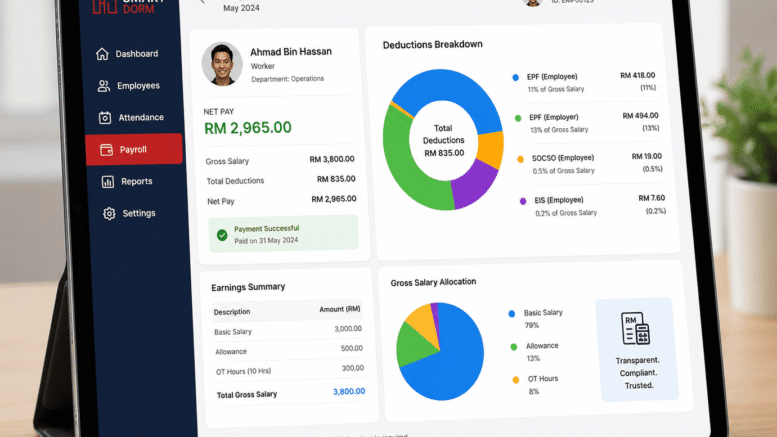
Accurate payroll processing is one of the most important responsibilities for every employer in Malaysia. Besides ensuring employees receive their salaries on time, employers must also make the correct statutory contributions to the Social Security Organisation (SOCSO). Even a small payroll mistake can result in underpaid SOCSO contributions, which may lead to contribution arrears, penalties, compliance issues, and unnecessary administrative work.
If you discover that your company has underpaid an employee’s SOCSO contribution, it’s important to act quickly. The good news is that these errors can usually be corrected by submitting the necessary adjustments and paying any outstanding contributions promptly.
This guide explains what happens when SOCSO contributions are underpaid, how employers can correct the mistake, possible penalties, and how using an integrated payroll system can help prevent similar issues in the future.
What Is SOCSO?
The Social Security Organisation (SOCSO), also known as PERKESO, administers Malaysia’s social security schemes for employees. Employers are legally responsible for registering eligible employees and making monthly SOCSO contributions based on the employee’s monthly wages.
SOCSO contributions provide employees with protection under various schemes, including:
- Employment Injury Scheme
- Invalidity Scheme
- Employment Insurance System (EIS) (administered separately)
- Medical benefits
- Disability benefits
- Survivor benefits
- Rehabilitation support
Because contributions are calculated based on employees’ wages, payroll accuracy is essential.
What Causes SOCSO Underpayment?
SOCSO underpayments can happen for several reasons, including:
Incorrect Salary Information
An employee’s salary may have increased, but payroll was not updated before SOCSO contributions were calculated.
Payroll Calculation Errors
Manual payroll calculations increase the risk of:
- Incorrect contribution rates
- Formula mistakes
- Human calculation errors
- Data entry mistakes
Late Salary Adjustments
Allowances, commissions, bonuses, or wage revisions may not have been reflected during payroll processing, resulting in lower-than-required contributions.
Employee Record Errors
Mistakes in employee profiles such as:
- Incorrect wage category
- Wrong contribution table
- Outdated payroll information
can also lead to contribution discrepancies.
Manual Payroll Processes
Companies still relying on spreadsheets or manual payroll calculations face a much higher risk of statutory calculation errors compared to businesses using automated payroll software.
What Happens If SOCSO Contributions Are Underpaid?
Underpaid contributions do not simply disappear.
If the discrepancy is discovered during internal payroll reviews or compliance checks, employers are expected to make the necessary corrections.
Possible consequences include:
- Outstanding contribution payments
- Late payment charges
- Administrative penalties where applicable
- Compliance issues during audits
- Additional paperwork
- Delays in payroll reconciliation
Prompt correction helps minimise further complications and demonstrates responsible payroll management.
How to Correct Underpaid SOCSO Contributions
Step 1: Identify the Error
Review payroll records carefully to determine:
- Which employee is affected
- Which contribution month is incorrect
- Correct monthly wages
- Correct SOCSO contribution amount
- Difference between paid and payable contributions
The sooner the error is identified, the easier it is to resolve.
Step 2: Recalculate the Correct Contribution
Using the applicable SOCSO contribution table for the affected period, calculate the correct employer and employee contribution amounts.
Ensure that:
- Monthly wages are correct
- Wage adjustments are included
- Contribution category is accurate
Accurate recalculation prevents further corrections later.
Step 3: Submit the Correction
Employers should submit the necessary contribution adjustments through the appropriate PERKESO/SOCSO channels or online employer portal where applicable.
Depending on the situation, supporting payroll information may be required.
Step 4: Pay Outstanding Contributions
Once the corrected contribution amount has been determined, employers should pay the outstanding balance as soon as possible.
Prompt payment helps reduce potential late payment charges and keeps statutory records up to date.
Step 5: Update Payroll Records
After corrections have been completed:
- Update payroll records
- Verify employee contribution history
- Reconcile payroll reports
- Maintain supporting documentation
Good recordkeeping simplifies future audits and compliance reviews.
Are There Penalties for SOCSO Underpayment?
Late or insufficient statutory contributions may result in additional charges or penalties under applicable regulations.
The actual amount depends on factors such as:
- Amount underpaid
- Length of delay
- Applicable regulations
- Individual circumstances
Rather than delaying corrective action, employers should address discrepancies immediately to minimise potential additional costs.
For the most current requirements, employers should always refer to the latest guidance issued by PERKESO.
Common Payroll Mistakes That Lead to SOCSO Errors
Many payroll issues can be prevented through proper payroll controls.
Common mistakes include:
- Forgetting salary increments
- Missing allowance updates
- Incorrect overtime calculations
- Manual spreadsheet errors
- Employee profile mistakes
- Incorrect payroll setup
- Delayed employee registration
- Failure to update statutory contribution tables
Regular payroll reviews help identify these issues before statutory submissions are made.
How Payroll Software Helps Prevent SOCSO Underpayments
Modern payroll software significantly reduces the risk of statutory contribution errors.
Instead of manually calculating every employee’s contribution, payroll software automates much of the process while improving accuracy.
Key benefits include:
- Automatic payroll calculations
- Updated contribution tables
- Accurate statutory deductions
- Payroll validation
- Digital payroll records
- Centralised employee database
- Faster payroll processing
Automation reduces human error while improving compliance.
Integrating Payroll with HRMS
Businesses achieve even greater efficiency when payroll is integrated with a Human Resource Management System (HRMS).
Integrated systems allow employee information to flow automatically between:
- Employee Database
- Attendance
- Leave Management
- Overtime
- Claims
- Payroll
- Payslip Generation
This reduces duplicate data entry and helps ensure payroll calculations remain accurate.
Time Attendance Integration Improves Payroll Accuracy
One major cause of payroll errors is incorrect attendance information.
When payroll integrates directly with a Time Attendance System, working hours are automatically transferred into payroll calculations.
This improves the accuracy of:
- Basic Salary
- Overtime
- Shift Allowances
- Late Arrivals
- Early Departures
- Public Holiday Work
- Rest Day Work
Automation helps ensure statutory deductions are based on accurate payroll data.
Employee Self-Service Reduces Administrative Errors
Modern HR systems also provide Employee Self-Service (ESS), allowing employees to:
- View Payslips
- Apply Leave
- Check Attendance
- Review Overtime
- Submit Claims
- Update Personal Information
Employees can identify payroll discrepancies early, allowing HR teams to make timely corrections before statutory submissions.
Why Choose Smart Touch Payroll Software?
Smart Touch Technology offers a comprehensive Payroll and HRMS Solution designed to simplify payroll processing while helping Malaysian businesses improve statutory compliance.
Our integrated solution combines:
- Payroll Automation
- Time Attendance
- Leave Management
- Overtime Management
- Employee Self-Service
- Claims Management
- Attendance Integration
- Multi-Branch Payroll
- Digital Payslips
- HR Reporting
By automating payroll calculations and integrating workforce data into one platform, businesses can reduce payroll errors, improve efficiency, and better manage statutory obligations such as SOCSO contributions.
Best Practices to Avoid Future SOCSO Underpayments
Employers can minimise payroll errors by adopting several best practices:
- Review payroll data before submission.
- Keep employee salary information updated.
- Record overtime and allowances accurately.
- Regularly verify statutory contribution settings.
- Maintain complete payroll documentation.
- Automate payroll calculations using integrated payroll software.
- Conduct periodic internal payroll audits.
- Train payroll personnel on current statutory requirements.
A proactive payroll process helps reduce costly corrections and improves long-term compliance.
Conclusion
Discovering that your company has underpaid an employee’s SOCSO contribution can be stressful, but addressing the issue promptly is the best course of action. By identifying the error, recalculating the correct contribution, submitting the necessary corrections, and updating payroll records, employers can resolve discrepancies efficiently while reducing the risk of additional penalties.
As payroll regulations continue to evolve, businesses benefit greatly from adopting automated payroll solutions that integrate attendance, leave management, and statutory calculations into one centralised platform. This not only improves payroll accuracy but also saves valuable administrative time and supports better compliance.
For Malaysian businesses looking to streamline payroll operations and reduce manual errors, investing in an integrated HRMS and payroll system is a practical step towards building a more efficient, compliant, and future-ready workplace.
Smart Touch technology pte ltd , www.smartouch.com.sg +65-63964767, sales@smartouch.com.sg , www.smartouch.com.my +607-3889903 sales@smartouch.com.my