Hybrid work was supposed to give employees flexibility and employers cost savings, yet many organizations struggle to make it work smoothly. The missing piece is often technology. A robust HRMS mobile app connects distributed teams, tracks attendance and leave accurately, and keeps HR processes running no matter where employees are working from.
This article explains why hybrid work models fail without strong mobile HR technology, and what capabilities employers should look for to support a distributed workforce successfully.
Why Hybrid Work Models Struggle Without Mobile HR Technology
Hybrid work requires HR processes that function equally well in the office, at home, or on a client site. Without a mobile-first HRMS, companies fall back on email chains, spreadsheets, and manual approvals that slow everything down.
Fragmented Communication Across Locations
When some employees are in the office and others are remote, communication about schedules, approvals, and policy updates easily becomes fragmented without a central mobile platform everyone can access.
Inconsistent Attendance and Time Tracking
Office-based clock-in systems do not work for remote or field employees. Companies without a mobile app often end up with two separate, inconsistent methods of tracking attendance.
Key Features a Hybrid Workforce Needs from an HRMS Mobile App
Mobile Clock-In with Geofencing
Employees can clock in and out from their phone, with geofencing or GPS verification ensuring attendance is recorded accurately regardless of location.
Self-Service Leave and Claims
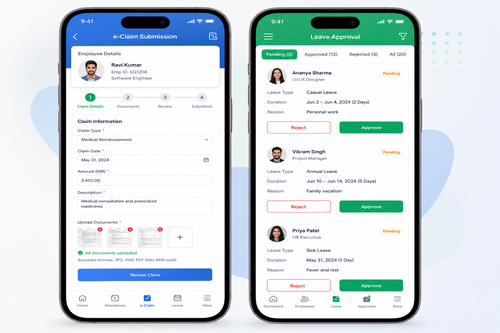
Employees should be able to apply for leave, submit expense claims, and check approval status directly from their phone, without needing to be in the office or emailing HR.
Push Notifications for Approvals
Managers receive instant notifications for pending approvals, keeping hybrid teams moving quickly instead of waiting days for a signature or reply.
Benefits of a Strong HRMS Mobile App for Hybrid Teams
| Benefit | Impact on Your Business |
|---|---|
| Consistent attendance tracking | Works the same whether employees are in-office or remote |
| Faster approvals | Managers can approve leave and claims from anywhere |
| Improved employee experience | Self-service tools reduce friction and back-and-forth emails |
| Better workforce visibility | HR can see real-time attendance and leave data across all locations |
How to Choose the Right HRMS Mobile App
Step 1: Confirm Cross-Platform Support
Make sure the app works reliably on both iOS and Android, since hybrid teams often use a mix of personal and company-issued devices.
Step 2: Check Integration with Payroll and Attendance
The mobile app should feed data directly into payroll and attendance systems, avoiding duplicate data entry across platforms.
Step 3: Evaluate Offline Capability
Field employees may work in areas with poor connectivity. An app that queues actions offline and syncs later prevents lost attendance or claim submissions.
Best Practices for Supporting Hybrid Teams
- Set clear policies on where and how employees are expected to clock in.
- Encourage managers to approve requests promptly through mobile notifications.
- Regularly review mobile usage data to identify adoption gaps across departments.
- Provide simple onboarding guides so new hires can set up the app quickly.
Common Mistakes to Avoid
Rolling Out Without Employee Training
Even an intuitive app needs a short onboarding session so employees understand how to clock in, apply for leave, and submit claims correctly from day one.
Ignoring Data Privacy for Location Tracking
Geofencing and GPS features must be implemented transparently and in compliance with Malaysia’s Personal Data Protection Act (PDPA), with clear communication to employees about what data is collected.
Underestimating Device and Network Diversity
Hybrid teams often use a wide range of phone models, operating system versions, and mobile network speeds. Test the app across common device types before a full rollout to avoid frustrating compatibility issues.
In-Office Tools vs Mobile-First HRMS for Hybrid Teams
| Aspect | In-Office Only Tools | Mobile-First HRMS |
|---|---|---|
| Attendance | Requires physical terminal | Clock in from anywhere with geofencing |
| Approvals | Depends on manager being in office | Push notifications enable approval from anywhere |
| Employee experience | Slower, email-based requests | Self-service through a mobile app |
Why Adoption Matters More Than Features
Even the most feature-rich HRMS mobile app fails if employees do not actually use it. Successful hybrid deployments typically pair the technology rollout with clear communication about why the change is happening and how it benefits employees directly, such as faster leave approvals or fewer manual forms. Departments with strong manager buy-in tend to see much higher adoption rates than those where the app is introduced with no context. Measuring adoption through simple metrics, such as the percentage of clock-ins done via mobile versus manual correction, helps HR identify which teams need additional support during rollout.
Key Takeaways
- Hybrid work models fail when HR technology only works well for in-office employees.
- A robust HRMS mobile app keeps attendance, leave, and claims consistent across all work locations.
- Choosing an app with offline support and strong payroll integration reduces friction for distributed teams.
Conclusion
Hybrid work models succeed when HR technology supports every employee equally, whether they are in the office, at home, or in the field. A robust HRMS mobile app closes the gap by enabling consistent attendance tracking, fast approvals, and self-service HR tools no matter where work happens.
If your current HR tools were not built with hybrid work in mind, it may be time to explore a mobile-first HRMS designed for today’s distributed teams.
Frequently Asked Questions
Why do hybrid work models fail without a mobile HRMS?
Without mobile access, attendance tracking, approvals, and self-service tools only work well for in-office employees, creating inconsistency and delays for remote staff.
Does an HRMS mobile app support both iOS and Android?
Most modern platforms support both major operating systems, which is essential for hybrid teams using a mix of devices.
Can employees apply for leave through the mobile app?
Yes, self-service leave and claims submission is a core feature of most modern HRMS mobile apps.
Is geofencing required for mobile attendance tracking?
Geofencing is optional but commonly used to verify that employees are clocking in from an approved location.
Interested in this product? Click here to learn more: https://www.smartouch.com.my/smartgogo
Smart Touch technology pte ltd , www.smartouch.com.sg +65-63964767, sales@smartouch.com.sg , www.smartouch.com.my +607-3889903 sales@smartouch.com.my