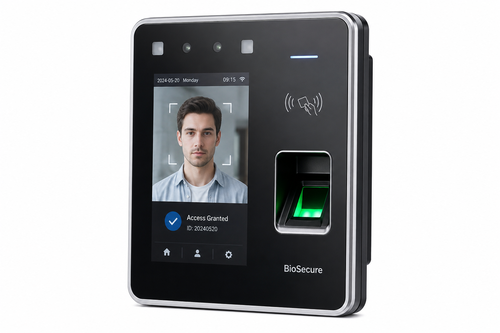
Buddy punching, time theft, and inaccurate manual attendance records continue to cost businesses money every month. A fingerprint biometric punch card machine solution addresses these problems directly by tying attendance to a unique physical identifier that cannot be shared, lost, or forgotten. For companies across Malaysia looking to modernise time tracking, biometric fingerprint devices offer a reliable, cost-effective upgrade from traditional punch cards.
What Is a Fingerprint Biometric Punch Card Machine?
A fingerprint biometric punch card machine is a time attendance device that uses an employee’s fingerprint to record clock-in and clock-out times. Unlike traditional punch cards or PIN-based systems, fingerprint verification ensures that only the actual employee can register their own attendance, eliminating buddy punching entirely.
Modern devices typically combine fingerprint scanning with a small display, connectivity options, and software that automatically compiles attendance data for payroll processing.
Why Businesses Are Switching to Fingerprint Biometric Solutions
Eliminating Buddy Punching
Traditional card-based systems allow one employee to clock in on behalf of another. Fingerprint verification removes this loophole completely, since biometric data is unique to each individual.
Improved Payroll Accuracy
Accurate clock-in and clock-out data flows directly into payroll calculations, reducing disputes over hours worked and minimising manual data entry errors.
Faster, Contactless-Friendly Alternatives Available
While classic fingerprint scanning remains popular for its low cost and reliability, many modern devices now also support hybrid verification methods for added flexibility.
Fingerprint Biometric vs Traditional Punch Card Systems
| Feature | Traditional Punch Card | Fingerprint Biometric System |
|---|---|---|
| Buddy Punching Risk | High | Eliminated |
| Data Accuracy | Manual entry, error-prone | Automatic and precise |
| Hardware Cost | Low upfront, ongoing card costs | Moderate upfront, minimal ongoing cost |
| Integration With Payroll | Manual compilation required | Often integrates directly with payroll software |
| Maintenance | Card replacement needed regularly | Minimal, device-based maintenance only |
Key Features to Look For
- Fast fingerprint recognition: Reduces queues during peak clock-in times.
- Large user capacity: Supports growing headcounts without performance issues.
- Offline data storage: Retains records even during network downtime.
- Payroll software integration: Automatically exports attendance data for processing.
- Durable hardware design: Suitable for factory floors, warehouses, and retail environments.
Best Practices for Implementing a Fingerprint Biometric System
1. Communicate the Change Clearly
Inform employees about the switch in advance, including how their biometric data will be stored and used, to build trust and reduce resistance.
2. Register Fingerprints Carefully
Ensure each employee’s fingerprint is registered correctly during setup to avoid recognition issues later on.
3. Position Devices Strategically
Place devices near entry points to minimise congestion and ensure smooth clock-in and clock-out flow during shift changes.
4. Integrate With Payroll Early
Set up the data integration between your biometric system and payroll software before go-live to avoid manual reconciliation in the first payroll cycle.
Key Takeaways
- Fingerprint biometric punch card machines eliminate buddy punching and improve attendance accuracy.
- They reduce payroll disputes by providing precise clock-in and clock-out records.
- Choosing a device with payroll integration saves significant administrative time.
- Clear employee communication supports smoother adoption.
Conclusion
A fingerprint biometric punch card machine solution offers Malaysian businesses a practical, reliable way to modernise attendance tracking while eliminating common issues like buddy punching and manual data errors. With the right device and proper implementation, companies can improve payroll accuracy, reduce administrative workload, and build a stronger foundation for workforce management.
Frequently Asked Questions
1. Is fingerprint data securely stored on biometric devices?
Reputable devices store fingerprint data as encrypted templates rather than actual images, providing a strong layer of security and privacy protection.
2. Can fingerprint biometric systems integrate with existing payroll software?
Yes, most modern devices are designed to export attendance data directly into popular payroll systems, streamlining the entire process.
3. What happens if an employee’s fingerprint is not recognised?
Most systems allow for backup verification methods, such as a PIN or card, to ensure employees are never locked out of clocking in.
4. Are fingerprint biometric machines suitable for factories and warehouses?
Yes, many devices are built with durable, industrial-grade casings suitable for demanding environments like factories and warehouses.
5. How long does it take to set up a fingerprint biometric system?
Setup time varies by company size, but most businesses can have the system operational within a few days, including employee fingerprint registration.
Click here to find out how the product works: https://www.smartouch.com.my/category/time-clock/biometric-fingerprint/
Smart Touch technology pte ltd , www.smartouch.com.sg +65-63964767, sales@smartouch.com.sg , www.smartouch.com.my +607-3889903 sales@smartouch.com.my