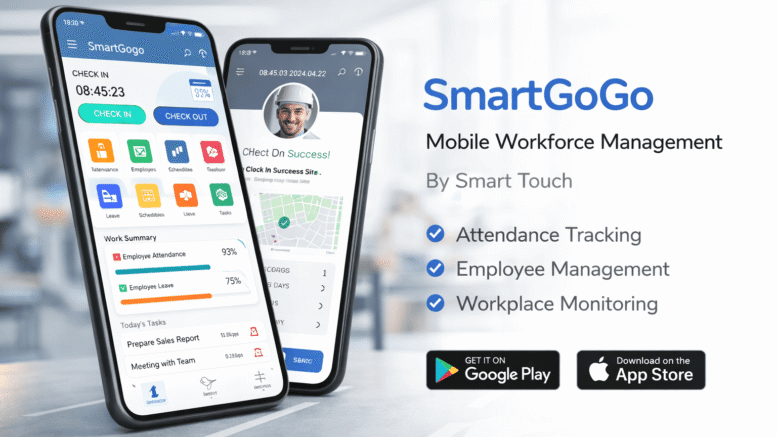
HR managers today are expected to be accessible anywhere, anytime — not chained to a desktop computer. That is exactly why more HR teams prefer a smart HR system with native mobile support over traditional, desktop-only HR platforms. From approving leave on the go to checking attendance during a site visit, mobile-first HR tools are reshaping how HR departments operate across Malaysia.
What Does “Native Mobile Support” Really Mean?
Native mobile support means the HR system has a dedicated mobile app built specifically for smartphones, rather than a desktop website awkwardly squeezed onto a small screen. Native apps are faster, more intuitive, and can use phone features like push notifications, biometric login, and offline access far more effectively than a browser-based alternative.
Why HR Managers Prefer a Smart HR System With Native Mobile Support
Faster Approvals and Decision-Making
Leave requests, claims, and attendance exceptions often need quick action. A native mobile app allows HR managers to approve or reject requests within seconds, rather than waiting until they are back at their desk.
Better Support for Multi-Site or Field-Based Teams
For organisations with staff working across multiple branches, warehouses, or client sites, a mobile-first HR system ensures both employees and managers stay connected regardless of location.
Improved Employee Self-Service Experience
Employees increasingly expect the same convenience from workplace tools as they get from consumer apps. A well-designed mobile HR app makes checking payslips, applying for leave, or clocking in feel effortless.
Real-Time Notifications
Push notifications alert managers and employees instantly about pending approvals, schedule changes, or important HR announcements — something email alone cannot match in speed or visibility.
Desktop-Only HR Systems vs Smart HR Systems With Native Mobile Support
| Feature | Desktop-Only HR System | Smart HR System With Native Mobile App |
|---|---|---|
| Accessibility | Limited to office or laptop use | Accessible anytime, anywhere |
| Approval Speed | Delayed until desktop access | Near-instant via mobile notifications |
| Employee Experience | Basic, often clunky on mobile browsers | Smooth, app-based interface |
| Clock-In Options | Fixed terminal only | GPS or app-based clock-in supported |
| Adoption Rate | Lower among younger, mobile-first staff | Higher due to familiar app experience |
Key Features HR Managers Look For in a Mobile HR App
- Leave application and approval: Apply, review, and approve leave directly from a smartphone.
- Digital payslip access: Employees can view and download payslips without contacting HR.
- Mobile clock-in/clock-out: Useful for field staff or hybrid work arrangements.
- Push notifications: Keeps everyone updated on approvals and announcements in real time.
- Secure biometric login: Protects sensitive HR data even on personal devices.
Best Practices When Evaluating a Mobile HR System
1. Test the App Yourself Before Rolling It Out
Download and use the mobile app during the evaluation stage to assess speed, usability, and reliability firsthand.
2. Check for Offline Functionality
In areas with weak connectivity, offline support ensures employees can still clock in or view essential information.
3. Confirm Data Security Standards
Since the app will handle sensitive employee data, verify encryption standards and access controls before adoption.
Key Takeaways
- Native mobile apps offer faster approvals and better usability than desktop-only systems.
- Mobile-first HR tools support field-based and multi-site teams effectively.
- Push notifications improve response times for approvals and announcements.
- Security and offline functionality are important evaluation criteria.
Conclusion
As workplaces become more mobile and distributed, HR managers increasingly prefer a smart HR system with native mobile support because it keeps HR processes moving, no matter where the team is located. From faster approvals to a smoother employee self-service experience, mobile-first HR platforms are quickly becoming the standard rather than the exception.
Frequently Asked Questions
1. What is the difference between a mobile-responsive website and a native mobile app?
A mobile-responsive website adjusts its layout for smaller screens but runs through a browser, while a native app is built specifically for mobile devices, offering better speed and features like push notifications.
2. Can employees clock in using a mobile HR app?
Yes, many smart HR systems support mobile clock-in, often with GPS verification to confirm the employee’s location.
3. Is employee data safe on a mobile HR app?
Reputable HR apps use encryption and secure login methods, such as biometric authentication, to protect sensitive employee information.
4. Do mobile HR apps work without an internet connection?
Some systems offer limited offline functionality, syncing data once connectivity is restored, though this varies by provider.
5. Is a native mobile app worth it for small businesses?
Yes, even small businesses benefit from faster approvals and improved employee experience, especially if staff work remotely or across multiple locations.
Interested in this product? Click here to learn more: https://www.smartouch.com.my/smartgogo/
Smart Touch technology pte ltd , www.smartouch.com.sg +65-63964767, sales@smartouch.com.sg , www.smartouch.com.my +607-3889903 sales@smartouch.com.my