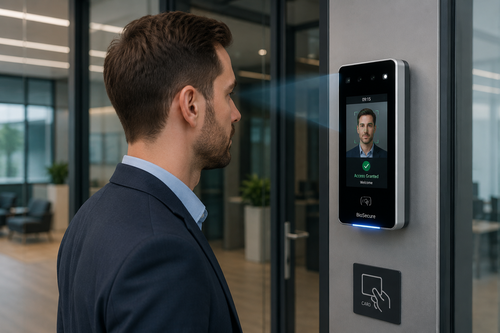
Facial clocking has moved quickly from a futuristic concept to a practical, everyday tool for tracking employee attendance. By using facial recognition to verify identity at clock-in and clock-out, businesses gain a touchless, fast, and highly accurate way to record working hours.
For organizations weighing their options for time and attendance systems, facial clocking offers a compelling mix of speed, hygiene, and reliability that older methods simply cannot match.
The Limitations of Traditional Time Attendance Methods
Card swipes, PIN pads, and manual sign-in sheets have served businesses for decades, but each comes with a real cost. Cards get lost or shared. PINs are forgotten or passed along to a colleague. Paper logs are the easiest of all to falsify.
Beyond fraud risk, these methods slow down high-traffic entry points during shift changes, creating queues that eat into productive time. Facial clocking removes these friction points by verifying identity almost instantly, without physical contact.
How Facial Recognition Time Attendance Works
Enrollment
Each employee’s facial data is captured once during setup and converted into an encrypted mathematical template. No photo is stored in a way that could be extracted and misused.
Daily Verification
At each clock-in, the camera captures a live image and compares it against the enrolled template within a fraction of a second. A match instantly records the timestamp, with no need to touch a device or carry a card.
Data Sync
Attendance records flow automatically into payroll and HR systems, eliminating manual entry and reducing the chance of human error in calculating hours worked.
Key Benefits of Facial Recognition Time Attendance
- Touchless verification: Improves hygiene by removing the need to touch shared surfaces.
- Faster clock-ins: Employees are verified in under a second, reducing queues at peak hours.
- Stronger accuracy: Eliminates buddy punching since faces cannot be shared like cards or PINs.
- Lower long-term cost: No physical cards or fobs to replace or manage.
- Detailed audit trail: Every clock-in is timestamped and stored for compliance reporting.
Best Practices for Deploying Facial Recognition Attendance
- Inform employees clearly about how the system works and how their data is protected.
- Position cameras at consistent height and lighting for reliable recognition accuracy.
- Enroll multiple facial angles per employee to account for lighting or appearance changes.
- Provide a backup clock-in method for rare cases of misrecognition.
- Schedule periodic software updates to maintain recognition accuracy and security.
Step-by-Step: A Typical Facial Clock-In
- The employee approaches the camera-equipped terminal at the entrance.
- The camera captures a live image of the employee’s face.
- The system compares the image against the enrolled facial template.
- A successful match logs the exact date and time of arrival.
- The record syncs instantly with the attendance and payroll platform.
Key Takeaways
- Facial clocking offers touchless, fast, and highly accurate attendance verification.
- It eliminates buddy punching by design, since facial data cannot be shared.
- Enrollment and daily use both take just seconds per employee.
- Data syncs automatically with payroll, reducing administrative workload.
- Careful camera placement and backup verification keep the system reliable.
Frequently Asked Questions
Does facial recognition work in low light conditions?
Most modern systems use infrared or near-infrared sensors alongside standard cameras, allowing accurate recognition even in dim lighting or at night.
Can facial recognition be fooled by a photo or video?
Reputable systems include liveness detection, which checks for natural movement and depth to distinguish a real person from a static photo or recorded video.
How is employee facial data protected?
Enrolled data is stored as an encrypted mathematical template rather than an actual image, making it extremely difficult to reverse-engineer or misuse.
What if an employee’s appearance changes significantly?
Most systems allow re-enrollment or periodic template updates, and many also offer a backup verification method such as a PIN for added flexibility.
Can facial clocking integrate with our existing HR software?
Yes. Most facial recognition attendance systems support common export formats or direct API integration with popular payroll and HR platforms.
Facial Clocking vs. Other Biometric Options
Facial recognition is one of several biometric approaches available today, and it holds a distinct advantage in fully touchless environments. Fingerprint scanners remain highly accurate but require physical contact, which some workplaces now prefer to avoid. Iris scanning offers strong precision but typically costs more to deploy at scale.
For most offices, retail outlets, and factories, facial recognition strikes a practical balance between accuracy, speed, and hygiene. It also tends to require less physical maintenance than fingerprint devices, since there are no sensor surfaces that wear down or need regular cleaning from repeated contact.
Organizations already running fingerprint or card-based systems can often transition gradually, running both methods in parallel during a trial period before fully switching over. This phased approach reduces disruption and gives staff time to adjust to the new process.
Total Cost of Ownership Considerations
Beyond the upfront purchase price, businesses should factor in software licensing, maintenance, and potential upgrades when comparing attendance systems. Facial recognition devices generally have lower physical wear than fingerprint scanners, since there is no direct contact involved, which can reduce long-term repair costs.
Cloud-based facial recognition platforms often include automatic software updates and remote monitoring, reducing the need for on-site IT support. Weighing these ongoing costs against the upfront investment gives a clearer picture of the total value delivered over several years of use.
Employers that calculate these figures over a three to five year horizon typically find that touchless biometric systems pay for themselves through reduced fraud, faster processing at entry points, and lower administrative overhead.
Vendors typically provide cost calculators or case studies that help estimate payback periods for a specific site.
Conclusion
Facial clocking represents a meaningful step forward for organizations that want faster, more hygienic, and more accurate time attendance tracking. By removing the vulnerabilities of cards, PINs, and paper logs, businesses gain a system that scales easily and integrates cleanly with existing payroll workflows. For companies ready to modernize their attendance process, facial recognition offers a proven path forward.
Read the product overview here: http://www.smartouch.com.my/tms-time-management-system-singapore-malaysia/
Smart Touch technology pte ltd , www.smartouch.com.sg +65-63964767, sales@smartouch.com.sg , www.smartouch.com.my +607-3889903 sales@smartouch.com.my