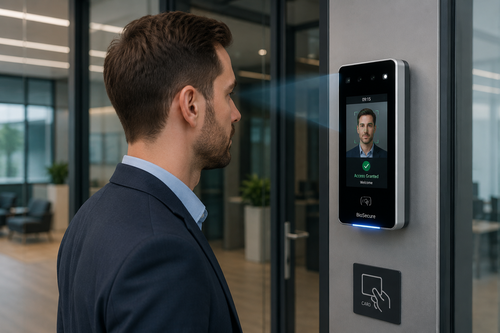
Traditional access cards and PINs are no longer enough to keep a modern office lobby secure. Face recognition access control gives Malaysian businesses a faster, touchless way to verify employees and visitors the moment they step through the door. Instead of tapping a card or typing a code, the system identifies a person in a fraction of a second by matching their face against an enrolled database. This article explains how high-speed face recognition technology works, why it is becoming the standard for lobby security, and what to look for when choosing a system for your organization.
Why Lobby Security Needs an Upgrade
Access cards get lost, shared, or cloned. PIN codes get forgotten or passed between colleagues, quietly defeating the purpose of controlled access. Every one of these weaknesses creates a gap that lets unauthorized people into restricted areas. Businesses in busy commercial buildings, factories, and co-working spaces need an access method that cannot be borrowed or duplicated.
The Problem with Cards and PINs
A misplaced access card in the wrong hands can compromise an entire building. Buddy-punching, where one employee taps in for another, also undermines attendance and security records. These are structural weaknesses that no amount of policy enforcement can fully solve.
Rising Expectations for Contactless Access
Since the pandemic, businesses and employees alike have grown accustomed to touchless technology. Face recognition meets this expectation while also removing the hygiene concerns associated with shared touchpoints like keypads and card readers.
How High-Speed Face Recognition Works
A face recognition terminal captures an image, extracts unique facial landmarks, and converts them into a mathematical template. This template is compared against a pre-enrolled database, granting or denying access in under a second, even for people wearing masks or glasses on models built for Malaysian conditions.
Key Hardware Components
Most systems combine a high-resolution camera, an infrared sensor for liveness detection, and an onboard processor that runs the matching algorithm locally, so access decisions do not depend on an internet connection.
Key Benefits of Face Recognition Access Control
- Eliminates lost cards, shared PINs, and buddy-punching.
- Verifies identity in under a second, keeping entry lines moving.
- Provides an accurate, tamper-proof attendance and access log.
- Reduces hygiene concerns with fully touchless verification.
Face Recognition vs. Traditional Access Methods
| Criteria | Face Recognition | Cards / PINs |
| Can be shared or lost | No | Yes |
| Verification speed | Under 1 second | 2 to 5 seconds |
| Touchless | Yes | No |
Best Practices for Deploying Face Recognition
- Position cameras at eye level for the most accurate reads.
- Enroll employees with clear, well-lit reference photos.
- Keep a backup access method, such as a PIN, for edge cases.
- Review data privacy policies to stay aligned with PDPA requirements.
Conclusion
Face recognition access control gives Malaysian businesses a faster, safer, and more hygienic way to manage entry to their premises. By replacing easily compromised cards and PINs with a touchless system that verifies identity in a fraction of a second, organizations can close common security gaps while improving the daily experience for employees and visitors. As lobby security expectations continue to rise, high-speed face recognition is quickly becoming the practical standard rather than a futuristic option.
Click here to find out how the product works: https://www.smartouch.com.my/category/time-clock/biometric-fingerprint/
Frequently Asked Questions
Does face recognition work with masks or glasses?
Yes. Modern systems use infrared sensors and advanced algorithms that can accurately identify people even while wearing masks, glasses, or hats.
Is facial data stored securely?
Yes. Facial templates are encrypted and stored securely, and reputable vendors follow PDPA-compliant data handling practices.
Can face recognition integrate with existing door access systems?
Yes. Most face recognition terminals can integrate with existing door controllers and time attendance systems for a unified security setup.
How many people can a face recognition system store?
Capacity varies by model, but most commercial terminals can store anywhere from a few thousand to tens of thousands of enrolled faces.
Industries That Benefit Most from Face Recognition Access Control
Face recognition access control is not a one-size-fits-all solution, but a growing number of industries in Malaysia are adopting it because the return on investment shows up quickly in reduced security incidents and administrative overhead. Corporate offices use it to secure server rooms, executive floors, and shared coworking spaces where card-sharing was previously a persistent problem. Manufacturing plants and factories rely on it to enforce strict access zones around hazardous equipment while keeping a defensible audit trail for safety compliance audits.
Healthcare facilities, including private clinics and hospitals, use face recognition to restrict access to pharmacies, records rooms, and neonatal units without slowing down staff during emergencies. Educational institutions, from tuition centres to universities, apply it at gates and dormitories to keep unauthorized visitors out while giving parents peace of mind. Retail chains and F&B outlets increasingly pair face recognition with time attendance to stop buddy punching and get an accurate picture of labour costs across multiple outlets.
Choosing the Right Vendor for Your Face Recognition Rollout
Not every face recognition system on the market is built for Malaysian office conditions, so a few questions are worth asking before you commit. Confirm whether the terminal has been tested for tropical humidity and heat, since some budget devices overheat or misread faces after prolonged outdoor exposure. Ask whether firmware and facial template updates are handled locally or require sending data overseas, which matters for PDPA compliance. Finally, check what happens if the internet connection drops: a well-designed system should keep verifying and logging entries offline, then sync once connectivity is restored, so your lobby is never left unsecured.
Implementation typically takes one to two weeks from site survey to go-live, depending on the number of doors and whether existing wiring can be reused. Reputable vendors will provide on-site training for your security team, a maintenance schedule for camera lens cleaning, and a clear service-level agreement for firmware updates and support response times. Budgeting for these ongoing services, not just the hardware cost, is what separates a system that stays reliable for years from one that becomes a maintenance headache within months.
Click here to find out how the product works :https://www.smartouch.com.my/category/time-clock/biometric-fingerprint/
Smart Touch technology pte ltd , www.smartouch.com.sg +65-63964767, sales@smartouch.com.sg , www.smartouch.com.my +607-3889903 sales@smartouch.com.my