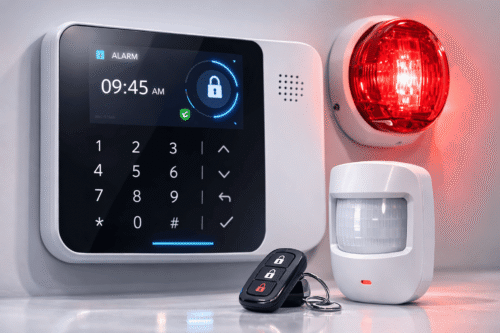
Traditional wired alarm systems often require drilling through walls, running cables between rooms, and hiring a technician for a full day of installation. A wireless alarm system for easy installation removes nearly all of that hassle, letting homeowners and business owners set up comprehensive security coverage in hours rather than days. This guide covers what makes wireless alarm systems easy to install, the key components to look for, and how to plan a setup that protects your property without the disruption of a traditional wired install.
Why Easy Installation Matters When Choosing an Alarm System
The Downsides of Traditional Wired Alarm Installations
Wired alarm systems typically require professional installation, visible cabling, and structural modifications that can take a full day or longer. For renters, this often isn’t even an option, and for property owners, it means scheduling downtime and living with drilled holes and exposed wiring.
How Wireless Systems Simplify the Process
A wireless alarm system for easy installation uses battery-powered sensors and wireless communication protocols, so most components can be mounted with adhesive pads or a couple of screws and paired to the main hub within minutes. There is no cabling to run and no need to involve a professional electrician for a basic setup.
Key Features to Look for in a Wireless Alarm System
- Door and window sensors with long battery life
- Motion detectors with pet-immune settings to reduce false alarms
- Mobile app control for arming, disarming, and real-time alerts
- Backup battery and cellular connection in case of power or internet outage
- Optional professional monitoring for 24/7 emergency response
Step-by-Step: Installing a Wireless Alarm System
- Plan sensor placement by identifying all entry points, including doors, windows, and secondary access areas.
- Position the main control panel or hub in a central location with strong Wi-Fi coverage.
- Mount sensors using the included adhesive strips or screws, following the manufacturer’s spacing guidelines.
- Pair each sensor to the hub through the manufacturer’s mobile app, testing signal strength as you go.
- Set up user profiles, entry delays, and notification preferences in the app.
- Run a full system test, triggering each sensor to confirm alerts are received correctly.
Wireless vs. Wired Alarm Systems
| Criteria | Wireless System | Wired System |
| Installation time | Hours, often DIY-friendly | A full day or more, professional required |
| Property modification | None, sensors mount with adhesive or screws | Drilling and cable runs through walls |
| Renter-friendly | Yes, fully removable | No, permanent fixture |
Best Practices After Installing Your Wireless Alarm System
- Replace sensor batteries proactively rather than waiting for low-battery alerts
- Test the system monthly to confirm all sensors remain connected
- Update the mobile app and firmware whenever new versions are released
Key Takeaways
- A wireless alarm system for easy installation eliminates drilling, cabling, and professional installation costs
- Renters and property owners alike can benefit from a fully removable, non-invasive setup
- Ongoing maintenance is minimal, but regular testing keeps the system reliable
Conclusion
Choosing a wireless alarm system for easy installation means you can protect your property in a single afternoon, without drilling, wiring, or scheduling a professional visit. With the right combination of sensors, a reliable hub, and a few smart setup habits, homeowners and renters alike can enjoy comprehensive, flexible security that adapts as their needs change.
Get the full scoop on the product right here :https://www.smartouch.com.my/alarm-system/
Frequently Asked Questions
Do I need any tools to install a wireless alarm system?
Most wireless sensors use adhesive backing or a couple of screws, so a basic screwdriver is usually all you need. No drilling or electrical wiring is required for standard setups.
How long does the battery last in wireless sensors?
Most door, window, and motion sensors run one to two years on a single battery, depending on usage and the quality of the components.
Will the system still work during a power outage?
Yes. Most wireless alarm hubs include a backup battery and, in many cases, a cellular backup connection, so the system continues to operate even if the power or internet goes down.
Can I expand the system later by adding more sensors?
Yes. Wireless systems are designed to be modular, so you can pair additional sensors or cameras to the same hub as your security needs grow.
Choosing the Right Placement for Your Sensors and Hub
Placement has a bigger impact on performance than most buyers expect. Door and window sensors should sit close to the frame edge where the magnet and sensor unit can align without a gap, since a loose fit can cause false alerts or missed triggers. Motion detectors work best in corners of a room, angled to cover the main walking path rather than facing a window, where sunlight and moving curtains can trigger false alarms.
The central hub deserves just as much thought as the sensors themselves. It should sit near the center of the property, away from thick concrete walls or large metal appliances that can weaken the wireless signal. Placing the hub on a shelf or table rather than the floor also improves range, since elevation helps the signal travel more evenly to sensors on upper floors or in far corners of a building.
For businesses with multiple entry points, it is worth mapping out every door, loading bay, and ground-floor window before purchasing sensors, so nothing is left uncovered on installation day. A short planning session upfront usually saves a second round of shopping later.
Many manufacturers also offer a free placement consultation or a setup wizard within their mobile app that suggests sensor positions based on your property’s floor plan. Taking advantage of these tools before drilling a single screw can help avoid the need to relocate sensors after the fact, saving both time and adhesive residue on walls and door frames. Even a rough sketch of the property with sensor positions marked can make the actual installation faster and reduce the chance of gaps in coverage. This small step often pays for itself many times over in reduced troubleshooting later.
Get the full scoop on the product right here :https://www.smartouch.com.my/alarm-system/
Smart Touch technology pte ltd , www.smartouch.com.sg +65-63964767, sales@smartouch.com.sg , www.smartouch.com.my +607-3889903 sales@smartouch.com.my