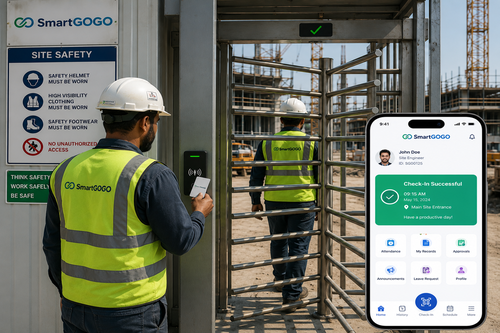
Retail and hospitality businesses run on shift work, high staff turnover, and constant schedule changes, which makes a reliable mobile HR app essential rather than optional. This roundup compares the top mobile HR app platforms for retail and hospitality, highlighting the features that matter most for frontline teams: shift scheduling, clock-in tools, leave requests, and manager communication. Whether you run a single outlet or a multi-location chain, the right mobile HR app can cut administrative workload and keep frontline staff informed in real time.
Why Retail and Hospitality Teams Need a Dedicated Mobile HR App
The Unique Challenges of Frontline Workforce Management
Frontline employees in retail and hospitality rarely sit at a desk, which means paper schedules and email-based communication frequently fail to reach them in time. Frequent shift swaps, part-time staff, and irregular hours make manual coordination time-consuming and error-prone.
How Mobile HR Apps Solve These Problems
A mobile HR app puts scheduling, clock-in, and leave management directly into every employee’s pocket. Push notifications ensure schedule changes reach staff instantly, while self-service tools reduce the volume of manual requests handled by HR and store managers.
Key Features That Separate the Best Mobile HR Apps
- Real-time shift scheduling with instant push notifications
- GPS-verified mobile clock-in and clock-out
- Self-service leave requests and approvals
- In-app messaging between managers and frontline staff
- Integration with payroll and time attendance systems
How to Evaluate and Choose the Right Platform
- List the specific pain points your current process creates, such as missed shift swaps or delayed leave approvals
- Shortlist platforms that integrate with your existing payroll and attendance systems
- Test the mobile app experience directly with a small pilot group of frontline staff
- Compare pricing models, since per-employee fees can add up quickly for large hourly workforces
- Roll out gradually, starting with one location or department before a full deployment
Mobile HR Apps vs. Traditional Workforce Management
| Criteria | Traditional Methods | Mobile HR App |
| Schedule distribution | Printed rosters or group chats | Instant push notifications |
| Clock-in accuracy | Manual sign-in sheets | GPS-verified mobile clock-in |
| Leave request turnaround | Days, via paper forms | Minutes, approved in-app |
Best Practices for Rolling Out a Mobile HR App
- Provide short in-app tutorials so frontline staff can get started without formal training
- Nominate shift leads or supervisors as early adopters to help troubleshoot on the floor
- Keep a manual fallback process available during the first few weeks of rollout
- Collect employee feedback and adjust configuration before scaling to additional sites
Key Takeaways
- The best mobile HR app platforms for retail and hospitality combine scheduling, clock-in, and communication in one place
- A pilot rollout with frontline staff feedback leads to smoother adoption across locations
- Integration with existing payroll and attendance systems is critical for long-term value
Conclusion
Choosing among the top mobile HR app platforms for retail and hospitality comes down to matching features to your team’s real day-to-day pain points, whether that’s shift visibility, leave approvals, or manager communication. The right platform turns a fragmented, paper-based process into a single tool that keeps frontline staff informed and HR teams free from repetitive manual work.
Interested in this product? Click here to learn more: https://www.smartouch.com.my/smartgogo/
Frequently Asked Questions
Can a mobile HR app handle multiple retail or hospitality locations?
Yes. Most platforms are built to manage staff and schedules across multiple sites from a single admin dashboard, with location-specific permissions for managers.
Do employees need to download a separate app?
Most mobile HR platforms provide a dedicated employee app that is free to download, with login credentials issued during onboarding.
How long does it take staff to learn a new mobile HR app?
Most employees can complete basic tasks like clocking in or checking a schedule within their first shift, since these apps are designed for quick, intuitive use.
What happens to attendance data if an employee loses their phone?
Attendance history is stored in the cloud rather than on the device, so a lost or replaced phone does not affect existing records. Employees can simply log in again on a new device.
Common Mistakes When Comparing Mobile HR App Platforms
With so many mobile HR app platforms marketed to retail and hospitality businesses, it is easy to get distracted by flashy feature lists that do not reflect how your team will actually use the software day to day. One common mistake is choosing a platform based on a demo environment alone, without testing it under real conditions such as spotty warehouse Wi-Fi, older staff phones, or a busy Friday night shift change.
Another frequent misstep is underestimating the importance of manager-side tools. Employees interact with the app briefly to clock in or check a schedule, but managers rely on it constantly to approve leave, adjust shifts, and monitor labor costs. A platform with a polished employee app but a clunky manager dashboard often creates more friction than it solves.
Businesses also sometimes overlook total cost of ownership, focusing only on the advertised per-seat price while ignoring setup fees, training time, or charges for premium integrations. Building a full cost picture before committing to a multi-year contract helps avoid unpleasant surprises once the rollout is underway.
Finally, it helps to involve frontline employees, not just HR and IT, in the evaluation process. The people who will use the app every shift often spot usability issues that decision-makers miss entirely, and their early buy-in tends to make the eventual rollout far smoother.
A useful final step before signing any contract is asking each shortlisted vendor for references from other retail or hospitality customers of a similar size. Speaking directly with a peer business about their actual day-to-day experience, including any support issues or hidden costs, often reveals far more than a sales demo or feature comparison chart ever could. That single conversation can save months of frustration down the line. It costs nothing but a phone call and often changes the shortlist entirely. Treat it as a required step, not an optional one. The strongest choice usually becomes clear once real feedback is on the table.
Interested in this product? Click here to learn more: https://www.smartouch.com.my/smartgogo/
Smart Touch technology pte ltd , www.smartouch.com.sg +65-63964767, sales@smartouch.com.sg , www.smartouch.com.my +607-3889903 sales@smartouch.com.my