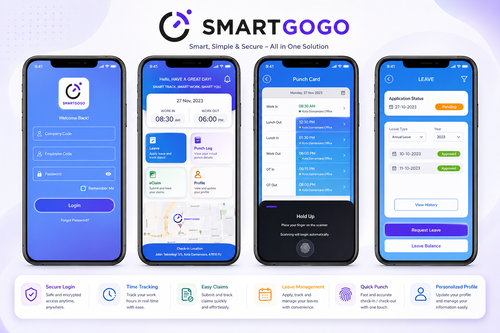
Remote work, satellite offices, and field teams have made the traditional, single-location HR model largely obsolete. Employees now clock in from client sites, home offices, and branch locations across Malaysia and beyond. This shift raises an important question for HR leaders: how do you choose the best smart HR system for modern distributed workforces when your team isn’t sitting in one building anymore?
Getting this decision right affects everything from payroll accuracy to employee experience, so it’s worth approaching methodically rather than picking based on brand recognition alone.
Why Distributed Teams Need a Different Kind of HR System
Traditional HR tools were often built around a single physical office with fixed clock-in points. Distributed workforces break that assumption entirely.
Location Flexibility
Employees working from multiple sites, client locations, or home need attendance and access tools that don’t depend on a fixed physical terminal.
Data Consistency Across Locations
Without a centralised system, HR data can fragment across spreadsheets and local records, making company-wide reporting unreliable.
Communication and Approval Delays
Distributed teams relying on email or paper-based approvals for leave and claims experience slower turnaround times, frustrating both employees and managers.
What to Look for in a Smart HR System
Mobile-First Attendance
Look for systems offering GPS-verified mobile clock-in, so field employees and remote staff can log attendance accurately without a physical terminal.
Centralised Cloud Dashboard
A good system consolidates attendance, leave, and payroll data from all locations into one dashboard, giving HR a single source of truth.
Flexible Approval Workflows
Managers should be able to approve leave, claims, and overtime remotely, without bottlenecking on a single physical signature process.
Scalable Architecture
As your distributed workforce grows — adding new branches, remote hires, or field teams — the system should scale without requiring a complete overhaul.
Key Benefits of the Right Smart HR System
- Accurate attendance regardless of location — Mobile and GPS-based clocking works wherever employees are.
- Faster approvals — Remote workflows eliminate delays caused by physical paperwork.
- Unified reporting — Centralised data gives leadership clear visibility across all locations.
- Better employee experience — Self-service access reduces frustration for remote and field staff.
- Future-proof scalability — Systems built for distributed teams grow more easily with your business.
Comparing HR System Approaches
| Factor | Traditional Office-Based HR Tools | Smart HR System for Distributed Teams |
|---|---|---|
| Attendance tracking | Fixed physical terminal | Mobile, GPS-verified clocking |
| Data visibility | Fragmented across locations | Centralised dashboard |
| Approval speed | Slower, paper-dependent | Fast, remote-enabled |
| Scalability | Limited | Built for growth across sites |
| Employee experience | Location-dependent | Consistent regardless of location |
Best Practices for Choosing a System
- Map out all the locations and work arrangements your workforce currently spans.
- Prioritise mobile functionality if you have field or remote employees.
- Confirm the system supports Malaysian statutory payroll and leave requirements.
- Ask vendors specifically about multi-location reporting capabilities.
- Request a trial period with real employees across different locations before committing.
Common Mistakes to Avoid
Choosing a System Built for Single-Office Use
Some HR platforms were designed around a fixed office model and only later added mobile features as an afterthought. These often feel clunky for genuinely distributed teams. Prioritise systems built with distributed use cases in mind from the ground up.
Underestimating Connectivity Challenges
Field employees don’t always have reliable internet access. Look for systems that support offline clock-in with automatic syncing once connectivity resumes, rather than requiring a constant connection.
Overlooking Local Compliance Requirements
A system designed primarily for another market may not fully support Malaysian statutory payroll and leave requirements. Always confirm local compliance capabilities before committing, regardless of how polished the interface looks.
Skipping a Real-World Pilot
Evaluating a system purely through a sales demo rarely reveals how it performs with actual field or remote employees. A short pilot with a real distributed team surfaces practical issues a demo simply won’t show.
Step-by-Step: Evaluating Your Options
- List your current pain points with attendance and approvals across locations.
- Shortlist vendors with proven experience supporting distributed or multi-branch teams.
- Test mobile clock-in functionality directly with a small pilot group.
- Review reporting dashboards for clarity and completeness across all sites.
- Confirm implementation timeline and support availability for a smooth rollout.
Key Takeaways
Choosing the best smart HR system for modern distributed workforces comes down to prioritising mobile flexibility, centralised data visibility, and scalable architecture. Systems designed around a single physical location simply can’t keep pace with teams spread across multiple sites, home offices, and field locations. The right system consolidates fragmented data into one reliable source of truth.
Conclusion
Distributed workforces need HR tools built for flexibility, not systems retrofitted from single-office assumptions. Knowing how to choose the best smart HR system for modern distributed workforces means focusing on mobile-first attendance, centralised reporting, and workflows that don’t depend on physical presence. Businesses that get this right see faster approvals, more accurate data, and a noticeably better experience for employees working outside a traditional office.
Interested in this product? Click here to learn more: https://www.smartouch.com.my/smartgogo/
FAQ
1. What makes an HR system suitable for distributed workforces?
Mobile-first attendance tracking, centralised reporting, and remote-friendly approval workflows are key features that support teams spread across multiple locations.
2. Can distributed teams still track attendance accurately without a physical terminal?
Yes, GPS-verified mobile clock-in allows accurate attendance tracking regardless of an employee’s physical location.
3. How does a smart HR system help with multi-location payroll?
Centralised data consolidation ensures payroll calculations draw from consistent, unified records rather than fragmented local spreadsheets.
4. Is it difficult to scale a smart HR system as a company grows?
Systems built specifically for distributed teams are generally designed to scale, allowing new locations or remote hires to be added without a full system overhaul.
5. What should be the first step when evaluating HR systems for a distributed workforce?
Start by mapping out your current pain points and the specific locations or work arrangements your system needs to support before comparing vendors.
Smart Touch technology pte ltd , www.smartouch.com.sg +65-63964767, sales@smartouch.com.sg , www.smartouch.com.my +607-3889903 sales@smartouch.com.my