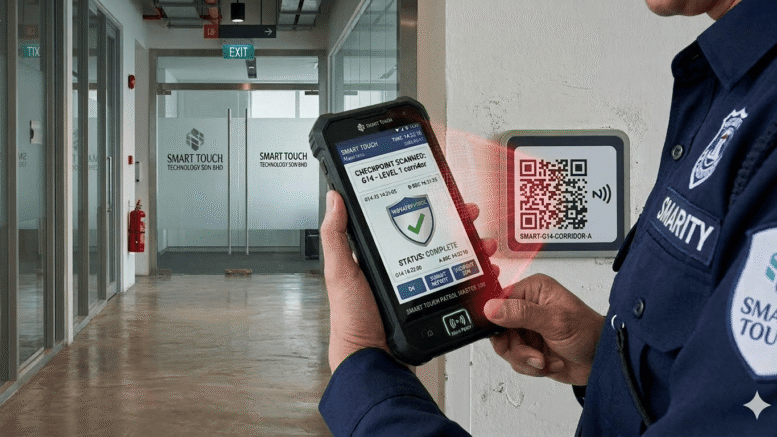
Security guard patrols only work if they actually happen on schedule, and paper logbooks make that almost impossible to verify. A guard could skip a checkpoint entirely and the logbook would show no evidence either way. A guard patrol system solves this by requiring guards to scan checkpoints in real time, creating a verifiable record of every round completed, missed, or delayed. This article covers how guard patrol systems work, the features that matter most, and how to roll one out across a security team.
The Problem With Paper-Based Patrol Logs
No Way to Verify Checkpoints Were Actually Visited
A handwritten log only proves someone filled in a form, not that they physically walked the route. Guards under pressure to finish a shift quickly can fill in an entire log without visiting a single checkpoint, and there is no way to catch it after the fact.
Incident Response Is Slower Without Real-Time Data
If a guard notices something unusual during a round, a paper log means the information does not reach a supervisor until the shift ends and someone reviews the logbook, by which point the situation may have already escalated.
Client Reporting Relies on Trust Alone
Security companies serving commercial clients often need to prove patrol compliance as part of a contract. Without digital records, that proof is limited to a logbook the client has to take on faith rather than data they can independently verify.
Key Features of a Guard Patrol System
NFC or QR Checkpoint Scanning
Guards scan a tag or code at each checkpoint using a mobile device, instantly logging the time and location. Because the tag has to be physically present to scan, there is no way to fake a completed round from a distance.
Real-Time Alerts for Missed or Delayed Rounds
If a checkpoint is not scanned within its scheduled window, supervisors receive an alert immediately, allowing them to check in with the guard or dispatch backup rather than discovering the gap the next day.
Incident Reporting With Photos
Guards can log incidents directly from the checkpoint, attaching photos and notes that reach the operations team in real time instead of waiting for a written report at the end of the shift.
Benefits for Security Operators and Clients
Verifiable Proof of Patrol Compliance
Clients can be given access to patrol reports showing exactly when each checkpoint was scanned, turning a trust-based relationship into one backed by data both sides can review.
Better Guard Accountability
Knowing that every checkpoint is logged encourages guards to complete rounds properly, and supervisors can identify patterns, such as a specific checkpoint consistently being scanned late, and address them directly.
Faster, Better-Documented Incident Response
Real-time incident logging means supervisors can respond while a situation is still developing, and the photo and timestamp record gives a clear account of what happened for any follow-up investigation.
Rolling Out a Guard Patrol System
Map Checkpoints to Actual Risk Areas
Place checkpoints at entry points, blind spots, and other locations where a security gap would matter most, rather than spacing them evenly around a site regardless of actual risk.
Train Guards on the App Before Go-Live
A short hands-on training session covering how to scan checkpoints and file an incident report prevents confusion during the first few shifts, when guards are still getting used to the new process.
Review Patrol Data Weekly
Set a regular time to review patrol completion rates and response times, so patterns like consistently late rounds get addressed early instead of becoming normal practice.
Key Takeaways
Paper-based patrol logs cannot verify that a guard actually visited a checkpoint, which creates blind spots for both security operators and their clients. A guard patrol system with checkpoint scanning, real-time alerts, and incident reporting closes that gap, while mapping checkpoints to real risk areas and reviewing patrol data weekly keeps the system effective over time.
Conclusion
A guard patrol system turns security rounds from an unverifiable routine into a documented process that protects both the client and the security team. It gives supervisors visibility they never had with paper logs, gives clients confidence backed by data, and gives guards a clear, simple way to prove the work was done. If your security operation still relies on handwritten logs, moving to a digital patrol system is one of the more straightforward upgrades available.
For more information about the product, please click here: http://www.smartouch.com.my/guard-patrol-system/
Smart Touch technology pte ltd , www.smartouch.com.sg +65-63964767, sales@smartouch.com.sg , www.smartouch.com.my +607-3889903 sales@smartouch.com.my
Frequently Asked Questions
Do guards need special hardware to use a patrol system?
Most systems run on a standard smartphone with a companion app, paired with low-cost NFC tags or QR codes installed at each checkpoint. No specialized scanning hardware is typically required.
What happens if a guard’s phone loses signal during a patrol?
Most patrol apps can store scans locally and sync automatically once signal returns, so a temporary dead zone does not result in lost patrol records.
Can clients access patrol reports directly?
Many systems offer a client-facing dashboard or scheduled report exports, giving clients direct visibility into patrol compliance without needing to request the information manually from the security provider.
How many checkpoints does a typical site need?
This depends entirely on the size and layout of the site. A small office might need only a handful of checkpoints, while a large industrial site could require dozens placed at every entry point and high-risk area.
Choosing a Guard Patrol System for Your Business
Vendors vary in how well their systems fit different site types, so it helps to evaluate a few specific factors before choosing one.
Offline Capability for Remote Sites
Sites in basements, warehouses, or remote areas often have poor mobile signal. Confirm the system can reliably store and sync data offline before relying on it for a site with known connectivity gaps.
Integration With Existing Security Operations Software
If your team already uses scheduling or incident management software, check whether the patrol system integrates with it. Running separate, disconnected systems tends to create more administrative work rather than less.
Ease of Adding or Moving Checkpoints
Site layouts change, whether due to renovations or new client requirements. A system that lets administrators add, remove, or relocate checkpoints without vendor involvement keeps the patrol route relevant as circumstances shift.