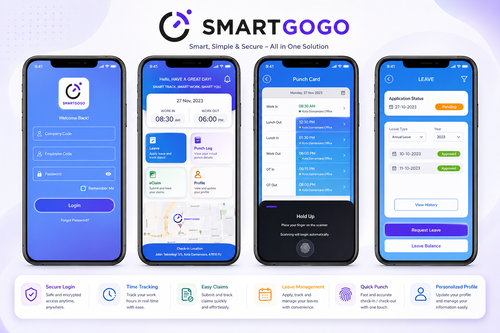
Many companies still run HR on a mix of paper forms, printed memos, and manual filing, even as most other business functions have gone digital. Building a paperless workspace with a unified smart HR system brings employee records, approvals, and communication into one platform, cutting down on physical storage, lost documents, and the time spent chasing signatures.
Why Paperless Matters for Modern Workplaces
Paper-based HR processes are slow to search, easy to misplace, and costly to store over time. As teams grow or become more distributed, relying on physical documents also makes it harder for HR to respond quickly to employee requests or produce records during an audit.
Common Paper-Based Bottlenecks
- Physical filing cabinets that take up office space and are hard to search
- Printed forms that require in-person signatures and manual routing
- Duplicate data entry across separate systems for leave, payroll, and attendance
- Risk of lost or damaged documents with no backup copy
What a Unified Smart HR System Brings Together
A unified smart HR platform, such as smartgogo, combines attendance, leave, payroll, and employee self-service into a single mobile app, so employees and HR no longer need to switch between separate tools or print anything to complete routine tasks.
Core Modules to Look For
- Digital employee self-service for payslips, leave, and personal details
- Mobile attendance and clock-in tracking
- Digital approvals for leave and claims
- Centralized document storage for contracts and HR records
- Company announcements and internal communication in one place
Steps to Build a Paperless Workspace
Step 1: Audit current paper processes to identify which forms and records are used most often.
Step 2: Migrate employee records and historical documents into the new digital system.
Step 3: Replace paper forms with digital workflows for leave, claims, and approvals.
Step 4: Train employees on the mobile app so self-service becomes the default habit.
Best Practices for a Smooth Transition
- Roll out one module at a time instead of switching everything at once
- Keep a short transition period where both digital and paper records are accepted
- Appoint department champions to help colleagues adopt the new system
- Set a clear cutoff date after which paper submissions are no longer accepted
Measuring the Impact of Going Paperless
Once the system is live, HR can track adoption through app login rates, the volume of paper forms still submitted, and the time it takes to process requests such as leave approvals or document retrieval. A steady decline in paper submissions alongside faster processing times is a clear sign the transition is working.
Conclusion
A unified smart HR system turns a paper-heavy workplace into a streamlined digital one, giving employees faster self-service and giving HR a single source of truth for records, approvals, and communication. The result is less time spent on administrative busywork and more time available for work that actually moves the business forward.
Frequently Asked Questions
Is it difficult to migrate existing paper records into a digital system?
Migration is usually done in phases, starting with active employee records, so the process does not require digitizing every historical document at once.
Can employees still access their information without the app?
Most systems also offer a web portal, so employees who prefer a desktop browser can access the same features without installing the mobile app.
How long does a typical rollout take?
A phased rollout across attendance, leave, and self-service modules typically takes a few weeks, depending on company size and how much historical data needs migrating.
Is employee data secure on a mobile HR app?
Reputable smart HR platforms use encrypted storage and role-based access controls, so employee data is better protected than paper files kept in an unlocked cabinet.
test## Handling Approvals and Signatures Digitally
One of the biggest hurdles in going paperless is replacing wet-ink signatures with something both employees and management trust. Digital approval workflows solve this by recording who approved a request, when, and from which device, creating an audit trail that is often more reliable than a signed paper form that can be misplaced or altered. Managers can approve leave, claims, or document requests directly from their phone, which also removes the delay of waiting for someone to be physically in the office to sign off.
Common Concerns When Going Paperless
Some employees may worry about losing access to familiar paper processes, especially those less comfortable with mobile apps. Providing a short guided walkthrough during onboarding, along with a printable summary for the first few weeks, usually addresses this concern without slowing down the overall transition. IT teams should also confirm that the app works reliably on the range of devices used across the company before a full rollout.
Interested in this product? Click here to learn more: https://www.smartouch.com.my/smartgogo/
Smart Touch technology pte ltd , www.smartouch.com.sg +65-63964767, sales@smartouch.com.sg , www.smartouch.com.my +607-3889903 sales@smartouch.com.my