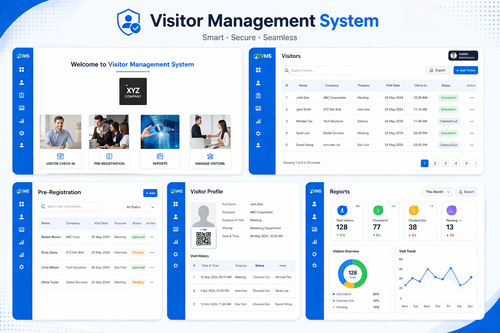
Front desks across Malaysia are replacing paper visitor logbooks with self-service kiosks that let guests check themselves in without waiting for a receptionist. A visitor management system kiosk speeds up entry, creates a searchable digital record of every guest, and gives building management a clearer picture of who is on the premises at any given time.
Why Malaysian Businesses Are Switching to Self-Service Visitor Kiosks
A paper logbook at the front desk might seem simple, but it creates real problems once a building has regular visitor traffic. Handwriting is often illegible, records are hard to search, and there is no way to confirm a visitor’s identity or notify the host automatically when their guest arrives.
Problems With Manual Visitor Logbooks
- Illegible handwriting that makes records difficult to search later
- No automatic notification to the host when a visitor arrives
- Long queues at the front desk during busy periods
- No record of exactly when a visitor left the building
What a VMS Self-Service Kiosk Does
A visitor management system kiosk lets guests check in on a touchscreen at the lobby, capturing their details, purpose of visit, and host name without any manual data entry from staff. Once checked in, the system can print a visitor badge and send an instant notification to the host, all within seconds.
Core Kiosk Features
- Touchscreen self-check-in with photo capture
- Instant host notification by SMS, email, or app
- Printed or digital visitor badges with visit details
- Pre-registration links for expected visitors to speed up check-in
- Searchable digital visitor logs for security and compliance
How the Check-In Process Works
Step 1: The visitor approaches the kiosk and taps to begin check-in, entering their name and the host they are visiting.
Step 2: The kiosk captures a photo and, if required, a signed non-disclosure or safety acknowledgment.
Step 3: A badge prints automatically, and the host receives an instant notification that their guest has arrived.
Step 4: When the visitor leaves, they check out at the kiosk or through a QR code, closing the digital record with a timestamp.
Best Practices for Deploying a Visitor Kiosk
- Place the kiosk where it is clearly visible as visitors enter the lobby
- Keep the check-in flow short, ideally under a minute for a first-time visitor
- Enable pre-registration for expected guests to skip most of the kiosk steps
- Keep a staffed backup option available for visitors who need assistance
Choosing the Right Kiosk for Your Lobby
Office buildings, factories, and event venues each see different visitor volumes and have different security requirements, so the right kiosk setup depends on daily foot traffic, whether badge printing is required, and how the system should integrate with existing access control or CCTV. A good supplier will help match the hardware and screen size to the space rather than offering a single standard unit for every location.
Conclusion
A self-service visitor management kiosk replaces slow, error-prone paper logbooks with a fast, searchable digital process that improves both security and the guest experience. With instant host notifications, printed badges, and complete visitor records, Malaysian businesses can manage front desk traffic more efficiently while keeping a clear record of who enters and exits the building.
Frequently Asked Questions
Can the kiosk handle a high volume of visitors at once?
Yes. Multiple kiosks can be deployed at busy lobbies, and pre-registration for expected guests further reduces wait times during peak hours.
Is visitor data stored securely?
Visitor records are stored in an encrypted cloud database with access limited to authorized administrators, rather than being left in an open paper logbook at the front desk.
Does the host need a special app to get notified?
Notifications can typically be sent by SMS or email, so hosts do not need to install a dedicated app to be alerted when their visitor arrives.
Can the kiosk work alongside existing access control systems?
Yes. Many visitor management kiosks integrate with existing door access and CCTV systems, so visitor badges can be linked to temporary access permissions where needed.
Data Privacy for Visitor Records
Because a visitor kiosk collects personal information such as names, photos, and contact details, it is worth confirming how long records are retained and who has access to them. A well-designed system lets administrators set automatic data retention periods and restrict visitor data access to security or front desk staff, rather than leaving that information exposed the way an open paper logbook would be.
Measuring Front Desk Improvement After Rollout
After the kiosk is live, facilities teams can track average check-in time, the number of visitors handled during peak hours, and how often the front desk still needs to step in manually. A drop in average check-in time alongside fewer manual interventions is a good indicator that the self-service kiosk has taken over the bulk of the front desk workload.
Want to see how this fits your organization? Click here to request a free demo: https://www.smartouch.com.my/vms-visitor-management-system/
Smart Touch technology pte ltd , www.smartouch.com.sg +65-63964767, sales@smartouch.com.sg , www.smartouch.com.my +607-3889903 sales@smartouch.com.my