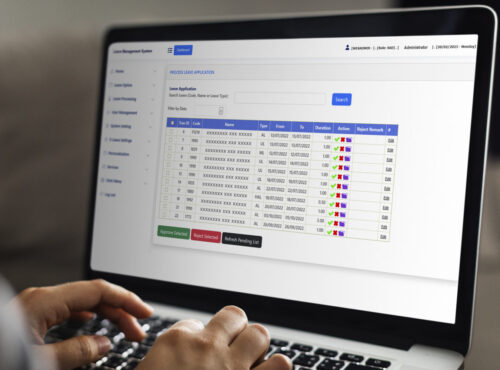
Managing employee leave through paper forms and spreadsheets is one of the most time-consuming, error-prone tasks for HR teams. A web based leave management system in Malaysia replaces this manual process with a fully digital workflow, allowing employees to apply for leave, managers to approve requests, and HR teams to track balances, all from a single online platform.
This article explains how a web based leave management system works, why more Malaysian businesses are adopting one, and what to look for when choosing the right solution for your organisation.
What Is a Web Based Leave Management System?
A web based leave management system is an online platform that automates the entire leave process, from application and approval to balance tracking and reporting. Because it is cloud-based, employees can apply for leave from any device with internet access, and managers can approve or reject requests without needing to be in the office.
For Malaysian businesses, this is especially useful given the variety of leave types required under the Employment Act 1955, including annual leave, sick leave, maternity leave, and paternity leave, each with different entitlement rules.
Why Malaysian Businesses Are Moving to Web Based Leave Management
1. Reduced Administrative Burden
HR teams no longer need to manually calculate leave balances or chase paper forms across departments. The system automatically updates balances as leave is approved or taken.
2. Fewer Errors and Disputes
Because every application, approval, and balance update is logged digitally, there is a clear audit trail that reduces disputes between employees and management over leave entitlement.
3. Better Visibility for Managers
Managers can see team leave calendars at a glance, helping them plan around absences and avoid approving overlapping leave that could leave a department understaffed.
4. Compliance with Malaysian Labour Law
A properly configured system applies the correct statutory entitlements automatically, based on length of service and employment type, reducing the risk of non-compliance with the Employment Act 1955.
Key Features to Look For
- Multi-level approval workflows that route requests to the correct manager automatically.
- Automatic balance calculation based on Malaysian statutory leave entitlements.
- Mobile access so employees can apply for leave and check balances from their phone.
- Team leave calendars for better workforce planning.
- Integration with payroll so unpaid leave and leave encashment are reflected accurately.
Comparison: Manual Leave Tracking vs. Web Based Leave Management
| Aspect | Manual (Paper or Spreadsheet) | Web Based Leave Management System |
|---|---|---|
| Application process | Physical forms or emails | Online application from any device |
| Approval speed | Depends on manager availability | Instant notifications and approvals |
| Balance accuracy | Manually updated, error-prone | Automatically calculated |
| Reporting | Time-consuming to compile | Instant, exportable reports |
Best Practices for Implementing a Leave Management System
- Map your leave policies clearly before configuring the system, including entitlements by employee category.
- Set up approval hierarchies that match your actual organisational structure.
- Train employees and managers on how to apply for and approve leave through the new system.
- Integrate with attendance and payroll to avoid manual reconciliation of unpaid leave.
- Review leave reports regularly to identify patterns such as high absenteeism in specific teams.
Step-by-Step: How Employees Apply for Leave Online
- Employee logs into the web based leave management system.
- They select the leave type and dates, and the system checks their available balance.
- The application is routed automatically to the relevant approver.
- The manager reviews and approves or rejects the request through the platform.
- Once approved, the leave balance updates automatically and the calendar reflects the absence.
Key Takeaways
- A web based leave management system automates applications, approvals, and balance tracking.
- It reduces administrative workload and minimises leave-related disputes.
- Malaysian businesses benefit from automatic compliance with Employment Act 1955 entitlements.
- Integration with payroll ensures unpaid leave and encashment are calculated correctly.
- Mobile access makes the system convenient for both office and field employees.
Conclusion
As Malaysian businesses grow, manual leave tracking quickly becomes unsustainable. A web based leave management system streamlines the entire process, from application to approval to reporting, while helping ensure compliance with local labour regulations. For HR teams looking to reduce administrative work and give employees a smoother experience, moving to a digital leave management platform is a practical, high-impact step.
Frequently Asked Questions (FAQ)
1. Can a web based leave management system handle different leave types under Malaysian law?
Yes, a properly configured system can manage annual leave, sick leave, maternity leave, paternity leave, and other statutory or company-specific leave types.
2. Is employee data secure in a cloud-based leave system?
Reputable providers use secure, encrypted cloud infrastructure and access controls to protect employee data.
3. Can managers approve leave requests from their phone?
Yes, most modern leave management systems include mobile access for both employees and approving managers.
4. Does the system calculate leave balances automatically?
Yes, balances are updated automatically based on configured entitlement rules, reducing the need for manual tracking.
5. Can a leave management system integrate with payroll?
Yes, integration with payroll ensures that unpaid leave, leave encashment, and related adjustments are reflected accurately in each pay cycle.
For a complete breakdown of features and modules, visit our product page here: https://www.smartouch.com.my/e-leave-system/.
Smart Touch technology pte ltd , www.smartouch.com.sg +65-63964767, sales@smartouch.com.sg , www.smartouch.com.my +607-3889903 sales@smartouch.com.my