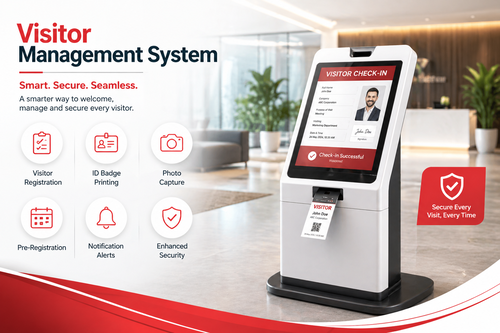
Front desks and building entrances are often the first point of contact for visitors, contractors, and delivery personnel, yet many businesses still rely on paper logbooks to record who comes and goes. VMS software with real-time monitoring replaces this outdated approach with a digital Visitor Management System that tracks every visitor automatically, improving both security and the visitor experience.
This article explains what VMS software is, why real-time monitoring matters, and how businesses can use it to strengthen security while creating a more professional first impression for guests.
What Is VMS Software?
VMS, or Visitor Management System, software digitises the entire visitor check-in process. Instead of signing a paper logbook, visitors register through a self-service kiosk, mobile app, or QR code, and their details, photo, and purpose of visit are captured instantly. Hosts are notified automatically when their visitor arrives.
With real-time monitoring, security teams and receptionists can see exactly who is currently on the premises at any given moment, along with their check-in time, host, and visit purpose.
Why Real-Time Monitoring Matters
1. Stronger Security Oversight
Security personnel can instantly view a live list of everyone on site, making it easier to identify unregistered individuals or investigate incidents quickly.
2. Faster Emergency Response
In the event of an evacuation, real-time visitor data helps ensure everyone, including guests and contractors, is accounted for.
3. Improved Visitor Experience
Self-service kiosks and mobile check-in reduce waiting times at reception, giving visitors a smoother, more professional first impression of your organisation.
4. Automatic Host Notifications
Hosts receive instant notifications when their visitor arrives, eliminating the need for reception staff to manually call or message each department.
Key Features of Modern VMS Software
- Self-service kiosk check-in that captures visitor details and photos automatically.
- Real-time visitor dashboard showing who is currently on site.
- Host notification system via SMS, email, or app alerts.
- Pre-registration for expected visitors to speed up check-in.
- Visitor badge printing for quick visual identification on site.
Comparison: Paper Logbook vs. VMS Software with Real-Time Monitoring
| Aspect | Paper Logbook | VMS Software with Real-Time Monitoring |
|---|---|---|
| Check-in speed | Slow, manual writing | Fast, self-service kiosk or QR code |
| Data accuracy | Often illegible or incomplete | Digitally captured and complete |
| Live visitor visibility | None | Real-time dashboard |
| Host notification | Manual call or intercom | Automatic instant alert |
| Emergency headcount | Difficult to compile quickly | Instant, accurate list |
Best Practices for Deploying VMS Software
- Set up pre-registration for scheduled visitors to reduce check-in time.
- Train reception staff to handle exceptions such as walk-in visitors without appointments.
- Integrate with access control so visitor badges align with permitted areas.
- Review visitor logs regularly as part of routine security audits.
- Communicate the new process to regular contractors and vendors so they know what to expect.
Step-by-Step: How VMS Software Works in Practice
- Visitor arrives and checks in via a kiosk, mobile app, or pre-registered QR code.
- The system captures their details, photo, and purpose of visit.
- The host receives an instant notification that their visitor has arrived.
- A visitor badge is printed or displayed digitally for identification while on site.
- The visitor checks out upon leaving, and the record is closed automatically in real time.
Key Takeaways
- VMS software with real-time monitoring replaces manual visitor logbooks with a digital, auditable process.
- Real-time dashboards give security teams instant visibility into who is on site.
- Automatic host notifications remove delays in greeting visitors.
- Emergency evacuation planning improves with accurate, live visitor headcounts.
- Self-service kiosks and pre-registration improve the overall visitor experience.
Conclusion
A modern front desk needs more than a paper logbook to manage visitor traffic securely and professionally. VMS software with real-time monitoring gives organisations instant visibility into who is on site, faster check-ins for visitors, and stronger emergency preparedness. For any business that regularly hosts guests, contractors, or delivery personnel, upgrading to a digital Visitor Management System is a practical step toward better security and a more polished visitor experience.
Frequently Asked Questions (FAQ)
1. Can VMS software integrate with building access control systems?
Yes, many VMS platforms integrate with access control so visitor badges can be linked to specific permitted areas.
2. Is visitor data stored securely?
Reputable VMS providers store visitor data securely and allow administrators to configure data retention according to company policy.
3. Can visitors pre-register before arriving?
Yes, hosts can typically pre-register expected visitors, allowing for a faster check-in process on arrival.
4. Does VMS software work for multiple office locations?
Yes, most VMS platforms can be deployed across multiple sites while maintaining centralised visitor records and reporting.
Want to see how this fits your organization? Click here to request a free demo: https://www.smartouch.com.my/vms-visitor-management-system/.
Smart Touch technology pte ltd , www.smartouch.com.sg +65-63964767, sales@smartouch.com.sg , www.smartouch.com.my +607-3889903 sales@smartouch.com.my