As more businesses in Malaysia adopt flexible work arrangements and mobile workforce management, GPS Clock In Apps have become an essential tool for tracking employee attendance accurately. These solutions help organisations manage remote employees, field staff, sales teams, technicians, and multiple job sites while reducing manual attendance processes.
However, introducing a new GPS Clock In App policy is not always straightforward. Employees may worry about privacy, feel uncomfortable with location tracking, or simply resist changing from familiar attendance methods. Without proper communication and implementation, even the best attendance system can face low adoption rates.
The good news is that employee resistance can be overcome through transparency, training, and the right technology. By helping employees understand the benefits of GPS attendance and implementing clear policies, businesses can improve acceptance while strengthening attendance accuracy and operational efficiency.
What Is a GPS Clock In App?
A GPS Clock In App is a mobile attendance solution that allows employees to clock in and clock out using their smartphones while verifying their location through GPS technology.
Instead of using a traditional punch card machine, employees simply open the mobile application and record their attendance from approved work locations.
Depending on the company’s attendance policy, the app may support:
- GPS Location Verification
- Wi-Fi Verification
- Geofencing
- Selfie Verification
- Facial Recognition
- QR Code Attendance
- Real-Time Attendance Synchronisation
The attendance data is automatically sent to the HR management system, where managers can monitor attendance and generate reports.
Why Businesses Introduce GPS Clock In Policies
GPS attendance has become increasingly popular because today’s workforce is no longer limited to a single office location.
Businesses commonly use GPS attendance for:
- Remote Employees
- Sales Representatives
- Service Technicians
- Construction Workers
- Security Personnel
- Delivery Drivers
- Property Management Teams
- Multi-Branch Operations
A GPS clock in policy helps organisations ensure attendance is recorded accurately regardless of where employees are working.
Why Employees Resist GPS Clock In Apps
Employee resistance is often caused by misunderstandings rather than the technology itself.
Some common concerns include:
Privacy Concerns
Many employees worry that the company will monitor their location throughout the entire day.
In reality, most GPS attendance systems only verify location when employees perform a clock-in or clock-out action, depending on the company’s configuration.
Fear of Constant Monitoring
Some employees assume the application continuously tracks every movement.
Clear communication is important to explain when location information is collected and how it is used.
Resistance to Change
Employees who have used punch cards or fingerprint terminals for years may initially hesitate to adopt mobile attendance.
This is a normal response whenever organisations introduce new technology.
Technical Concerns
Employees may worry about:
- GPS accuracy
- Mobile data usage
- Battery consumption
- Internet connectivity
- Device compatibility
Providing clear guidance and technical support helps reduce these concerns.
Lack of Understanding
If employees do not understand why the company is introducing the policy, they may assume it exists purely for monitoring rather than improving operational efficiency.
Explaining the business purpose helps build trust.
How to Successfully Introduce a GPS Clock In Policy
1. Explain the Purpose Clearly
Communication is the foundation of successful implementation.
Employees should understand that the new attendance policy is designed to:
- Improve attendance accuracy
- Reduce manual paperwork
- Simplify payroll processing
- Support remote working
- Improve workforce management
- Increase operational efficiency
When employees understand the business benefits, they are more likely to support the change.
2. Be Transparent About Location Tracking
Privacy concerns should never be ignored.
Employers should clearly explain:
- When GPS is collected
- Why GPS is required
- How attendance data is stored
- Who has access to attendance records
- How employee information is protected
Transparency builds employee confidence and trust.
3. Provide Employee Training
Employees should receive practical training before the new system goes live.
Training should include:
- How to clock in
- How to clock out
- How GPS verification works
- How Wi-Fi verification works
- How to check attendance history
- How to report attendance issues
Hands-on demonstrations reduce confusion and improve user adoption.
4. Introduce the Policy Gradually
Rather than enforcing immediate mandatory usage, businesses can introduce a transition period.
For example:
- Pilot the system with one department.
- Gather employee feedback.
- Resolve technical issues.
- Expand implementation gradually.
A phased rollout gives employees time to adapt to the new process.
5. Address Employee Feedback
Employees appreciate being heard.
Encourage staff to share concerns about:
- GPS accuracy
- Technical issues
- Mobile devices
- Attendance procedures
Responding quickly to feedback helps improve confidence in the system.
6. Provide Reliable Technical Support
Nothing discourages users more than technical problems.
Businesses should ensure employees receive prompt assistance whenever they encounter issues such as:
- Login problems
- GPS errors
- Clock-in failures
- Device registration
- Network connectivity issues
Quick support helps maintain trust and minimise disruption.
Benefits of GPS Clock In Apps
Accurate Attendance Recording
GPS verification confirms employees are at approved work locations when recording attendance.
This improves attendance accuracy while reducing manual verification.
Better Payroll Accuracy
Attendance records flow directly into payroll calculations, helping HR teams process salaries more efficiently.
Accurate attendance supports:
- Working Hours
- Overtime
- Shift Attendance
- Late Arrivals
- Early Departures
Increased Flexibility
Employees can clock in from authorised locations without travelling back to the office simply to record attendance.
This is especially valuable for remote workers and field staff.
Real-Time Workforce Visibility
Managers can monitor attendance across multiple locations through one central dashboard.
They can instantly identify:
- Employees Present
- Employees Absent
- Late Attendance
- Remote Workforce Status
Reduced Administrative Work
HR teams spend less time managing manual attendance records and more time focusing on employee development and strategic HR initiatives.
Integrating GPS Attendance with HRMS
GPS attendance becomes even more powerful when integrated with a Human Resource Management System (HRMS).
Employee attendance automatically synchronises with:
- Payroll
- Leave Management
- Overtime
- Employee Self-Service
- Claims Management
- Attendance Reports
This eliminates duplicate data entry while improving payroll accuracy.
Smart GoGo Mobile Attendance Solution
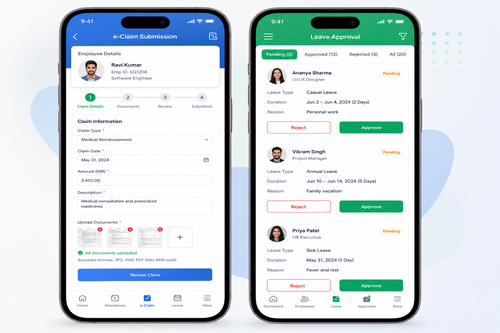
The Smart GoGo Mobile App from Smart Touch Technology enables employees to record attendance conveniently using their smartphones.
Features include:
- GPS Clock In & Clock Out
- Wi-Fi Attendance Verification
- Attendance History
- Leave Application
- Leave Balance
- Claims Submission
- Overtime Records
- Employee Self-Service
- Digital Payslips
Managers can monitor attendance in real time while employees enjoy a simple and convenient attendance experience.
Best Practices for a Successful GPS Attendance Policy
Businesses can improve employee acceptance by following these best practices:
- Communicate the purpose clearly before implementation.
- Develop a written attendance policy.
- Explain how location data is collected and used.
- Respect employee privacy and only collect information necessary for attendance verification.
- Provide user training before launch.
- Test the system thoroughly before full deployment.
- Offer responsive technical support.
- Gather employee feedback and continuously improve the process.
A well-planned implementation creates a smoother transition and encourages long-term adoption.
Why Choose Smart Touch GPS Clock In Solution?
Smart Touch Technology offers an intelligent GPS Clock In Solution designed to simplify attendance management for businesses across Malaysia.
Our Smart GoGo Mobile App integrates seamlessly with payroll, HRMS, leave management, claims, overtime, and employee self-service to create one complete workforce management platform.
Key features include:
- GPS Clock In & Clock Out
- Wi-Fi Attendance Verification
- Smart GoGo Mobile App
- Payroll Integration
- Leave Management
- Employee Self-Service (ESS)
- Claims Management
- Overtime Management
- Attendance Reports
- Multi-Branch Management
- Cloud & On-Premise Deployment
- Real-Time Attendance Dashboard
- Professional Local Support
Whether your employees work from the office, remotely, or across multiple project sites, Smart Touch provides a flexible attendance solution that improves workforce visibility and operational efficiency.
Conclusion
Implementing a GPS Clock In App Policy can initially be met with employee resistance, but successful adoption depends on clear communication, transparency, and proper training. By addressing privacy concerns, explaining the benefits, and providing reliable support, organisations can build employee confidence while improving attendance accuracy.
An integrated GPS attendance solution not only simplifies attendance management but also strengthens payroll processing, workforce visibility, and overall HR efficiency. With Smart Touch’s Smart GoGo Mobile App and HRMS solutions, Malaysian businesses can confidently embrace modern attendance management while supporting a more connected, productive, and future-ready workforce.
Interested in this product? Click here to learn more: https://www.smartouch.com.my/smartgogo/
Smart Touch technology pte ltd , www.smartouch.com.sg +65-63964767, sales@smartouch.com.sg , www.smartouch.com.my +607-3889903 sales@smartouch.com.my