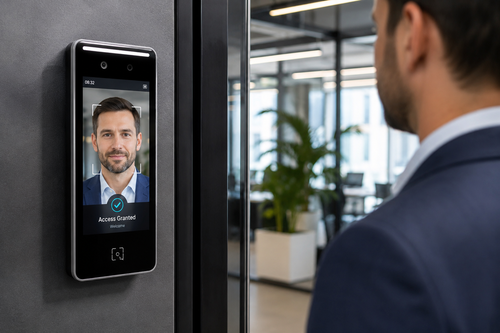
Managing who can enter your office should not require someone to be physically present at the front desk every time a door needs to be unlocked, a new employee needs access, or a contractor shows up outside normal hours. Remote management for a door access system solves exactly this problem, giving facility managers and business owners the ability to control entry points from a smartphone, tablet, or laptop no matter where they are.
For businesses across Malaysia, from small offices to multi-branch operations, moving away from traditional lock-and-key or even basic on-premise card systems is becoming less of a luxury and more of an operational necessity. This article looks at what remote door access management actually involves, why it matters, and how to choose and roll out a system that fits your organization.
What Is Remote Door Access Management?
Remote door access management refers to controlling, monitoring, and configuring an office’s entry points through a cloud-connected platform rather than only through hardware installed at the door itself. Instead of visiting each site to reprogram a keypad or reissue a card, an administrator logs into a web dashboard or mobile app to lock or unlock doors, add or remove user credentials, and review who entered which door and when.
This shift is powered by internet-connected door controllers, cloud software, and credentials that can be issued or revoked instantly, such as mobile credentials, QR codes, or cloud-managed cards and fobs.
Why Businesses Are Moving to Remote-Managed Access
Multi-Location Oversight
Companies with more than one office or warehouse no longer need a dedicated on-site administrator at every location. A single security manager can monitor and adjust access permissions for all branches from one dashboard, which is especially valuable for businesses expanding into new cities or states.
Faster Onboarding and Offboarding
When a new hire starts, HR or IT can grant building access before the person even arrives, and when someone leaves the company, their credentials can be revoked immediately and remotely. This removes the security risk created by former employees who still hold a physical key or an active card.
Key Benefits of Remote Door Access Management
- Control entry points from anywhere using a phone or computer
- Instantly issue or revoke access credentials without visiting the site
- Receive real-time alerts for unauthorized or unusual entry attempts
- Maintain detailed access logs for audits and compliance
- Reduce costs tied to lost keys, rekeying locks, and on-site technicians
Core Features to Look For
Mobile App Control
A good system provides a dedicated mobile app so administrators can unlock doors, view live status, and manage users without needing a desktop computer. This is especially useful for handling after-hours requests or unexpected visitor situations.
Real-Time Alerts and Logs
Notifications for forced entry, doors left open, or repeated failed access attempts let security teams respond quickly. Detailed logs also make it straightforward to investigate incidents or produce records for compliance audits.
Integration with Other Systems
Leading platforms connect with visitor management, CCTV, fire alarm, and HR software, so access permissions can update automatically when an employee’s status changes in the HR system. This reduces manual work and keeps records consistent across departments.
Best Practices for Rolling Out Remote Access Control
- Audit existing doors and entry points before choosing hardware
- Set clear access tiers based on role, department, and working hours
- Enable two-factor confirmation for highly sensitive areas
- Test backup power and offline access modes before going live
- Review access logs on a regular schedule, not only after an incident
Step-by-Step: Setting Up Remote Management
- Assess your building’s doors, wiring, and network connectivity
- Select a cloud-based access control platform and compatible hardware
- Install door controllers, readers, and network connections
- Configure user groups, schedules, and access tiers in the software
- Issue credentials to employees and test entry at every door
- Train administrators on the mobile app and monitor logs after launch
Remote Access vs. Traditional On-Site Access Control
- Management: Remote systems allow control from anywhere; traditional systems require someone on site
- Credential changes: Remote systems update instantly; traditional systems often need physical reprogramming
- Scalability: Remote systems handle multiple branches easily; traditional systems scale with more effort and cost
- Visibility: Remote systems provide real-time logs and alerts; traditional systems offer limited or no live monitoring
- Maintenance: Remote systems often include cloud updates; traditional systems rely on manual servicing
Key Takeaways
- Remote door access management lets you control entry points from anywhere
- Onboarding and offboarding become instant, reducing security gaps
- Real-time alerts and logs improve response time and accountability
- Integration with HR and security systems reduces manual administration
- A phased rollout with clear access tiers leads to a smoother transition
Frequently Asked Questions
Is remote door access management secure?
Yes. Reputable systems use encrypted communication between the door controller and the cloud platform, along with secure credential formats, making them at least as secure as traditional systems and often more so due to real-time monitoring.
What happens if the internet goes down?
Most systems include offline modes where door controllers continue enforcing the last synced permissions locally, and they resync automatically once connectivity is restored.
Can remote access control work with existing doors and locks?
In many cases, yes. Existing electric strikes, magnetic locks, or card readers can often be integrated with new controllers, though older hardware may need to be upgraded for full compatibility.
How long does implementation typically take?
A single office can often be set up within a few days, while multi-branch rollouts may take several weeks depending on the number of doors, existing infrastructure, and how much staff training is required.
Who should manage the system day to day?
Most companies assign this to IT or facilities staff, who can grant, adjust, or revoke access as needed while security or HR teams handle policy decisions on who should have access to which areas.
Conclusion
Remote door access management gives businesses a practical way to secure their premises without the delays and costs tied to traditional lock systems. From instant credential changes to real-time alerts and centralized oversight across multiple locations, the benefits extend well beyond convenience into measurable improvements in security and operational efficiency.
Whether you operate a single office or a growing network of branches, moving to a cloud-based, remotely managed access control system is a step toward a safer and more efficient workplace.
Want to know more about the product? Check it out here :https://www.smartouch.com.my/door-access-system/
Smart Touch technology pte ltd , www.smartouch.com.sg +65-63964767, sales@smartouch.com.sg , www.smartouch.com.my +607-3889903 sales@smartouch.com.my