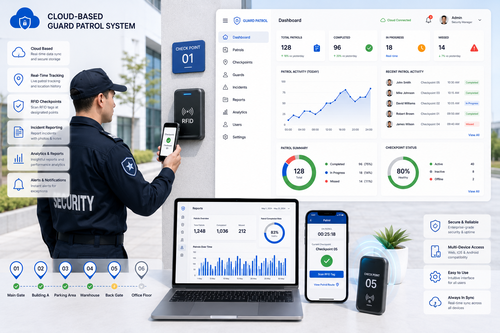
Security guards patrolling a large facility on foot with a paper checklist can only report what they remember to write down after the fact. Guard patrol management software changes this by giving security teams a digital, timestamped record of every checkpoint visited and every incident reported, in real time.
This guide covers how automated guard patrol and incident reporting works, why facility managers are adopting it, and what to look for when choosing a system.
Why Facilities Need Automated Guard Patrol Management
Security operations have traditionally relied on manual logbooks and radio check-ins, which are slow to verify and easy to falsify. An automated guard patrol system solves this by requiring guards to scan checkpoints and log incidents directly through a mobile device.
The Problem with Manual Patrol Logs
Paper-based patrol logs cannot be verified in real time. Supervisors often discover missed checkpoints or incomplete rounds only after an incident has already occurred.
Rising Expectations from Clients and Insurers
Corporate clients and insurance providers increasingly require verifiable proof that contracted patrol rounds were actually completed, making digital patrol records a competitive necessity for security service providers.
Key Features of Guard Patrol Management Software
NFC or QR Checkpoint Scanning
Guards scan a tag at each checkpoint using a mobile app, creating a timestamped, GPS-verified record that proves the checkpoint was physically visited.
Real-Time Incident Reporting
When a guard discovers an issue, such as a broken lock or suspicious activity, they can log it instantly with photos and notes, alerting supervisors immediately rather than at the end of a shift.
Centralized Patrol Dashboards
Supervisors and clients can view live patrol status, completion rates, and incident history from a single dashboard, without needing to call guards on duty for updates.
Benefits of Automated Guard Patrol and Incident Reporting
| Benefit | Impact on Your Business |
|---|---|
| Verified patrol completion | Provides proof that contracted rounds were actually performed |
| Faster incident response | Supervisors are alerted the moment an issue is reported |
| Stronger client reporting | Clients can access patrol and incident history directly |
| Reduced liability | Digital records support investigations and insurance claims |
How to Choose the Right Guard Patrol System
Step 1: Map Your Patrol Routes
Identify every checkpoint that needs to be covered across your facility before comparing vendors, so you can confirm the system supports your required number of checkpoints and routes.
Step 2: Confirm Offline Functionality
Large facilities often have dead zones with poor connectivity. Choose a system that can record scans offline and sync automatically once a connection is restored.
Step 3: Evaluate Reporting and Client Access
If you manage patrols on behalf of clients, check whether the platform allows clients to log in and view their own patrol reports directly.
Best Practices for Guard Patrol Management
- Rotate checkpoint routes periodically to avoid predictable patrol patterns.
- Review incident reports weekly to identify recurring problem areas.
- Train guards thoroughly on how to use the mobile scanning app before their first shift.
- Set clear escalation procedures for high-priority incidents reported through the app.
Common Mistakes to Avoid
Choosing a System Without Offline Support
A patrol system that fails whenever guards lose signal defeats the purpose of real-time verification. Always confirm offline scanning capability before purchasing.
Failing to Train Supervisors on Dashboard Use
Even the best patrol data is wasted if supervisors do not regularly review dashboards and act on flagged incidents promptly.
Neglecting Regular Hardware Maintenance
NFC tags and QR checkpoint markers can wear out or become damaged over time. Schedule periodic checks to replace worn tags so patrol verification remains accurate.
Manual Patrols vs Automated Guard Patrol Systems
| Aspect | Manual Patrols | Automated Guard Patrol System |
|---|---|---|
| Verification | Paper logs, hard to confirm | GPS and timestamp verified checkpoint scans |
| Incident reporting | Reported after shift ends | Reported instantly with photos and notes |
| Client visibility | Requires phone calls or emailed reports | Live dashboard access for clients |
| Accountability | Difficult to prove routes were completed | Clear digital proof of every patrol round |
Integrating Guard Patrol Data with Broader Security Operations
A guard patrol system delivers the most value when it is not treated as an isolated tool. Facilities that integrate patrol data with CCTV footage, access control logs, and visitor management records get a complete picture of what happened at any given time. For example, if an incident is reported near a specific door, supervisors can immediately cross-reference access control logs and nearby camera footage to build a fuller understanding of the event. This kind of integration also supports more accurate post-incident investigations and can strengthen insurance claims by providing multiple independent sources of verified data.
Key Takeaways
- Automated guard patrol systems replace unreliable paper logs with verified, real-time checkpoint data.
- Instant incident reporting speeds up response times and improves accountability.
- Choosing a system with offline support and client dashboard access ensures reliability across large facilities.
Conclusion
Automated guard patrol and incident reporting management gives security teams the verified data they need to prove performance, respond faster to incidents, and build client trust. By replacing manual logbooks with checkpoint scanning, real-time incident alerts, and centralized dashboards, security operators can run a more accountable and efficient patrol operation.
If your organization still relies on paper patrol logs, it is worth exploring how an automated guard patrol system can strengthen your security operations.
Frequently Asked Questions
What is a guard patrol management system?
It is software that lets security guards scan checkpoints and log incidents through a mobile device, creating verified, timestamped patrol records.
Does the system work without internet access?
Most modern platforms support offline scanning, storing data locally and syncing automatically once connectivity is restored.
Can clients view patrol reports directly?
Many guard patrol platforms include a client-facing dashboard so clients can review completed patrols and incident reports without contacting the security provider.
How does automated patrol reporting reduce liability?
Verified, timestamped records provide clear evidence of completed patrols and reported incidents, which is valuable during investigations or insurance claims.
For more information about the product, please click here: http://www.smartouch.com.my/guard-patrol-system/
Smart Touch technology pte ltd , www.smartouch.com.sg +65-63964767, sales@smartouch.com.sg , www.smartouch.com.my +607-3889903 sales@smartouch.com.my