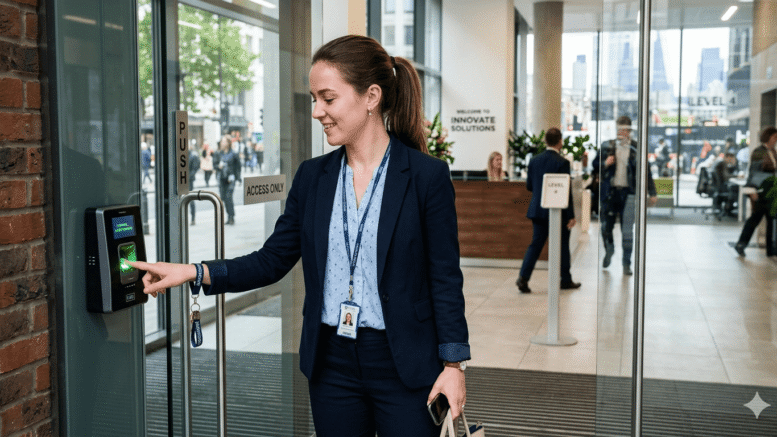
Shift-based businesses in Malaysia — from manufacturing plants to retail chains and security firms — share a common problem: making sure the person clocking in is actually the person scheduled to work. Buddy punching, where one employee clocks in for another, remains one of the most persistent forms of time theft. Fingerprint time clocks for reliable shift verification solve this at the source by tying attendance directly to a unique physical identifier.
For operations running multiple shifts across different sites, this isn’t a minor efficiency gain. It’s a meaningful control over labour costs and payroll accuracy.
Why Shift Verification Matters So Much
When shift handovers happen every eight or twelve hours across multiple locations, small attendance errors compound quickly. A few minutes of inaccurate clocking per employee, multiplied across a large workforce, adds up to real payroll discrepancies over a month.
The Buddy Punching Problem
Traditional card-based or PIN-based systems are vulnerable to employees clocking in on behalf of absent colleagues. This directly inflates labour costs without any corresponding productivity.
Shift Overlap Confusion
In busy operations, shift handover times can get messy — early clock-ins, late clock-outs, and disputes over who actually worked which hours. Accurate, individual verification removes ambiguity from these situations.
Payroll Disputes from Inaccurate Records
When attendance records are unreliable, payroll disputes follow. Employees question deductions, HR spends time investigating, and trust in the payroll process erodes.
How Fingerprint Time Clocks Solve This
Unique Biometric Identification
Because a fingerprint can’t be shared or transferred, each clock-in event is tied definitively to the actual employee present, eliminating buddy punching entirely.
Instant, Accurate Timestamps
Fingerprint clocks record precise clock-in and clock-out times, removing the guesswork and manual estimation that paper-based systems rely on.
Seamless Payroll Integration
Modern fingerprint time clocks feed data directly into payroll and HR systems, so shift hours calculate automatically without manual reconciliation.
Multi-Shift and Multi-Site Support
For businesses running rotating shifts across several locations, centralised systems allow managers to monitor attendance across all sites from a single dashboard.
Key Benefits for Malaysian Employers
- Eliminates time theft — Biometric verification removes the ability to clock in for someone else.
- Improves payroll accuracy — Precise, automated timestamps reduce disputes and manual corrections.
- Strengthens compliance — Accurate records support Employment Act working-hour documentation requirements.
- Saves administrative time — Automated data flow removes manual attendance reconciliation.
- Supports multi-site operations — Centralised monitoring works across factories, warehouses, or retail branches.
Fingerprint Clocks vs. Traditional Attendance Methods
| Factor | Card/PIN System | Fingerprint Time Clock |
|---|---|---|
| Buddy punching risk | High | Eliminated |
| Setup cost | Lower | Moderate |
| Accuracy | Dependent on honesty | Verified by biometric match |
| Hygiene considerations | Shared card handling | Contactless options available |
| Payroll integration | Often manual | Typically automated |
Best Practices for Deployment
- Communicate clearly with employees about how biometric data is stored and protected.
- Choose devices rated for your work environment — factory floors need more rugged hardware than office lobbies.
- Set up backup verification methods for employees with temporary fingerprint issues (injuries, etc.).
- Integrate directly with payroll to avoid manual data transfer.
- Regularly audit attendance reports for anomalies even after automation is in place.
Common Mistakes to Avoid
Choosing Hardware That Doesn’t Suit the Environment
Deploying office-grade fingerprint scanners in a dusty factory environment often leads to reliability issues over time. Match hardware ruggedness to the actual work environment rather than defaulting to the cheapest option.
Not Planning for Enrollment Edge Cases
A small percentage of employees may have fingerprints that are harder to scan due to manual labour, skin conditions, or age. Without a backup enrollment or verification process, these employees can end up excluded from an otherwise smooth system.
Poor Device Placement
Placing scanners too far from natural shift entry and exit points creates unnecessary bottlenecks, especially during large shift changeovers. Thoughtful placement based on actual foot traffic patterns prevents this.
Neglecting Ongoing Maintenance
Fingerprint scanners, like any hardware, require occasional cleaning and calibration checks, particularly in industrial settings. Skipping this maintenance gradually degrades accuracy and can reintroduce the very disputes the system was meant to prevent.
Step-by-Step: Implementing Fingerprint Time Clocks
- Assess your current attendance accuracy issues and estimate potential time-theft costs.
- Select hardware suited to your environment (indoor office vs. industrial floor).
- Plan device placement at shift entry and exit points to avoid bottlenecks.
- Register employee fingerprints and run a short verification test period.
- Connect the system to payroll for automated, end-to-end processing.
Key Takeaways
Fingerprint time clocks for reliable shift verification address a specific, costly problem — inaccurate attendance data — by tying clock-ins to a unique biometric identifier. Beyond eliminating buddy punching, they streamline payroll processing and strengthen compliance documentation, making them a practical investment for any shift-based Malaysian business.
Conclusion
For businesses running multiple shifts across one or more locations, fingerprint time clocks for reliable shift verification offer a direct solution to a persistent problem: knowing exactly who worked, and when. The payoff extends beyond security — it means fewer payroll disputes, stronger compliance records, and less administrative time spent chasing down attendance discrepancies.
Click here to find out how the product works: https://www.smartouch.com.my/category/time-clock/biometric-fingerprint/
FAQ
1. How accurate are fingerprint time clocks?
Modern fingerprint scanners offer high accuracy rates, with false matches being extremely rare when devices are properly calibrated and maintained.
2. Can fingerprint clocks integrate with existing payroll systems?
Yes, most fingerprint time clock systems are designed to feed attendance data directly into payroll software, reducing manual processing.
3. What happens if an employee’s fingerprint can’t be read (injury, etc.)?
Most systems support backup verification methods, such as PIN or card entry, for temporary situations.
4. Are fingerprint time clocks hygienic for shared use?
Many modern devices offer contactless or low-contact scanning options, addressing hygiene concerns in shared work environments.
5. Is employee biometric data secure?
Reputable systems store encrypted biometric templates rather than actual fingerprint images, and employers should ensure compliance with data protection practices when deploying these systems.
Smart Touch technology pte ltd , www.smartouch.com.sg +65-63964767, sales@smartouch.com.sg , www.smartouch.com.my +607-3889903 sales@smartouch.com.my