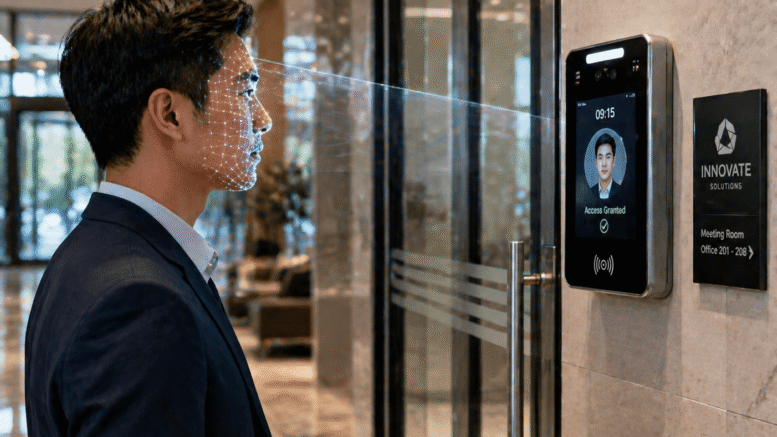
Payroll disputes rarely start as big problems. They usually begin with a small disagreement — an employee insists they clocked in on time, but the record shows otherwise. Multiply that across a large workforce and HR teams end up spending significant time investigating disputes that shouldn’t exist in the first place. This is one of the clearest examples of how facial clocking reduces payroll disputes across teams by removing ambiguity from attendance records.
Where Payroll Disputes Usually Come From
Understanding the root causes makes it easier to see why facial recognition attendance has become popular among Malaysian employers managing larger or multi-shift teams.
Inaccurate Manual Entries
Paper timesheets or manually logged attendance are vulnerable to transcription errors, rounding inconsistencies, and outright mistakes.
Buddy Punching and Proxy Clocking
Card or PIN-based systems can be misused, with one employee clocking in for another. This directly distorts attendance records and, by extension, payroll accuracy.
Disputed Clock-In Times
Without clear, verifiable timestamps, disagreements over exact clock-in or clock-out times become difficult to resolve, often coming down to one person’s word against another’s.
How Facial Clocking Directly Addresses These Issues
Verified, Individual Identification
Facial recognition ties each attendance record to a specific, verified individual, making proxy clocking effectively impossible.
Precise, Tamper-Resistant Timestamps
Because the system captures the exact moment of recognition, there’s no room for manual rounding or estimation errors that often trigger disputes.
Contactless and Fast
Employees simply walk up to the scanner, making clock-ins faster than card taps or PIN entry, especially useful during shift changes with many employees clocking in simultaneously.
Clear Audit Trail
When a dispute does arise, HR can pull up the exact timestamped record with facial verification, resolving disagreements quickly instead of relying on memory or incomplete logs.
Key Benefits Across Teams and Departments
- Fewer disputed hours — Verified timestamps leave little room for disagreement.
- Faster dispute resolution — Clear digital records mean HR can resolve questions in minutes, not days.
- Reduced time theft — Facial verification eliminates buddy punching entirely.
- Improved trust — Employees see the system as fair and consistent, since everyone is verified the same way.
- Streamlined multi-shift operations — Fast, contactless clocking reduces bottlenecks during shift handovers.
Facial Clocking vs. Traditional Attendance Methods
| Factor | Card/PIN Systems | Facial Recognition Clocking |
|---|---|---|
| Proxy clocking risk | Possible | Effectively eliminated |
| Speed at shift change | Moderate | Fast, contactless |
| Dispute resolution | Often unclear | Clear, verifiable records |
| Hygiene | Physical contact required | Contactless |
| Setup complexity | Lower | Moderate, requires camera hardware |
Best Practices for Rolling Out Facial Clocking
- Communicate clearly with employees about how facial data is captured, stored, and protected.
- Test lighting and camera placement at entry points to ensure reliable recognition.
- Provide a backup verification method for edge cases (masks, lighting issues).
- Integrate directly with payroll to avoid manual reconciliation of attendance data.
- Monitor initial rollout closely and address recognition issues quickly to build employee confidence.
Common Mistakes to Avoid
Rushing the Rollout Without Employee Communication
Introducing facial recognition without explaining how the data is used and protected can create unnecessary anxiety among staff. Transparent communication upfront builds trust faster than any technical feature.
Poor Camera Placement or Lighting
Recognition accuracy depends heavily on consistent lighting and camera angle. Skipping a proper site assessment before installation often leads to avoidable recognition errors in the first weeks of use.
No Fallback for Edge Cases
Face coverings, certain medical conditions, or temporary changes in appearance can occasionally affect recognition. Systems without a simple backup verification method create frustration rather than solving disputes.
Disconnecting Attendance Data from Payroll
Even accurate facial clocking data loses much of its value if it still needs to be manually transferred into payroll. Direct integration is what actually reduces disputes at the payroll stage, not just at the point of clocking in.
Step-by-Step: Implementation Guide
- Identify entry points where facial clocking devices will be installed.
- Register employee facial profiles during a short onboarding session.
- Run a parallel test period alongside existing attendance methods.
- Connect facial clocking data directly to payroll processing.
- Review early dispute rates to confirm the system is reducing, not creating, confusion.
Key Takeaways
Facial clocking reduces payroll disputes across teams primarily by removing the ambiguity that manual or card-based systems allow. Verified, timestamped records give both employees and HR a clear, trustworthy source of truth, cutting down on time spent investigating disagreements and reducing the risk of proxy clocking altogether.
Conclusion
Payroll disputes drain time and erode trust between employees and HR, often over issues that a more reliable attendance system could prevent entirely. Understanding how facial clocking reduces payroll disputes across teams comes down to one core principle: verified, individual identification removes the ambiguity that causes most disagreements in the first place. For businesses managing multiple shifts or larger teams, this translates into real time savings and stronger employee trust in the payroll process.
Read the product overview here: http://www.smartouch.com.my/tms-time-management-system-singapore-malaysia/
FAQ
1. How accurate is facial recognition for attendance tracking?
Modern facial recognition systems offer high accuracy under proper lighting and camera setup conditions, with regular software updates improving reliability further.
2. Does facial clocking work in low-light environments?
Many systems are designed with infrared or specialised sensors to maintain accuracy in varying lighting conditions, though proper installation planning is still important.
3. Can facial clocking data integrate with existing payroll systems?
Yes, most facial recognition attendance systems are built to feed data directly into payroll and HR platforms, reducing manual data entry.
4. What happens if an employee’s face isn’t recognised (mask, injury, etc.)?
Most systems include backup verification options, such as PIN or card entry, for situations where facial recognition isn’t immediately possible.
5. Is employee facial data stored securely?
Reputable systems use encrypted biometric templates rather than storing raw images, and employers should ensure appropriate data protection measures are in place.
Smart Touch technology pte ltd , www.smartouch.com.sg +65-63964767, sales@smartouch.com.sg , www.smartouch.com.my +607-3889903 sales@smartouch.com.my