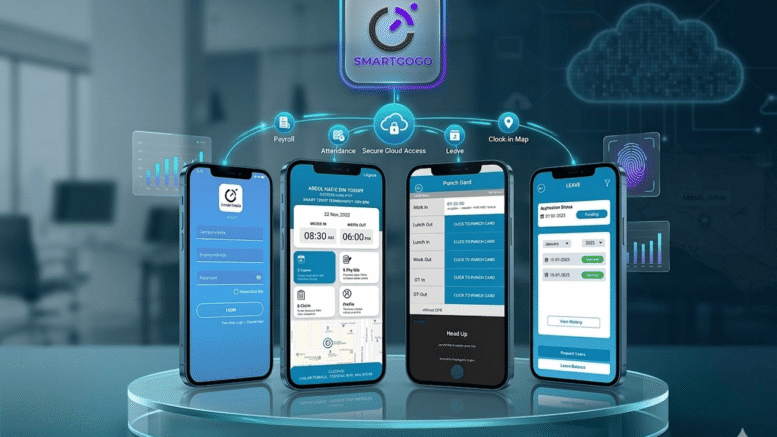
Managing employee attendance is no longer limited to office desks, factory entrances, or fixed workplace terminals. Today, many companies operate with mobile teams, field workers, remote staff, technicians, sales teams, cleaners, security guards, delivery drivers, construction workers, maintenance crews, healthcare support teams, and employees working across different locations. For these businesses, traditional attendance machines are often not enough.
A GPS Clock In App for Remote Attendance Tracking helps companies record employee attendance from different work locations using a mobile application with GPS location verification. Employees can clock in and clock out through their smartphones, while HR teams, supervisors, and management can review attendance records, work locations, working hours, late arrivals, missed punches, and daily manpower activity from a digital platform.
For companies searching for GPS clock in app, remote attendance tracking system, mobile attendance app, GPS employee attendance tracking, field staff attendance system, location-based clock in app, mobile workforce management software, employee clock in app with GPS, or SmartHR mobile attendance solution, Smart Touch provides practical technology solutions for businesses that need accurate and flexible workforce tracking.
What Is a GPS Clock In App for Remote Attendance Tracking?
A GPS Clock In App for Remote Attendance Tracking is a mobile attendance solution that allows employees to record their work attendance using a smartphone. When an employee clocks in or clocks out, the app captures attendance time together with GPS location data, depending on company settings and device permission.
This helps employers confirm where the employee was when attendance was submitted. The system may also include employee profile management, shift schedules, worksite assignment, geofencing, selfie verification, face recognition, supervisor approval, attendance reports, leave integration, overtime tracking, and payroll preparation support.
The main purpose is to make attendance tracking easier for employees who do not report to one fixed office or use a physical biometric attendance terminal every day.
A GPS clock in app is especially useful for companies with mobile workers, remote teams, service crews, multi-site operations, and field-based employees.
Why Businesses Need Remote Attendance Tracking
Many businesses still rely on manual attendance methods for remote workers. Employees may send WhatsApp messages, call supervisors, submit paper timesheets, fill Excel forms, or report attendance verbally. These methods can create confusion and errors.
Manual remote attendance tracking often leads to several problems. Employees may forget to report clock-in time. Supervisors may receive messages late. HR teams may spend too much time checking attendance records. Payroll preparation may become inaccurate. Management may not know whether field employees reached the assigned work location on time.
A GPS Clock In App for Remote Attendance Tracking solves these issues by creating a structured mobile attendance process. Employees submit attendance through the app, the system records time and location, and HR can review reports digitally.
This gives businesses better workforce visibility and reduces the administrative burden of manual attendance tracking.
Key Benefits of GPS Clock In App for Remote Attendance Tracking
1. Accurate Attendance for Remote and Field Workers
For employees who work outside the office, attendance accuracy can be difficult to maintain. A GPS clock in app helps record attendance based on actual mobile clock-in activity and location data.
This allows employers to verify that employees are clocking in from the assigned worksite, client location, project area, branch, outlet, or service destination.
Accurate remote attendance records help reduce disputes, improve payroll confidence, and strengthen employee accountability.
2. Location-Based Clock In and Clock Out
GPS location tracking allows the system to capture where employees clock in and clock out. This is useful for companies that need proof of worksite attendance.
For example, a cleaner may clock in at a client building. A technician may clock in at a service location. A construction supervisor may clock in at a project site. A salesperson may clock in before visiting customers. A delivery team may clock in at a dispatch point.
Location-based attendance gives management better confidence that employees are at the correct work location.
3. Real-Time Workforce Visibility
A GPS attendance app helps supervisors and HR teams see daily attendance activity more quickly. Management can check who has reported for work, who is late, who is absent, who has clocked out, and which locations have active employees.
This is useful for companies with many mobile workers or multiple job sites. Instead of waiting for manual reports, management can review attendance information more efficiently.
Real-time visibility supports faster manpower decisions and better operational control.
4. Reduced Manual Timesheets
Manual timesheets are time-consuming and often inaccurate. Employees may submit them late, write incorrect times, or forget details. HR teams then need to verify and enter the information manually.
A GPS clock in app reduces dependence on paper timesheets and manual attendance forms. Attendance data is captured digitally and can be reviewed from the system.
This saves time for employees, supervisors, HR staff, and payroll teams.
5. Better Accountability for Mobile Teams
Mobile teams often work with less direct supervision than office-based employees. A GPS clock in app improves accountability by recording when and where attendance is submitted.
Employees understand that attendance must be recorded properly through the app. Supervisors can review records and follow up when clock-in locations or times do not match work assignments.
This creates a fairer and more transparent attendance process.
6. Support for Geofencing
Geofencing is an important feature for remote attendance tracking. It allows companies to set approved clock-in areas around specific locations. Employees can only clock in when they are within the approved location range, depending on system settings.
For example, a company can set a geofence around a construction site, warehouse, customer premises, retail outlet, office branch, or service location.
This helps prevent employees from clocking in from the wrong place and improves location accuracy.
7. Selfie or Face Verification
Some GPS clock in apps can include selfie capture or face recognition verification. This helps confirm that the correct employee is submitting the attendance record.
Location data shows where the attendance was submitted, while selfie or face verification helps confirm who submitted it.
This is useful for companies that want stronger identity verification for remote workers.
8. Easier Payroll Preparation
Attendance data directly affects payroll. Working hours, overtime, late arrivals, early departures, absence, unpaid leave, and shift attendance may all affect salary calculation depending on company policy.
A GPS clock in app helps HR teams collect cleaner attendance records for payroll preparation. When attendance is digital, payroll teams spend less time checking manual timesheets and supervisor messages.
This improves payroll accuracy and reduces salary disputes.
9. Better Management of Multiple Worksites
Companies with multiple worksites often struggle to collect attendance data from different locations. A GPS clock in app allows employees at different sites to clock in through one system.
Management can review attendance by location, department, team, project, branch, or supervisor. This improves visibility across the organization.
For businesses with expanding operations, multi-site attendance tracking is a major advantage.
10. Improved HR Productivity
HR teams benefit greatly from mobile attendance automation. Instead of collecting paper attendance, chasing supervisors, checking chat messages, and manually updating spreadsheets, HR can review attendance records from a digital platform.
This reduces repetitive work and allows HR teams to focus on recruitment, training, employee support, compliance, and workforce planning.
Important Features of a GPS Clock In App
A reliable GPS Clock In App for Remote Attendance Tracking should include practical features that support real business operations.
Mobile Clock In and Clock Out
Employees should be able to clock in and clock out using a mobile phone with a simple and user-friendly interface.
GPS Location Capture
The app should capture location data when employees submit attendance, subject to device settings and permissions.
Geofence Attendance Control
Companies should be able to define approved clock-in zones for worksites, branches, client locations, or project areas.
Selfie or Face Verification
Selfie capture or face recognition can help confirm employee identity during clock-in.
Attendance Dashboard
HR and supervisors should be able to review real-time attendance status, late arrivals, absences, and clock-out records.
Worksite Assignment
Employees should be assigned to specific locations, projects, clients, departments, or branches for better tracking.
Shift and Schedule Management
The system should support fixed schedules, rotating shifts, flexible work hours, night shifts, weekend work, and part-time schedules.
Leave Integration
Approved leave should be reflected in attendance records so employees on leave are not treated as absent.
Overtime Tracking
The system should help monitor overtime based on clock-in and clock-out data.
Reports and Export
HR should be able to generate reports by employee, location, department, date range, project, or attendance status.
Multi-Branch Support
Companies with multiple locations should be able to manage attendance centrally.
User Permission Control
Different users should have different access levels, including employees, supervisors, HR, payroll teams, branch managers, and management.
GPS Clock In App for Field Service Teams
Field service teams often travel to customer sites to perform installation, repair, maintenance, inspection, or technical support. A GPS clock in app helps verify attendance at assigned service locations.
Technicians can clock in when they arrive at the site and clock out after completing work. Supervisors can review attendance and location records more easily.
This improves field service accountability and customer service management.
GPS Clock In App for Cleaning Companies
Cleaning companies often deploy staff to different client premises, including offices, schools, malls, factories, condominiums, and commercial buildings. Manual attendance tracking can be difficult because workers are spread across many sites.
A GPS clock in app allows cleaners to submit attendance from assigned locations. Supervisors can monitor whether teams have arrived on time and whether shifts are completed.
This helps cleaning companies improve service quality and client confidence.
GPS Clock In App for Security Companies
Security companies manage guards across many posts, buildings, factories, warehouses, residential estates, and commercial facilities. A mobile attendance app helps record guard attendance at assigned duty locations.
When combined with guard patrol systems, companies can track both shift attendance and patrol activity more effectively.
This improves security manpower accountability.
GPS Clock In App for Construction Teams
Construction companies often manage workers, supervisors, engineers, safety officers, and site administrators across different project sites. A GPS clock in app helps track attendance for mobile or project-based staff.
Supervisors can clock in at the assigned construction site, while HR can review attendance by project location.
This supports better manpower reporting and workforce visibility.
GPS Clock In App for Sales Teams
Sales employees often work outside the office, visiting customers, distributors, dealers, and business partners. A GPS attendance app allows sales staff to record attendance from their work location.
Management can review daily attendance and location-based activity more clearly. This supports better sales team accountability without requiring staff to report to the office every morning.
GPS Clock In App for Delivery and Logistics Teams
Delivery drivers, warehouse runners, transport teams, and logistics staff may start work from depots, warehouses, customer locations, or dispatch points. A GPS clock in app helps companies track attendance from different locations.
This supports better transport workforce management and payroll preparation.
GPS Clock In App for Retail and Multi-Outlet Businesses
Retail chains and F&B companies often operate many outlets. Employees may work at different branches or move between locations.
A GPS clock in app helps staff clock in from the assigned outlet, while head office HR can review attendance across branches. This reduces manual attendance consolidation and improves branch-level workforce control.
GPS Clock In App for Remote and Hybrid Employees
Remote and hybrid work arrangements require flexible attendance methods. A GPS clock in app allows employees to record attendance from approved locations such as home, branch office, client site, or project location depending on company policy.
This helps companies manage flexible work arrangements with better structure and visibility.
GPS Attendance Tracking vs Traditional Attendance Machines
Traditional attendance machines are useful for fixed workplaces, but they are not always suitable for mobile workers. Employees must physically visit the device to clock in, which may not be practical for field teams.
A GPS clock in app provides more flexibility because attendance can be submitted from approved work locations. It is suitable for mobile, remote, and multi-site employees.
Compared with traditional machines, GPS attendance tracking is more flexible and better suited for distributed workforces.
GPS Clock In App with HR Software Integration
A GPS clock in app becomes more powerful when integrated with HR software. Employee records, attendance, leave, overtime, shift schedules, and payroll-related data can be managed in one platform.
This helps HR teams reduce duplicate work and maintain more accurate workforce records.
SmartHR integration can support a smoother HR workflow for businesses with mobile teams.
GPS Clock In App with Payroll Integration
Payroll depends on accurate attendance records. When GPS clock-in data is connected with payroll preparation, HR and finance teams can calculate working hours, overtime, absence, and unpaid leave more accurately.
This reduces manual data entry and helps prevent payroll disputes.
For companies with hourly workers or field staff, payroll integration is highly valuable.
GPS Clock In App with Leave Management
Approved leave should be reflected in attendance reports. If an employee is on approved annual leave, medical leave, or unpaid leave, the system should not mark them as unexplained absence.
Integration between GPS attendance and e-leave management creates a cleaner HR record and reduces confusion.
GPS Clock In App with Supervisor Approval
Some companies may require supervisor approval for remote attendance records. For example, if an employee clocks in outside the geofence or forgets to clock out, the system can allow a correction request or supervisor review.
This creates a controlled process for exceptions without losing accountability.
Data Privacy and Responsible GPS Attendance Tracking
GPS attendance tracking should be used responsibly. Companies should clearly explain how location data is used, when it is captured, and who can access the records. A professional system should collect location data for attendance purposes and provide proper user permission control.
Responsible use helps maintain employee trust while improving business visibility.
Why Choose Smart Touch for GPS Clock In App for Remote Attendance Tracking?
Smart Touch provides practical HR, attendance, biometric, access control, visitor management, guard patrol, canteen, and workforce management solutions for businesses in Malaysia and Singapore. Our GPS Clock In App for Remote Attendance Tracking is designed to help organizations manage field staff, remote employees, mobile teams, multi-site workers, and branch employees more efficiently.
We understand that every workforce is different. Some companies need GPS attendance for field technicians. Some need geofence clock-in for cleaners. Some need mobile attendance for construction supervisors. Some need multi-branch attendance for retail outlets. Some need payroll integration. Some need e-leave integration. Some need a complete SmartHR platform with attendance, leave, overtime, payroll, and employee records.
Smart Touch helps businesses implement a mobile attendance solution based on workforce size, work locations, HR workflow, reporting needs, and future expansion plans.
SEO Readability Analysis for GPS Clock In App for Remote Attendance Tracking
This article is written with strong SEO readability by using a clear keyword-focused title, structured headings, natural keyword placement, and easy-to-read business language. The primary keyword, GPS Clock In App for Remote Attendance Tracking, appears in the title, introduction, main sections, and conclusion.
Related search terms such as GPS clock in app, remote attendance tracking system, mobile attendance app, GPS employee attendance tracking, field staff attendance system, location-based clock in app, mobile workforce management software, employee clock in app with GPS, geofence attendance app, and SmartHR mobile attendance solution are included naturally throughout the article.
The article structure supports search intent by explaining what the solution is, why businesses need it, what benefits it provides, what features matter, which industries can use it, how it compares with traditional attendance machines, and why Smart Touch is a suitable provider. Short paragraphs and clear subheadings improve readability for HR managers, business owners, payroll teams, field service managers, operations leaders, branch managers, construction companies, cleaning companies, security agencies, logistics firms, and SME decision-makers.
The content is designed to be informative, professional, keyword-rich, and easy to read for users searching for mobile attendance and GPS workforce tracking solutions.
Conclusion: GPS Clock In App for Remote Attendance Tracking for Smarter Workforce Management
A GPS Clock In App for Remote Attendance Tracking is an essential solution for companies that manage remote employees, field workers, mobile teams, multi-site staff, and branch-based employees. It helps businesses record attendance accurately, verify work locations, reduce manual timesheets, improve payroll preparation, and gain better workforce visibility.
By using mobile clock-in, GPS location capture, geofencing, selfie verification, attendance dashboards, leave integration, overtime tracking, and payroll support, companies can create a more efficient and transparent attendance process.
For cleaning companies, security agencies, construction firms, logistics businesses, field service providers, retail chains, F&B outlets, sales teams, remote workers, and multi-branch organizations, GPS attendance tracking provides flexibility and control.
Companies searching for GPS clock in app, remote attendance tracking system, mobile attendance app, GPS employee attendance tracking, field staff attendance system, location-based clock in app, or employee clock in app with GPS can benefit from Smart Touch’s practical technology and professional support.
A smarter workforce begins with accurate attendance. A stronger HR process begins with verified location records. A more flexible business begins with a GPS Clock In App for Remote Attendance Tracking.
For more information about the product, please click here: https://www.smartouch.com.my/smartgogo/
Smart Touch technology pte ltd , www.smartouch.com.sg +65-63964767, sales@smartouch.com.sg , www.smartouch.com.my +607-3889903 sales@smartouch.com.my