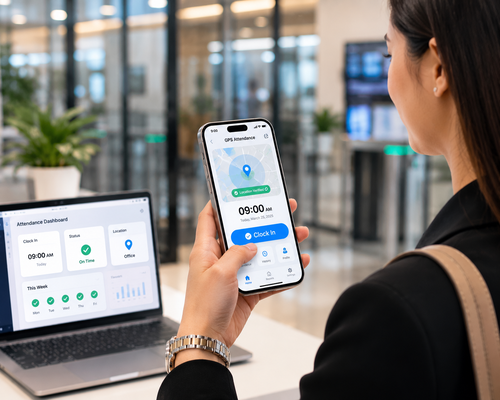
Time theft is one of the most costly and underreported problems facing businesses today. Employees clocking in for absent colleagues, exaggerating work hours, or extending breaks without accountability — these behaviours silently erode payroll budgets and productivity. An enterprise HRMS mobile app equipped with intelligent time tracking features can detect and eliminate time theft instantly, giving businesses accurate data and giving employees a fair, transparent system to work within.
What Is Time Theft and Why Does It Matter?
Time theft occurs whenever an employee receives pay for time they did not actually work. Common forms include:
- Buddy punching — A colleague clocks in on behalf of an absent employee
- Extended breaks — Employees take longer breaks than authorised without recording it
- Late arrivals recorded as on-time — Paper or honour-based systems allow this easily
- Personal activities during work hours — Without monitoring, unproductive time goes unrecorded
- Early clock-outs disguised as full shifts — Especially common in unsupervised environments
Studies suggest that even a few minutes of time theft per employee per day can add up to thousands in annual payroll losses for mid-sized organisations. An enterprise HRMS mobile app addresses this directly through biometric identity verification and real-time data capture.
How an Enterprise HRMS Mobile App Stops Time Theft
Biometric Selfie Clock-In
Employees clock in using a selfie captured by the app. Facial recognition algorithms verify identity in real time — making buddy punching impossible. The timestamp and location are captured simultaneously, creating an irrefutable record.
GPS Geofencing
The app can be configured to only allow clock-ins within a defined geographic boundary — the office, a client site, or a project location. Employees who attempt to clock in from outside this boundary are automatically rejected or flagged for review.
Real-Time Manager Visibility
Supervisors and HR managers can view who is clocked in, who is late, and who has not arrived — in real time, from any device. No need to wait for end-of-day reports or manual timesheets.
Automated Break and Overtime Tracking
The app tracks breaks automatically. Employees can clock out for breaks and back in when they return, with the system calculating net working hours accurately. Overtime is flagged and recorded without manual intervention.
Offline Capability with Sync
For employees working in areas with limited connectivity, the app stores attendance data offline and syncs it when a connection is available. This prevents data loss and maintains accurate records even in remote locations.
Key Features of an Enterprise HRMS Mobile App
| Feature | Benefit |
|---|---|
| Facial recognition clock-in | Eliminates buddy punching |
| GPS geofencing | Confirms employee is at the correct location |
| Real-time dashboard | Instant visibility for managers |
| Automated timesheets | No manual entry required |
| Leave and schedule integration | Full workforce picture in one app |
| Payroll integration | Accurate hours flow directly to payroll |
Beyond Time Theft — Broader HR Benefits
An enterprise HRMS mobile app does much more than prevent time theft. It centralises key HR functions into a single platform that employees and managers can access from anywhere:
Leave Management
Employees apply for leave directly from the app. Managers receive instant notifications and approve or reject requests with one tap. Leave balances update automatically.
Payroll Processing
Accurate attendance and leave data flows directly into payroll calculations, eliminating manual reconciliation and reducing the risk of payroll errors.
Employee Self-Service
Employees can view payslips, update personal information, check leave balances, and submit expense claims — all from their smartphone. This reduces the administrative burden on HR teams.
Performance and Task Tracking
Some HRMS mobile apps integrate task management features, allowing managers to assign work, track progress, and review productivity alongside attendance data.
Implementation Best Practices
- Communicate clearly — Explain to employees why the system is being implemented and how their data is used and protected.
- Pilot before full rollout — Test with a small team first to identify any configuration issues.
- Integrate with existing systems — Ensure the app connects with your payroll, HR, and access control systems for a seamless workflow.
- Train managers — Supervisors should know how to use the dashboard and respond to alerts.
- Review data regularly — Use the reports to identify patterns and address recurring issues before they become costly.
Conclusion
An enterprise HRMS mobile app is one of the most effective tools available for eliminating time theft and improving overall workforce management. By combining biometric verification, GPS tracking, real-time visibility, and automated reporting, it creates an environment where accurate attendance is the norm — not the exception.
For Malaysian businesses dealing with time theft or looking to modernise their HR operations, a mobile HRMS solution offers immediate, measurable results alongside long-term strategic value.
Read the product overview here: http://www.smartouch.com.my/tms-time-management-system-singapore-malaysia/
Frequently Asked Questions (FAQ)
How does a mobile HRMS app prevent buddy punching?
By requiring employees to clock in using facial recognition biometrics captured in real time, the app makes it impossible for one person to clock in on behalf of another.
Can the app work without an internet connection?
Yes. Most enterprise HRMS mobile apps support offline mode, storing attendance records locally and syncing with the central system when connectivity is restored.
Is employee location data stored permanently?
GPS data is typically recorded at the point of clock-in and clock-out, not tracked continuously. The data is stored securely and used only for attendance verification, in compliance with personal data protection laws.
How quickly can the app be deployed across a large organisation?
Cloud-based HRMS mobile apps can typically be deployed within two to four weeks for organisations of up to a few hundred employees. Larger deployments may require additional planning and phased rollout.
Does the app integrate with payroll software?
Yes. Enterprise HRMS mobile apps are designed to integrate with leading payroll systems, ensuring accurate attendance data flows directly into salary calculations without manual data entry.
Smart Touch technology pte ltd , www.smartouch.com.sg +65-63964767, sales@smartouch.com.sg , www.smartouch.com.my +607-3889903 sales@smartouch.com.my