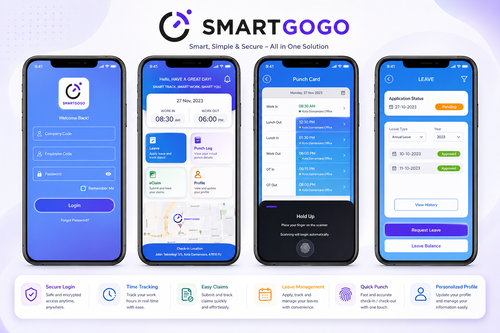
Choosing the right smart HR system and mobile HR app is one of the most impactful technology decisions a growing business can make. With so many vendors promising automation, compliance, and convenience, it can be hard to know which features actually matter. This buyer’s checklist breaks down what to evaluate before committing to a smart HR platform in Malaysia.
Why a Smart HR System Matters Today
HR teams are expected to do more with less — managing payroll, attendance, leave, claims, and performance while staying compliant with local employment laws. A smart HR system with a companion mobile app consolidates these tasks into one platform, reducing manual work and giving employees self-service access to their own records.
Key Areas to Evaluate Before Buying
1. Core HR Functions
Check whether the system covers the essentials: employee database management, leave application, claims submission, and attendance tracking. A fragmented setup with separate tools for each function often leads to data inconsistencies.
2. Mobile App Usability
Since much of the workforce today expects mobile access, test the app’s ease of use for common tasks such as clocking in, applying for leave, and checking payslips. A clunky app leads to low adoption among staff.
3. Payroll Integration
Confirm the HR system integrates smoothly with payroll, or includes payroll processing natively, so that attendance and leave data flow directly into salary calculations without manual re-entry.
4. Compliance With Malaysian Regulations
The system should be updated regularly to reflect changes in EPF, SOCSO, EIS, and income tax requirements, along with statutory leave entitlements under the Employment Act.
5. Scalability
Consider whether the platform can support your business as it grows — adding new branches, departments, or hundreds of additional employees without a major system overhaul.
Feature Comparison Table
| Feature | Basic HR Software | Smart HR System With Mobile App |
|---|---|---|
| Leave application | Manual or email-based | Self-service via app |
| Attendance tracking | Manual punch card or none | GPS or biometric mobile clock-in |
| Payroll integration | Separate system, manual entry | Fully integrated |
| Reporting | Static spreadsheets | Real-time dashboards |
| Employee self-service | Limited | Full access via mobile app |
Step-by-Step Buyer’s Checklist
Step 1: Define Your Requirements
List the HR processes causing the most friction today, whether it is leave tracking, payroll errors, or lack of attendance visibility.
Step 2: Shortlist Vendors
Look for providers with proven experience serving Malaysian businesses of similar size and industry.
Step 3: Request a Live Demo
Test the mobile app and admin dashboard using real scenarios from your own company rather than a generic sales demo.
Step 4: Check Support and Training
Confirm the vendor provides onboarding support, training materials, and responsive customer service after go-live.
Step 5: Review Pricing Structure
Understand whether pricing is per employee, per module, or a flat fee, and clarify what is included versus offered as an add-on.
Key Benefits of a Smart HR System
- Time savings: Automates repetitive HR administrative tasks
- Accuracy: Reduces payroll and attendance calculation errors
- Employee satisfaction: Gives staff self-service access via mobile
- Compliance: Keeps pace with changing Malaysian employment regulations
- Better decision-making: Real-time data supports workforce planning
Common Mistakes to Avoid When Buying HR Software
Many businesses choose a system based on price alone, without testing usability for non-technical staff. Others underestimate the importance of mobile access, which is now essential for a distributed or younger workforce. Take time to involve both HR staff and general employees in the trial phase before making a final decision.
Conclusion
A smart HR system paired with a capable mobile HR app can transform how your business manages its workforce, from onboarding to daily attendance and payroll. Using this buyer’s checklist — covering core functions, mobile usability, payroll integration, compliance, and scalability — helps ensure you choose a platform that fits both your current needs and future growth plans.
Frequently Asked Questions
1. What is the difference between HR software and a smart HR system?
A smart HR system typically combines multiple HR functions — attendance, leave, payroll, and claims — into one integrated platform with mobile access, rather than operating as a single-purpose tool.
2. Is a mobile HR app necessary for small businesses?
Yes, even small teams benefit from mobile access since it reduces the administrative burden on HR staff and improves convenience for employees.
3. How long does implementation usually take?
Implementation timelines vary, but most cloud-based HR systems can be set up and running within a few weeks, depending on data migration needs.
4. Can the system handle multiple work locations?
Most smart HR systems support multi-branch operations with centralized reporting and location-specific configurations.
5. Does the mobile app work for GPS-based attendance?
Many mobile HR apps include GPS or geofencing features, allowing field staff to clock in accurately from approved locations.
Interested in this product? Click here to learn more: https://www.smartouch.com.my/smartgogo/
Smart Touch technology pte ltd , www.smartouch.com.sg +65-63964767, sales@smartouch.com.sg , www.smartouch.com.my +607-3889903 sales@smartouch.com.my